Table of Contents
Understanding Snapchat requires more than a headline. The overview below breaks down the key facts, changes, and user impact.
So how to fix this error, please refer to the following article of Network Administrator.
If your iPhone has no Snapchat application, you can download Snapchat to your phone and install it here.
1. Force Snapchat to Close

When the application does not respond, hangs, the easiest way is to restart the application. After booting is complete, the application can resume normal operation.
Click the Home button 2 times, on the screen you will see a list of applications that you used recently. Find the Snapchat app, then swipe up on the screen to close the app. Finally reopen Snapchat to see if the application is still corrupted.
2. Update the Latest Snapchat Version

If the Snapchat application on your iPhone device is not updated, this is probably the cause of the error.
So in order to fix the error, you access the App Store and check if the app updates are available. If you have the latest version of the application downloaded and installed.
3. Restart Your Iphone
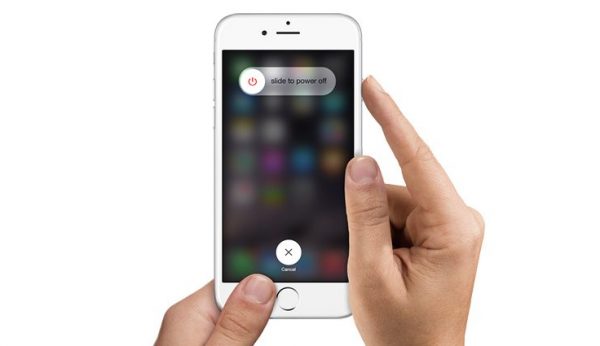
Whenever your iPhone device fails, it will cause errors on the application. As a result the best solution in this case is to restart your iPhone phone.
Press and hold the Sleep / Wake button (power on / off) until a message appears on the screen, drag the slider to to turn off your iPhone device.
Then press and hold the Sleep / Wake button (power on / off) to open the phone.
4. Uninstall Snapchat on Your Device and Then Reinstall the Application
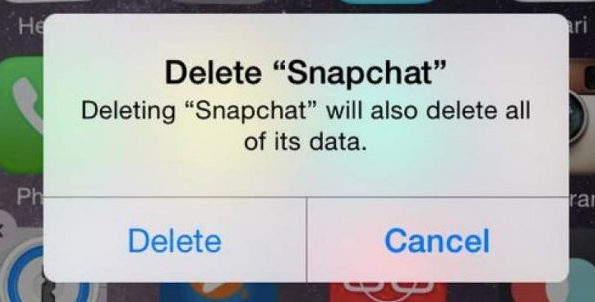
Find the Snapchat icon on the Home Screen screen. Click and hold on the icon until you see the application screen vibrate and an X icon appears.
Click the X icon to delete the application.
Next visit the App Store, download and install the new Snapchat application.
5. Some Other Solutions
5.1. iOS Update
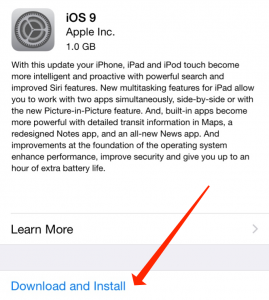
In some cases, updating the latest iOS version may help you fix the error:
- Wifi connection on your iPhone phone.
- Access Settings => General => Software update.
- Click Download and install.
In addition, you can refer to the specific steps to upgrade iOS for iPhone, iPod Touch and iPad here.
5.2. Contact the Snapchat Application Developer
If you have applied the above solutions and still cannot fix the error, you should contact the application developer for assistance with troubleshooting:
- Open the App Store.
- Find and click Snapchat.
- Click Select Reviews and then click App Support.
5.3. Erase All Content and Settings
The first step backs up all your files.
Then go to Settings => General => Reset => Erase all content and settings and then click the iPhone Erase.
After the process is finished, your iPhone device will return to the state it was in when you first purchased it.
Refer to Some of the Following Articles:
- 5 steps to register, create a Snapchat account on your phone
- Instructions to delete Snapchat account permanently on iPhone, iPad, Mac and Windows PC
- Hidden features on Snapchat that anyone should know
Good luck!
FAQ
What causes the issue covered in 5 Simple Ways to Fix Snapchat Error Hanging on Iphone?
Understanding Snapchat requires more than a headline.
How can users reduce the risk or fix the problem?
The overview below breaks down the key facts, changes, and user impact.
When should users seek additional technical support?
So how to fix this error, please refer to the following article of Network Administrator.
Related Articles
 Snapchat Not Working: How to Fix Snapchat Error Does Not Work7 minutes read
 iPhone, iPad Are Slow or Suspended, This Is a Fix6 minutes read
 How to Fix the Error Is Not Logged in Snapchat on iOS 114 minutes read
 Hidden Features on Snapchat That Anyone Should Know6 minutes read
 How to Turn Off Location Sharing in Snapchat on Iphone and Android3 minutes read
 7 Simple Ways to Fix Activation on iPhone Phones5 minutes read
Reader Comments 0
Sign in with email or Google to join the discussion.