Table of Contents
The developers of the Android 10 operating system have decided to disable the default display of the battery percentage. This means users will have to estimate the remaining battery level themselves.
View the battery percentage display on your Android 10 phone.
Specifically, Android 10 brings several visual changes to the status bar and quick settings panel, one of which is the disappearance of the battery percentage from the top of the quick settings panel. Fortunately, there are still two ways to display the battery percentage in the status bar or quick settings.
1. How to set up the battery percentage display on the status bar.
Step 1
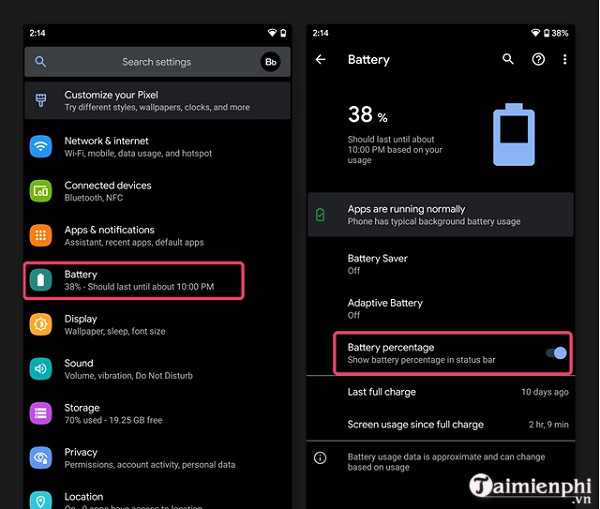
Open Settings on your Android 10 phone and go to the Battery section . Step 2 : Inside the Battery settings, you will find a toggle switch called Battery percentage that allows you to view the battery percentage in the status bar .
Step 3
Turn on the battery percentage display, and you will see the percentage shown on the status bar in the upper right corner of your phone.
2. How to display the battery percentage again in quick settings.
If you don't want to see the battery percentage constantly displayed in the status bar, you can follow these steps to enable the battery percentage in quick settings:
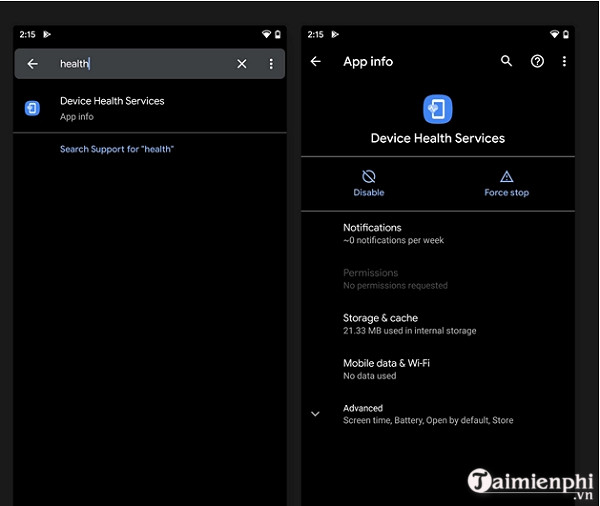
Step 1: Open Settings on your phone and type "Health " in the search bar. Step 2: From the search results, tap Device Health Services . You will then be taken to the app's settings page.
Step 3
Tap the Disable button and restart your phone. You will eventually see the battery percentage displayed again in the quick settings .
Above are two methods to display the battery percentage on Android 10 smartphones that you can refer to. Additionally, you can refer to how to display the battery percentage on an iPhone here.
Related Articles
 How to Fix a Windows 10 Laptop Error with the Wrong Battery7 minutes read
 Activate the Display of the Remaining Battery Percentage on Google4 minutes read
 How to Change the Battery Display Percentage on iPhone5 minutes read
 Microsoft: Windows 11 Finally Has a Battery Percentage Indicator3 minutes read
 How to View the Battery Percentage on iPhone X5 minutes read
 Instructions for Displaying Battery Percentage on Taskbar Bar5 minutes read
Reader Comments 0
Sign in with email or Google to join the discussion.