Table of Contents
The sections below explain Windows server 2012 released in august 2012 in a clear and practical way. Review the key details, examples, and considerations before applying the information.
Shortly after the announcement of the release of Windows 8, Microsoft also said it would release to its next generation (RTM) server operating system, Windows Server 2012, next month.
How Windows Server 2012 Released in August 2012 Works
With the RTM version, original equipment manufacturers (OEMs) will be able to start installing Windows Server 2012 on their new server products. Windows Server 2012 will be sold widely from September 2012.
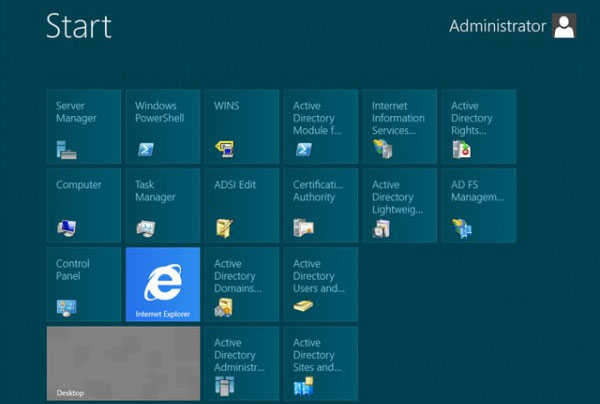 Photo: Windows8Update. com
Expectations are increasing for this server software version. Observers see Windows Server 2012 as a major update. According to Microsoft, up to now, pre-release versions of the operating system have been downloaded more than 500,000 times.
Microsoft has added some key features since the last major release of Windows Server 2008 Release 2. Improved access to files and processes. Now, many machines running Windows Server 2012 can be managed as a group, from a single console.
Embedded versions of Microsoft Hyper-V virtualization software can now work in multi-tenant configurations. And the new file system ReFS (Resilient File System) is designed to provide better scalability and reliability.
As with Windows 8, Windows Server 2012 will have a Metro user interface.
FAQ
What is the main benefit of Windows server 2012 released in august 2012?
The main benefit is a clearer understanding of the topic and a practical way to apply the information covered in this guide.
What should I check before using Windows server 2012 released in august 2012?
Confirm compatibility, review the required settings, protect important data, and use the latest supported version whenever possible.
What should I do if the result is different?
Repeat the steps carefully, verify permissions and version differences, and consult the product's official support documentation for changes not shown in the article.
Related Articles
 Quickly Download the August 8 Cumulative Update of Windows 106 minutes read
 Microsoft: Complete Guide: Microsoft Reminds Users That Windows Server3 minutes read
 Microsoft Launched Windows Server 2012 Operating System3 minutes read
 New Update of Windows Server Causes Many Serious Errors4 minutes read
 Use Iis to Set up Ftp Server on Windows11 minutes read
 10 Reasons to Install Windows Server 20086 minutes read
Reader Comments 0
Sign in with email or Google to join the discussion.