Table of Contents
This updated guide explores Windows 11 is getting a new settings page with advanced options with practical details, clear explanations, and useful takeaways. Windows 11 is getting a new Settings page that includes some advanced features. Technically, this isn't a completely new addition, but rather a reworked version of the "For developers" section, where users and programmers can tweak a bunch of additional options.
Specific Changes
Information about this " Advanced " settings page was first discovered by technology blogger @phantomofearth. Accordingly, Along with the new name, this area in the Settings app also has a refined interface and added features. Microsoft recently discontinued the Dev Home app and promised to integrate some parts into the operating system. Now, we see the results of that promise.
New features in the Advanced section are expected to include:
- Enable/disable long paths in folders
- Install Virtual Workspaces
- File Explorer source code integration
- Group options by category like Taskbar, File Explorer, Terminal, Virtual Workspaces.
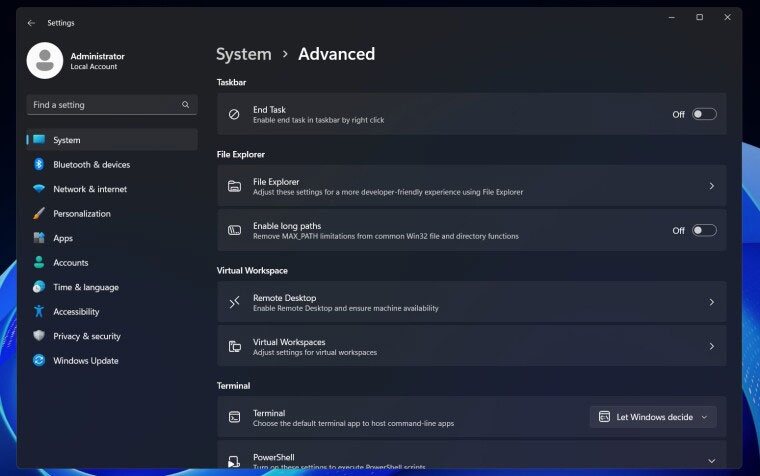
Currently, this new settings page is only available in Windows Server build 26404 and is hidden by default. To enable it, users need to manipulate feature IDs — a familiar trick for 'techies', but a bit complicated for regular users. This feature is expected to appear soon in Insider builds for regular users. If you are interested, keep an eye out for new builds in the next few days/weeks.
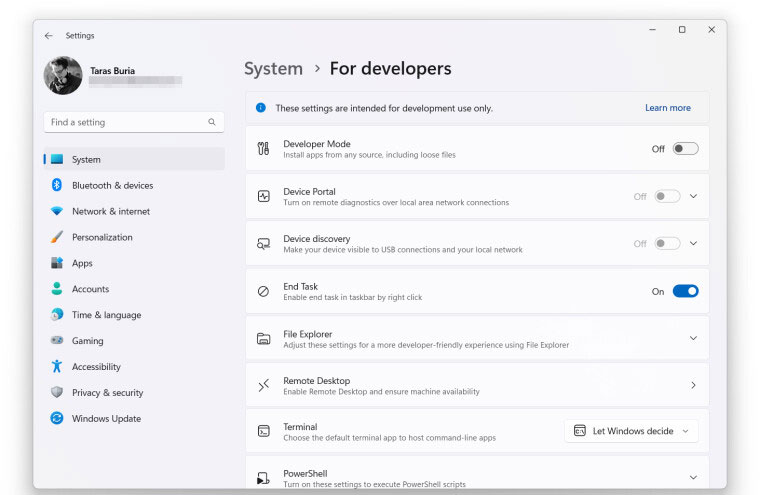
So the Settings app is slowly taking over items from the outdated Control Panel, which is slowly being phased out. Windows 11 will also soon have a modern keyboard settings page, making you less dependent on the Control Panel.
FAQ
What is the main takeaway about Windows 11 Is Getting a New Settings Page with Advanced Options?
The key is to understand the core idea, compare the available options, and apply the practical guidance that matches your situation.
What should beginners know about Windows 11 Is Getting a New Settings Page with Advanced Options?
Start with the essential steps and terminology. Avoid changing advanced settings until you understand how they affect performance, privacy, cost, or compatibility.
How can I use this information in practice?
Follow the relevant section in order, test one change at a time, and confirm the result before moving to the next step or recommendation.
Related Articles
 How to Enable Advanced Settings on Windows 114 minutes read
 4 How to Open Advanced Startup Options on Windows 104 minutes read
 8 Ways to Open Advanced Startup Options on Windows 106 minutes read
 How to Change Advanced Settings Hidden in the Browser5 minutes read
 How to Disable / Enable F8 Advanced Boot Options in Windows 105 minutes read
 5 Ways to Access Advanced Options on Windows 10/8 / 8.17 minutes read
Reader Comments 0
Sign in with email or Google to join the discussion.