Table of Contents
Windows 10 April 2018 Update is version 1803 and is no longer supported. Its system requirements remain useful only for historical documentation, an isolated compatibility lab, or checking an old device before migrating it. Do not download or deploy version 1803 for normal internet-connected use.
Original minimum requirements
| Component | Windows 10 version 1803 minimum |
|---|---|
| Processor | 1 GHz or faster compatible processor or system-on-chip |
| RAM | 1 GB for 32-bit; 2 GB for 64-bit |
| Storage | 16 GB for 32-bit; 20 GB for 64-bit |
| Graphics | DirectX 9 or later with a WDDM 1.0 driver |
| Display | 800 × 600 or higher |
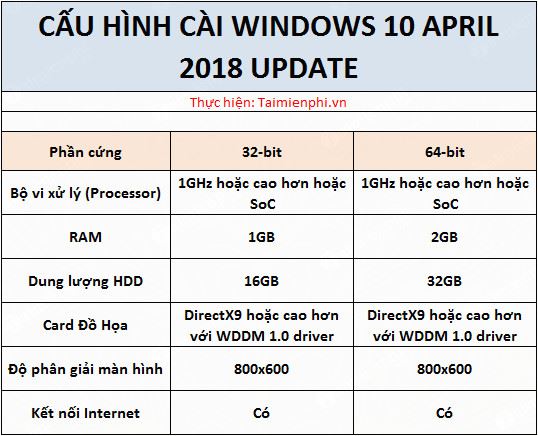
The 32 GB storage figure sometimes repeated for this update belongs to later Windows 10 requirement changes, not the original 1803 minimum. An internet connection was useful for activation, accounts, drivers, and updates, but a clean installation from complete local media did not universally require an active connection.
Minimum does not mean comfortable
The figures above indicate whether Setup may proceed, not whether the system will perform well. A PC at the minimum can struggle with feature updates, browser tabs, antivirus scans, modern applications, and virtual memory. Keep additional free space for updates, temporary files, applications, and user data.
Check the existing hardware
- Press Windows + R, run
msinfo32, and record System Model, Processor, Installed Physical Memory, System Type, and BIOS Mode. - Open Settings > System > Storage or File Explorer to check free space on the Windows drive.
- Run
dxdiagto review the graphics device and driver model. - Visit the PC manufacturer's support page to confirm that chipset, storage, graphics, and network drivers exist for the intended release.
- Back up files and the BitLocker recovery key before changing the operating system.
TipsMake's hardware-information guide explains the built-in checks.
32-bit versus 64-bit
Use 64-bit Windows only on a compatible 64-bit processor. A 64-bit edition can use more memory and is the normal choice for modern software, but changing from 32-bit to 64-bit requires a clean installation. The Windows edition must also match the device's license; architecture and edition are separate choices.
Why version 1803 should stay in a lab
Microsoft's version 1803 lifecycle notice records that Home and Pro servicing ended in November 2019 and Enterprise and Education servicing ended in May 2021. A PC can meet every hardware minimum and still be unsafe because the operating system no longer receives security fixes.
If a historical test requires 1803, use an authentic licensed image, isolate the VM or machine from the internet and production networks, avoid real credentials, and create a snapshot. Meeting the minimum hardware specification does not reduce the software's security risk.
Choose a supported target
For a compatible device, compare the hardware with Microsoft's current Windows 11 requirements and use official installation media. If the PC cannot run a supported Windows release reliably, consider a supported lightweight operating system or replace the device rather than installing an obsolete consumer build.
When creating legitimate Windows media, confirm UEFI/GPT or legacy BIOS/MBR requirements with TipsMake's bootable USB guide.
Related Articles
 How to Uninstall Windows 10 April 2018 Update4 minutes read
 Parallel Use of Headphones and Speakers on Windows 10 April4 minutes read
 The Computer Encountered Many Strange Phenomena After Upgrading Windows 10 April Update4 minutes read
 What's Special About Windows 10 April Update Update?1 minutes read
 How to Fix Common Windows 10 April 2018 Update Errors8 minutes read
 How to Download Windows 10 April Update 2018 Update 18035 minutes read
Reader Comments 0
Sign in with email or Google to join the discussion.