Table of Contents
The “Activate Windows” watermark disappears only after Windows confirms a valid digital license or product key. Watermark-removal utilities and registry edits do not activate Windows, may introduce malware or system changes, and can leave the underlying licensing error unresolved.
Windows 10 reached end of support on October 14, 2025, although some editions and enrolled devices have different servicing arrangements. If the PC supports Windows 11, plan a supported upgrade as well as fixing activation. Microsoft lists the applicable dates on the Windows 10 lifecycle page.
Check the activation status and error
- Open Start > Settings > Update & Security > Activation.
- Read the status message and note any error code.
- Confirm that the installed edition—Home, Pro, Enterprise, or Education—matches the license you own.
You can also use the built-in licensing dialog described in our guide to checking Windows activation status. Do not post a full product key in screenshots, forums, or support messages.
Run the Windows Activation troubleshooter
On the Activation page, select Troubleshoot and follow the result. The troubleshooter can detect a digital license for the device, identify an edition mismatch, or offer a reactivation path after hardware changes. Microsoft's Activation troubleshooter instructions describe the supported cases.
If the troubleshooter is not shown, Windows may already be activated, the account may lack administrator rights, or that activation state may require a different resolution.
Use the correct license method
If the PC has a digital license
Connect to the internet, sign in with the Microsoft account associated with the license if applicable, and return to Activation. A digital license is tied to the device's hardware; no product key may be necessary.
If you have a product key
Select Change product key on the Activation page and enter the 25-character key supplied with the PC or purchase. Check each character carefully. A key for another edition or a key already used outside its license terms will not activate this installation. Microsoft's Windows activation guide explains digital-license and product-key activation.
After a major hardware change
A motherboard replacement can cause Windows to treat the computer as a different device. In the troubleshooter, choose I changed hardware on this device recently, sign in to the linked Microsoft account, and select the eligible device. OEM licenses supplied with a computer may have transfer restrictions; check the license terms or contact the PC maker.
On a work or school computer
Enterprise activation may depend on an organization's network, VPN, subscription, or activation server. Connect through the approved method and contact the IT administrator. Do not replace an organization-provided key with a key found online.
Resolve common causes
- Wrong edition installed: A Home license does not activate Pro. Use the troubleshooter's edition guidance or reinstall the edition covered by the license.
- No internet or incorrect clock: Check the connection, date, time, and time zone, then try activation again.
- Activation servers temporarily unavailable: Wait and retry. Use Microsoft's official error guidance rather than repeated key changes.
- Invalid or blocked key: Contact the seller if the key was purchased separately. Extremely cheap marketplace keys may not be licensed for resale.
- Reinstalled system: Install the same edition previously activated on that device, connect to the internet, and allow the digital license to be detected.
For a quick explanation of an error number, TipsMake's Windows Activation Error Lookup can point you to legitimate troubleshooting steps; verify any licensing decision against Microsoft support.
Why the registry method does not fix activation
The PaintDesktopVersion registry value controls whether Windows displays version and build information on the desktop. It is not an activation switch. Changing it to 0 may hide diagnostic text on some builds, but it does not remove the genuine activation requirement or grant a license.
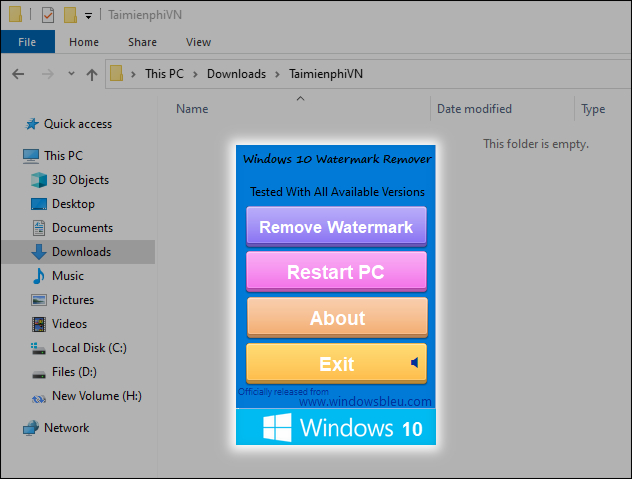
A third-party “watermark remover” similarly changes only what appears on screen. Because these tools often patch system files or are distributed from unverified sites, they can break updates or carry unwanted software. Remove such utilities, run a reputable security scan if you installed one, and fix the license through Windows Settings.
If Windows still will not activate
Record the error code, installed edition, where the license was obtained, and whether hardware was recently replaced. Then use the Microsoft Support activation path or contact the device manufacturer for a preinstalled OEM license. The supported resolution is a valid digital license, a valid product key for the installed edition, or installation of the edition the device is licensed to use—not hiding the notification.
Related Articles
 How to Turn Off the Notification Your Windows License Will Expire4 minutes read
 3 Ways to Turn Off Your Windows License Will Expire Soon5 minutes read
 Here's How to Uninstall the Product Key on a Windows Computer1 minutes read
 How to Quickly Fix the Error Your Windows License Will Expire Soon11 minutes read
 Quickest guide to checking if your Windows license is4 minutes read
 Turn Off the Your Windows License Will Expire Soon7 minutes read
Reader Comments 0
Sign in with email or Google to join the discussion.