Table of Contents
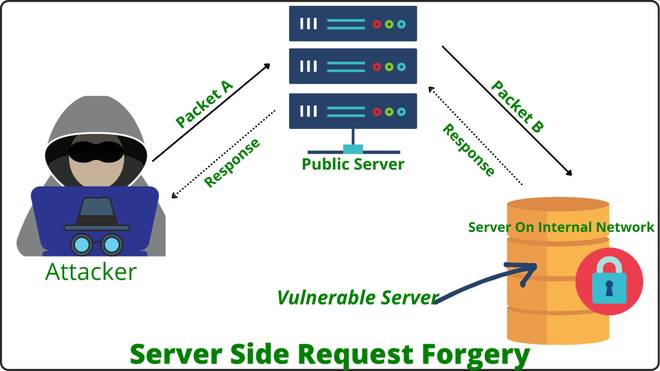
Server-side request forgery (SSRF) occurs when input lets someone direct an application's server to make unintended network requests. Features such as link previews, file imports, and webhook delivery need explicit rules for what the server may contact. The server can often reach resources that a browser on the public internet cannot.

Recognize where SSRF risk enters your application
Identify every place a URL, hostname, or destination from a user or another system reaches an HTTP client or similar library. Review background workers as well as interactive routes. A vulnerable request can expose a response to the user or produce effects even if no response body is returned.
Decide what each feature should be allowed to reach

- Known destinations: Prefer selecting a destination from a server-controlled list. Use a proper URL parser and enforce approved schemes, hosts, and ports. Do not rely on a substring match.
- Public URL fetching: Place the fetcher behind an egress proxy or equivalent network control. Block access to private networks, loopback, link-local ranges, and cloud metadata from that worker. Apply the policy consistently to IPv4 and IPv6.
- Redirects and DNS: Disable redirects unless required. If enabled, validate every destination and ensure the actual connection uses an approved address. Checking just the first hostname is insufficient.
- Limit the fetcher's privileges: Use a separate worker identity, avoid forwarding credentials, and set time and response-size limits. Those limits complement destination checks.
Verify the controls before release
In your own application tests, verify that approved destinations work and that disallowed destinations are rejected before a connection opens. Include the redirect behavior and use controlled test fixtures. Monitor unexpected outbound destinations and review any component that has access to cloud or internal services. See the OWASP SSRF defense guidance for more detail.






Reader Comments 0
Sign in with email or Google to join the discussion.