What is Second Brain AI? Building an effective memory system in the age of AI.
Second Brain AI is an intelligent knowledge management system that helps store, organize, and retrieve information efficiently using AI.
- 1. Introduction to the concept of Second Brain AI
- 2. History and Development of the Concept
- 3. Current understanding of Second Brain AI
- 4. Second Brain AI System Architecture: 4-Layer Model
- 5. Applications in Daily Life
- 6. Applications in the Workplace
- 7. Usefulness and Practical Value
- 8. Advantages and Disadvantages
- 9. How can it be built and used most effectively?
- 10. The Future of Second Brain AI
- 11. Conclusion
- Where should we begin?
- When the brain no longer has enough capacity
- The core issue: information overload is not a new problem.
- Why do humans need a "second memory"?
- From paper ballot boxes to AI
- Three most common misconceptions
- Adoption trends in 2026
- Level 1: Capture – Information Gathering
- Layer 2: Organize – Data Organization
- Level 3: Understand – AI Processes and Understands Content
- Grade 4: Retrieve – Intelligent Retrieval
- A real day with Second Brain AI
- Other specific applications
- Content Creator and Marketer
- Developer
- Manager and Leader
- Research and Analyst
- Data and comparisons
- Transform information into assets.
- Advantage
- Disadvantages
- Three fundamental principles
- Framework PARA + CODE to get started
- Automation with n8n and tools
- AI has "long-term memory".
- Personal knowledge graph – your "brain map"
- Second Brain in the Knowledge Economy
The concept of Second Brain AI is still vague for many people. TipsMake.com will help you explore Second Brain AI – tips for building an effective memory system in the age of AI – in the article below.
1. Introduction to the concept of Second Brain AI
When the brain no longer has enough capacity
There's an interesting paradox in our time: never before have people had access to so much information, yet never have we felt so overwhelmed by it. Every morning, the average knowledge worker is bombarded with dozens of emails, hundreds of text messages, and thousands of social media posts – and that's within the first few hours of the day. By the end of the day, they feel like they've absorbed a lot of information but can't recall learning anything truly valuable.
This isn't a personal issue, but a structural one. The human brain evolved to process the world of millions of years ago – where information arrived slowly, cyclically, and humans had time to absorb, process, and then receive more. But the world of 2026 operates on a completely different rhythm: information arrives continuously, simultaneously, without interruption.
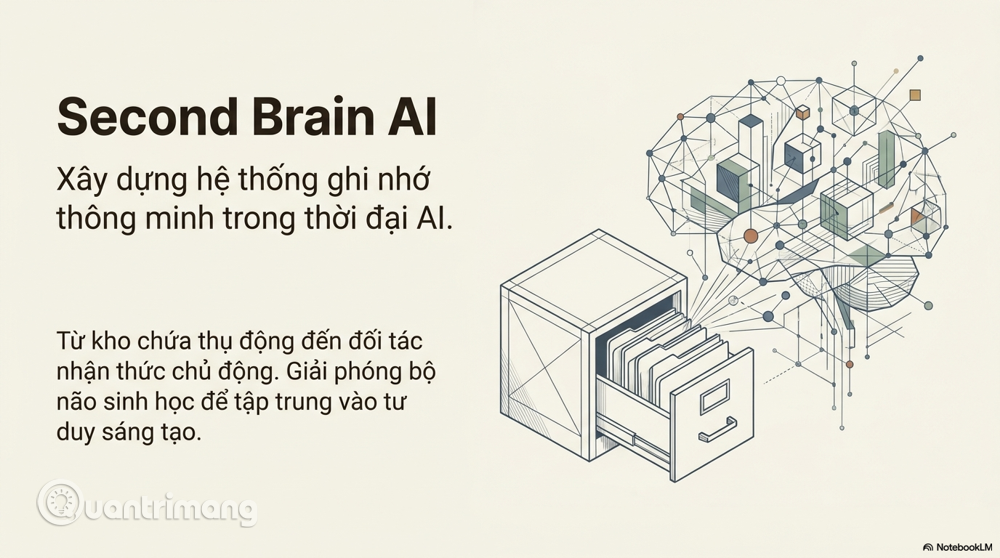
The "Second Brain" emerged as a solution to this very problem. In its simplest form, it's an external system outside the biological brain, where you can "dump" information, organize it, and retrieve it whenever needed. Tiago Forte, who popularized this concept in his 2022 book of the same name, defines the Second Brain as "a digital space where you store your ideas, notes, and creative work"—essentially an external archive that expands human cognitive capabilities.
But from 2023 onwards, and especially clearly in 2025–2026, this concept has evolved to a higher form: Second Brain AI . If the traditional Second Brain is a "passive storage"—you store information and then retrieve it yourself—then Second Brain AI is an active cognitive partner. It not only stores, but also understands, analyzes, connects, and proactively delivers information to you when you need it. This difference, seemingly minor in terminology, has extremely significant practical implications.
The core issue: information overload is not a new problem.
Information overload is not an invention of the internet age. The poet Samuel Johnson lamented the sheer number of books in the 18th century. The scientist Vannevar Bush proposed the concept of "Memex"—a device for storing and retrieving personal information—as early as 1945. People have always felt like they are "drowning" in information.
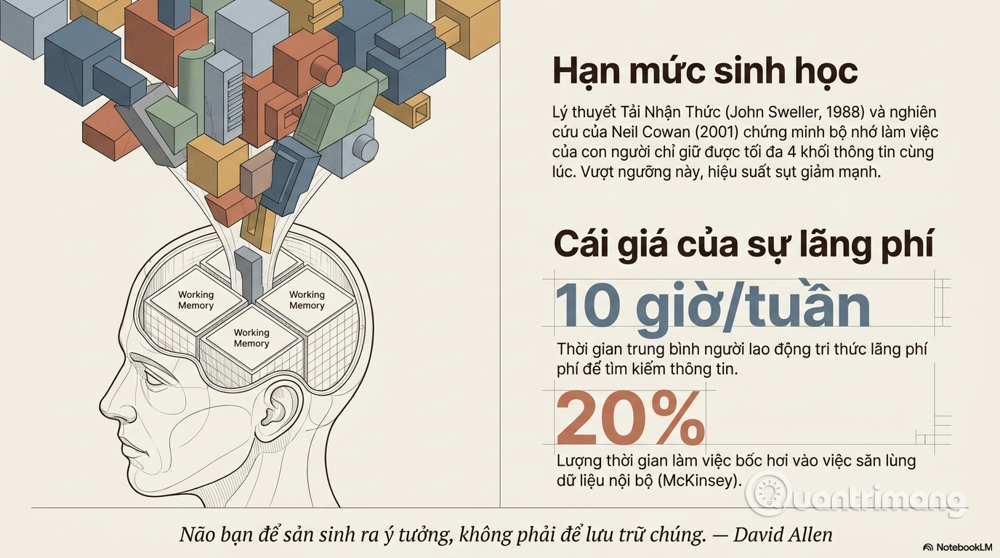
What makes the current era different is the speed and density . According to knowledge management studies, the average knowledge worker spends about 9 to 10 hours per week just searching for information – equivalent to almost a full workday "evaporating" into thin air. McKinsey estimates that nearly 20% of work time is lost hunting for internal information or chasing after colleagues to ask questions that should have been stored somewhere.
It's not just a matter of time. Psychologist John Sweller, with his "Cognitive Load Theory" from 1988, pointed out that the human brain has a certain information processing threshold. When information exceeds that threshold, cognitive performance declines rapidly – people make more mistakes, think less creatively, and make poorer quality decisions. Even Neil Cowan's 2001 research showed that the average person's working memory can only hold about four pieces of information at a time – a frighteningly small number considering the sheer volume of things we have to keep track of each day.
Why do humans need a "second memory"?
The short answer is: because your brain wasn't designed to memorize – it was designed to think.
This is an important distinction that many people overlook. Remembering and thinking are two different processes, using different cognitive abilities. When you spend a lot of brain resources trying to remember "where did I read that article?" or "where did I write that idea?" – you are robbing yourself of resources that could be used for something far more important: analysis, creativity, and decision-making.
David Allen, the father of the GTD (Getting Things Done) method, laid the foundation for this mindset with his famous quote: "Your brain is for generating ideas, not storing them." The philosophy of GTD is to free the brain from the burden of memorization by putting everything into a reliable external system – from there, the brain can focus entirely on processing and creating.
Second Brain AI takes this thinking process to the next level: it not only stores information to free up the brain, but also enhances your overall cognitive power by becoming a true partner in the thinking process.
2. History and Development of the Concept
From paper ballot boxes to AI
To fully understand Second Brain AI, we need to look back at its history. This concept didn't suddenly emerge in the AI era – it's the culmination of a century-long journey.
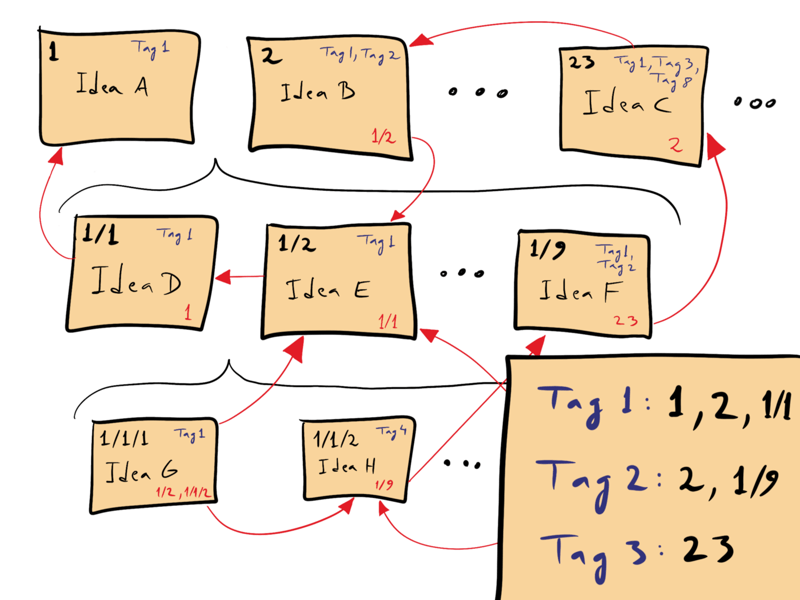
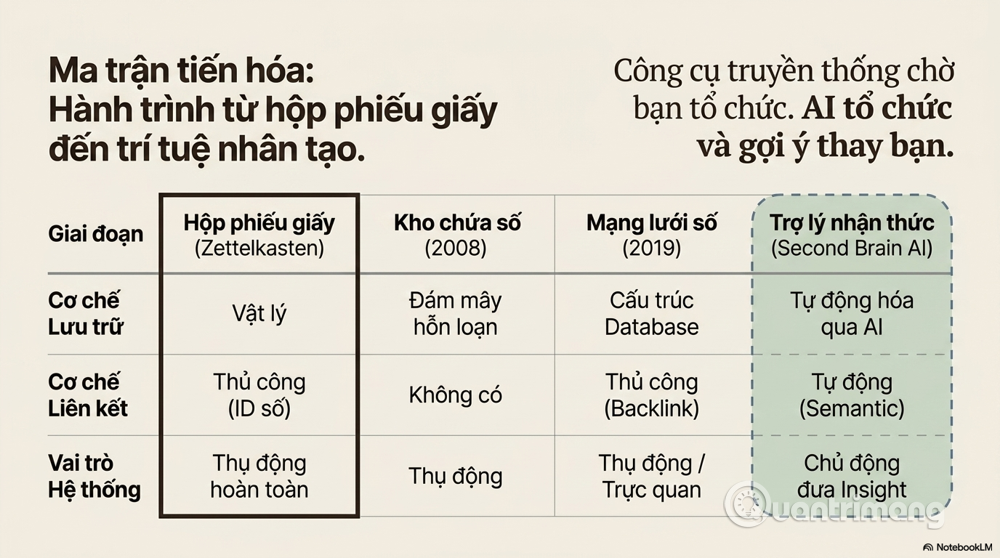
Zettelkasten is the earliest and perhaps most sophisticated model of a truly functioning "second brain." Developed by the German sociologist Niklas Luhmann (1927–1998), Zettelkasten literally means "ballot box," a system of notes on small paper slips linked together through a complex numerical ID system. What truly sets Zettelkasten apart is not the storage, but the linking.
Each note doesn't exist in isolation but is always linked to other related notes, forming a vibrant network of knowledge. Luhmann has produced over 70 academic books and nearly 400 scientific papers – the majority of which are direct results of this system. He once said, not jokingly, that his Zetellasten was a "true collaborator" in his research.
David Allen's GTD (Getting Things Done) , which emerged in the early 2000s, approached things from a different perspective – not knowledge management, but action management. However, GTD's core principle – "capture everything, process systematically, review regularly" – has become the backbone of most subsequent personal knowledge management systems. GTD frees the brain from the burden of remembering "things to do," and Second Brain inherits that spirit to free the brain from the burden of remembering "information already learned."
The years 2000–2010 saw the first wave of digital tools supporting second brains. Evernote launched in 2008 with the promise of "remembering everything," and reached 200 million users by 2015. But Evernote proved a painful lesson: collecting without structure only creates a massive digital garbage dump. Users constantly add but rarely retrieve anything of value.
Notion and Obsidian represent the second wave, emerging and booming between 2019 and 2022. Notion offers the flexibility of a database combined with note-taking, while Obsidian revives the Zettelcasten philosophy with Graph View – a visual map of how your notes are linked together. Obsidian stores everything as Markdown files on your local machine, providing control and security that cloud-based tools cannot offer.
But even with Notion and Obsidian, the fundamental problem remains unresolved: you still have to manually organize, manually tag, and manually link. The system is passive, waiting for you to invest effort. And the reality is that most people don't sustain that investment in the long run.
ChatGPT and the AI era (from 2023 to present) have profoundly changed this equation. Suddenly, it's possible to have an "assistant" that understands context, summarizes documents, answers complex questions, and synthesizes information from multiple sources. But pure ChatGPT still has a major limitation: it doesn't remember anything about you across different chat sessions. Each conversation is a blank slate.
This is precisely the gap that Second Brain AI fills, combining the storage and structured organization power of traditional PKM tools with the natural language understanding, semantic analysis, and intelligent retrieval capabilities of modern AI.
3. Current understanding of Second Brain AI
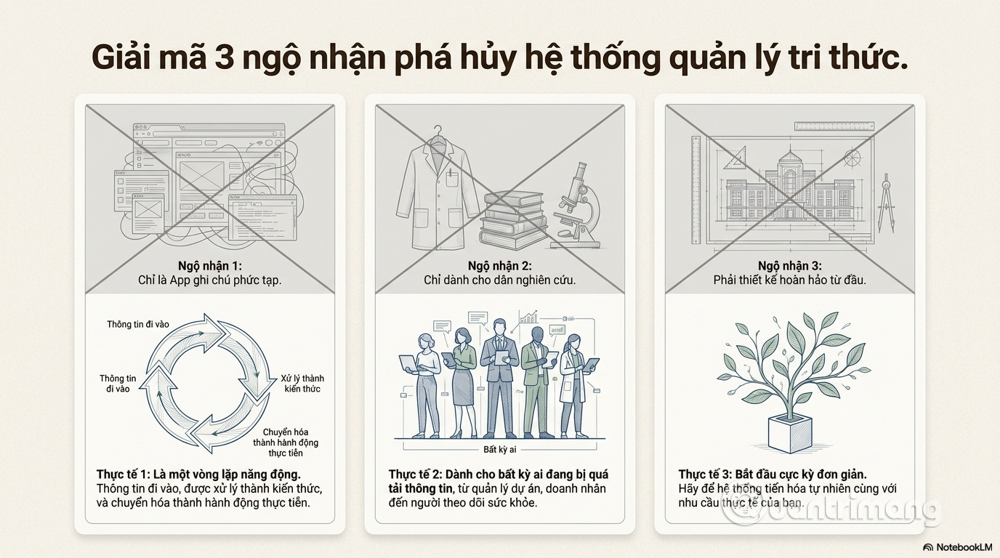
Three most common misconceptions
As Second Brain AI became more popular, several ingrained misconceptions formed that hindered many people from using the system effectively.
Misconception #1: "Second Brain is just a more sophisticated note-taking app."
This is the most common and dangerous misconception. Many people install Notion, create a bunch of databases, add fancy tags, and call it "Second Brain"—and wonder why they don't see any difference. The problem is they're creating a storage system, not a thinking system.
The Second Brain is truly a dynamic loop: information enters → is processed and linked → becomes knowledge → triggers action → generates new results → introduces new knowledge into the system. If your system only has the first step (input) and lacks the rest, it's just a warehouse – useful, but not the Second Brain.
Second misconception: "Only for knowledge workers, researchers, or creative people."
There's a common misconception that Second Brain AI is only suitable for researchers, writers, programmers, or those doing physically demanding "knowledge-based" work. This is incorrect.
A mother monitoring her child's health, a small business owner managing customer relationships, a student preparing a thesis, or an office worker trying to avoid missing deadlines – all can benefit from Second Brain AI. The issue isn't the type of work you do, but how much information you need to manage and how overwhelmed you are.
Third misconception: "It must be built right the first time."
Many people spend weeks, even months, designing the perfect system before they start using it – and most of them never actually start. The best Second Brain systems aren't those perfectly designed from the start, but rather those that begin simply and evolve with your actual needs.
Adoption trends in 2026
An interesting divergence is occurring in the Second Brain AI market. At the individual level, savvy users are shifting from building complex manual systems to AI-native solutions – where AI automates much of the organizational and retrieval work. At the enterprise level, the concept of a "corporate second brain" or "organizational knowledge graph" is gaining increasing attention, as companies realize that organizational knowledge is "leaking" every time an employee leaves.
4. Second Brain AI System Architecture: 4-Layer Model
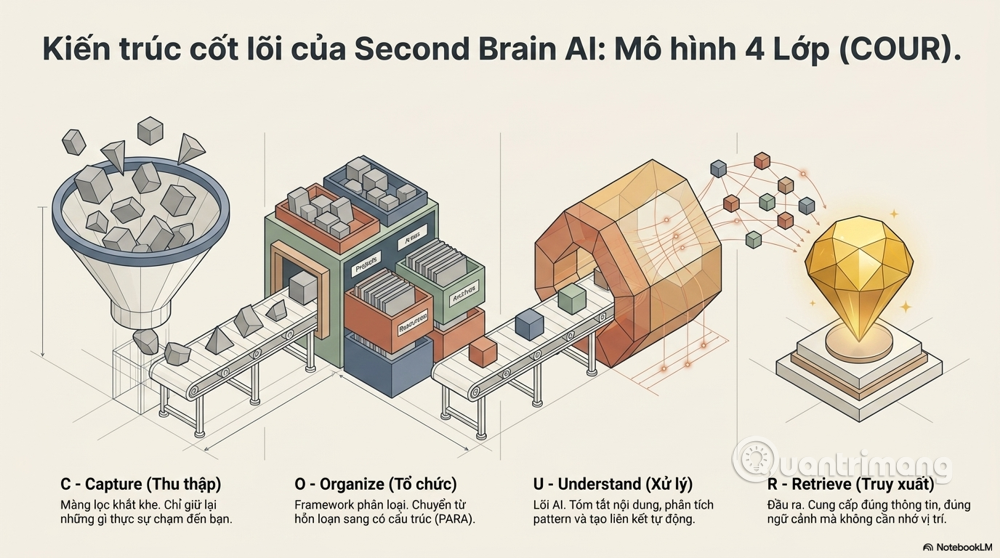
To understand Second Brain AI at a systems level, we need to look at its basic architecture. I propose the COUR model – four continuously operating and complementary layers:
Level 1: Capture – Information Gathering
This is the starting point of all Second Brain systems, and paradoxically, it's also where many systems fail right from the start.
The problem with information gathering isn't a lack of tools – you can use Readwise to save highlights from books and articles, Notion or Obsidian's web clippers to save web pages, Otter.ai to take meeting notes, or voice-to-text to jot down ideas while driving. The real problem is filtering – what you collect and what you ignore.
One important principle: not all information deserves to be in your Second Brain. Tiago Forte suggests the criterion of "capture what resonates"—collect what truly touches you, elicits an emotional or intellectual response, not what you think you "should" keep.
In practice, an effective Second Brain AI user might look like this:
- This morning I read a research paper on machine learning → highlighted the 3 most important sections, and Readwise automatically synced it to Obsidian.
- Midday, an insight is gained during lunchtime → the person speaks into the phone, the AI automatically converts it into text and adds it to the system's inbox.
- Afternoon meeting with the client → Otter.ai records and summarizes, automatically creating action items.
The result is a continuous flow of information into the system, but with a high filtering threshold – only what is truly valuable passes through.
Layer 2: Organize – Data Organization
This is the layer where most traditional systems put the most effort – and also the layer where AI makes the biggest difference.
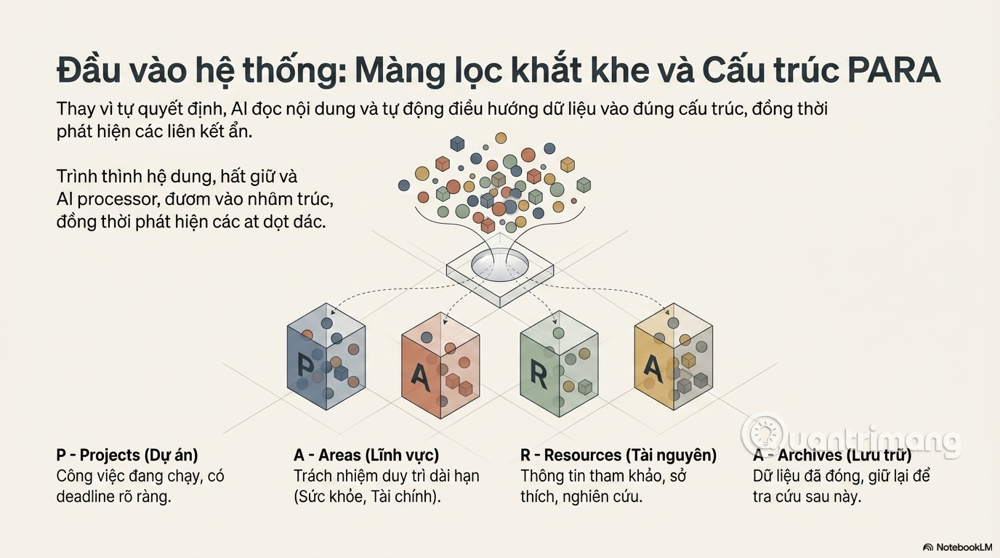
The most popular framework for organizing Second Brain is Tiago Forte's PARA , which consists of four groups:
- Projects : things you are working on with clear deadlines.
- Areas : long-term areas of responsibility (health, finances, work, etc.)
- Resources : reference information not associated with a specific project.
- Archives : anything that is no longer active but you still want to keep.
But with Second Brain AI, classification no longer needs to be entirely manual. AI can read the content of a document and suggest which Project, Area, or Resource it belongs to. You confirm or adjust – instead of having to decide from scratch.
More importantly, AI helps detect connections you might otherwise overlook. For example, you save an article on "personal energy management" and three weeks later save a study on "work productivity according to circadian rhythms." The AI recognizes that these two things are related and automatically creates a link, helping you see the bigger picture that you wouldn't be able to see if you just skimmed through each note individually.
Level 3: Understand – AI Processes and Understands Content
This is what distinguishes Second Brain AI from all traditional note-taking systems. It doesn't just store information; the AI actually reads and understands the content and performs advanced cognitive operations:
Summarize and refine : AI can read a 5,000-word article and summarize it into 5 bullet points containing core insights, preserving context and important nuances.
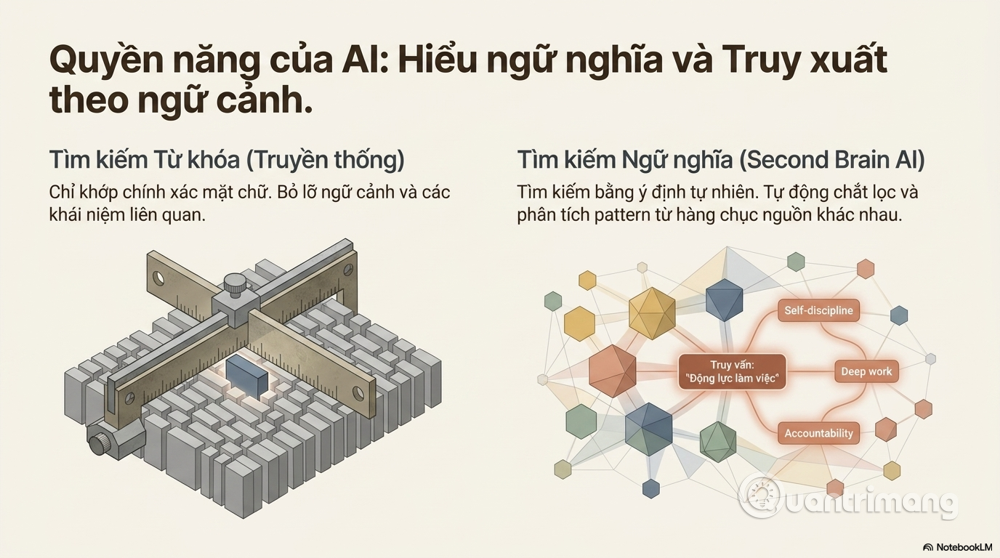
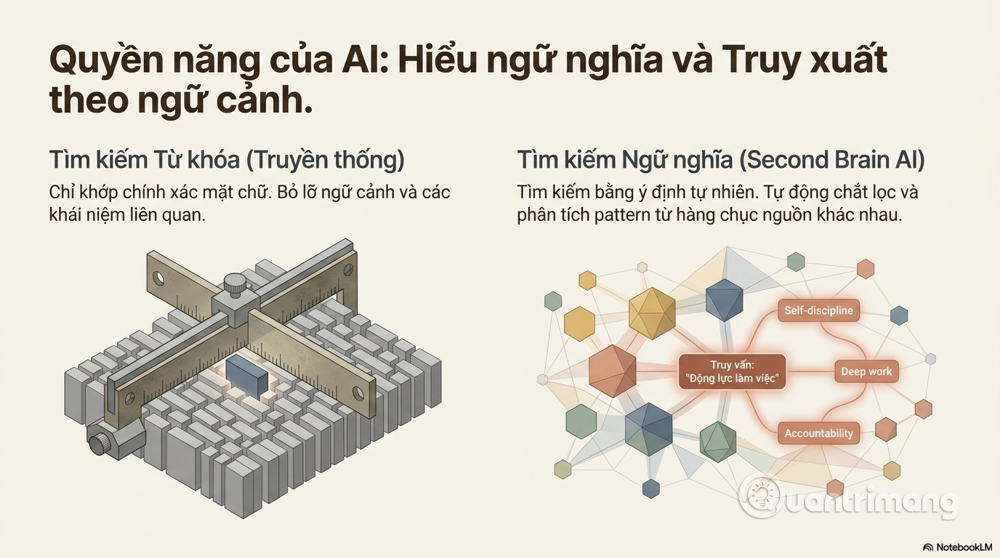
Semantic association : Unlike conventional keyword research, AI understands the meaning of content. You might ask, "Find all my saved notes about staying motivated while working alone," and the AI will pull up not only notes containing the word "motivation," but also notes about "self-discipline," "accountability partner," or "deep work"—because the AI understands these are all aspects of the same issue.
Analysis and Synthesis : This is its most powerful feature. Instead of just searching for information, you can ask the AI, "Based on everything I've read about marketing, what are the common patterns in successful strategies?" and receive a comprehensive analysis from dozens of sources you've accumulated over time.
Grade 4: Retrieve – Intelligent Retrieval
The ultimate goal of any note-taking system is retrieval – getting the right information, at the right time, with the right level of detail. This is where most traditional PKM systems fail.
The classic problem with manual note-taking systems is: to retrieve information, you have to remember where you saved it – but if you remember, do you even need to search? A system designed to free up memory requires memory to function – that's the deadly paradox.
Second Brain AI breaks this paradox with semantic search – searching by meaning rather than keywords. You don't need to remember whether you used the words "productivity," "yield," or "efficiency" when saving – you just ask the question in the most natural way, and the AI understands your intention.
Furthermore, a good Second Brain AI proactively provides information when you need it, without you having to ask. For example, if you start writing about the topic "leadership in a crisis," the system automatically suggests relevant notes you saved six months ago that you had forgotten about.
5. Applications in Daily Life
A real day with Second Brain AI
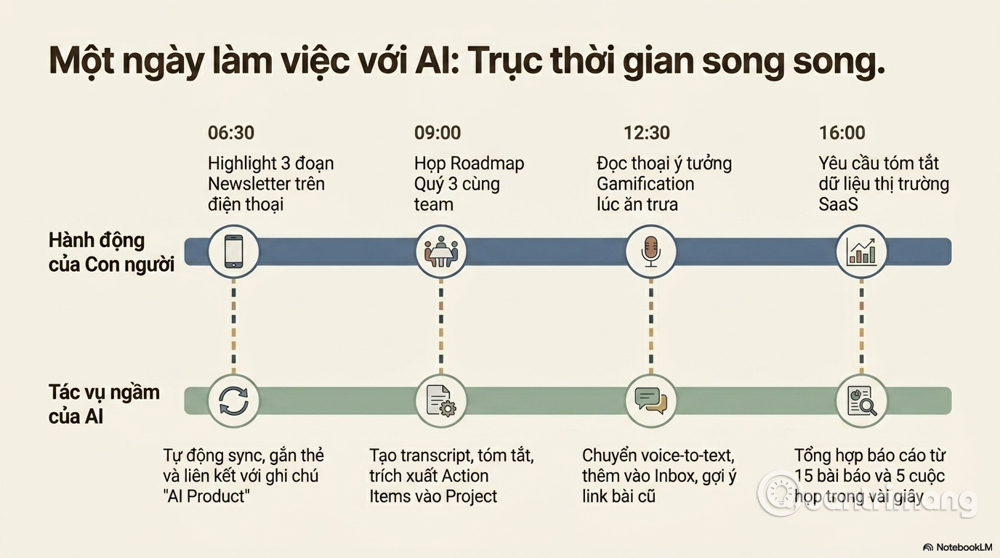
To illustrate this point, let's follow a day in the life of Minh – a 32-year-old product manager at a tech startup in Hanoi.
6:30 AM : Minh reads a newsletter about AI early in the morning. Instead of reading and forgetting, he uses Readwise Reader to highlight the three most important sections. The highlights automatically sync to his Obsidian vault, which the AI automatically tags and links to his old note about "AI in product development."
9:00 AM : Meeting with the team regarding the Q3 roadmap. Otter.ai recorded and created a transcript. After the meeting, the AI summarized and automatically generated a meeting notes page with highlighted action items. This page is linked to the "Q3 Roadmap" project in Minh's system.
12:30 PM : During lunch, Minh suddenly had an idea for improving user onboarding. He said into the phone: "Idea: Use gamification in onboarding, referencing the Duolingo model, related to retention strategy." The AI converted it into text, automatically added it to the inbox, and suggested a link to an old note about "retention mechanics" that Minh had saved last month.
4:00 PM : Minh needed to write a market report for leadership. Instead of starting from scratch, he asked his Second Brain AI: "Summarize everything I've gathered about the B2B SaaS market over the past three months." In seconds, the system produced a summary from 15 articles, 3 reports, and 5 meeting transcripts – saving Minh at least two hours of research.
9:00 PM : Minh reads on his Kindle. The sections he highlights are automatically synced to the system, ready to be connected to other work and ideas later.
In a single day, Minh's Second Brain AI collected information from five different sources, organized it automatically, and helped him synthesize information many times faster than traditional methods. More importantly, no information was "forgotten"—everything was retrieved later.
Other specific applications
Learning knowledge management : Second Brain AI transforms learning into a true accumulation process. Instead of reading a book and then forgetting it, you build an ever-growing knowledge base, where new knowledge is constantly connected to old knowledge to create deeper understanding.
Decision support : When making important decisions, you can query your system to retrieve all relevant information – precedents, data points, expert opinions – that has been collected over time. Your decision is then based on a more comprehensive picture, not just what you remember at the moment.
Storing creative ideas : The best ideas often come at the most inconvenient times – in the shower, while dozing off, or in the middle of a boring meeting. Second Brain AI allows for instant capture with minimal effort, ensuring no ideas are lost.
6. Applications in the Workplace
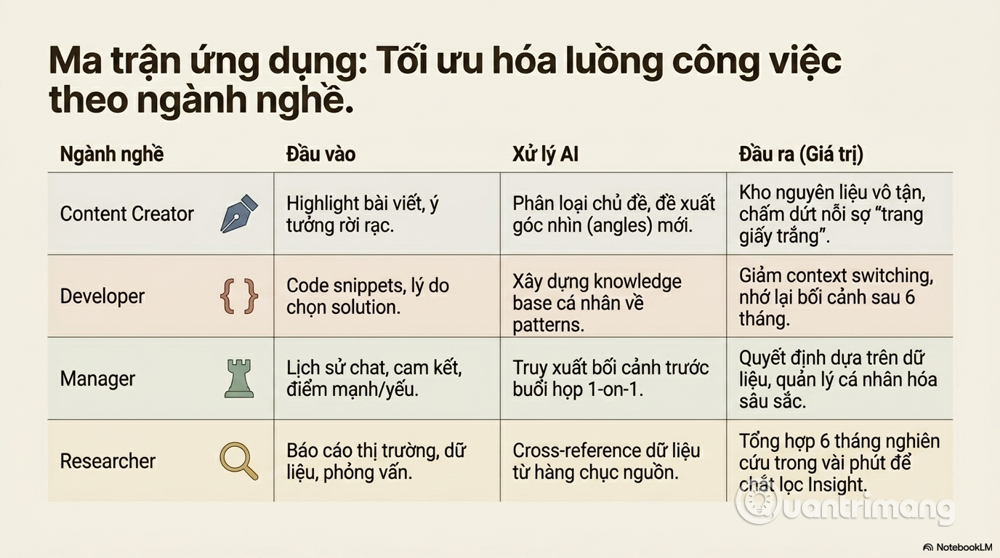
Content Creator and Marketer
Content creators are facing increasing pressure to produce content while their inspiration is limited. Second Brain AI addresses this problem by turning everything you read, watch, and listen to into fuel for future content.
A typical workflow for a content creator: A technology content creator, for example, might set up a pipeline as follows: All interesting articles are highlighted and saved to Readwise → Readwise automatically exports to Notion/Obsidian → AI automatically categorizes by topic (AI, startup, product design, etc.) → When a new article needs to be written, AI compiles all relevant material and suggests different angles → The writer chooses an angle and writes a draft → AI reviews and suggests relevant notes that haven't been used yet.
The result – instead of sitting staring at a blank screen and thinking "what should I write today?", creators have a rich source of ideas with plenty of material to develop.
Developer
One of the biggest "pain points" for developers is context switching – recalling the context of a problem after being interrupted. Second Brain AI addresses this by saving not only the code but also the reasoning – why you decided to do it this way, the alternatives you considered, and what ultimately led you to choose the current solution.
A specific workflow for developers: Before starting a complex task, make a brief note of the problem to be solved and the approaches being considered. During the process, record dead ends and the reasons for abandoning them. After completion, record the lessons learned. Over time, this system becomes a knowledge base of your own patterns and anti-patterns – invaluable when encountering a similar problem again after 6 months.
Manager and Leader
For managers, Second Brain AI is particularly useful in two areas: human relationship management and data-driven decision-making.
One-on-one management workflow: Before each one-on-one session with an employee, query the system to retrieve the context of previous conversations, commitments made, strengths/weaknesses noted, and goals being pursued. This makes the conversation more personalized and in-depth, rather than having to start from scratch each time.
Research and Analyst
This is the group of users who benefit most from Second Brain AI, because their work essentially involves synthesizing information from multiple sources.
Typical research workflow: A fintech research analyst could build a system where all market reports, expert interviews, and statistical data are stored and cross-referenced. When needing to write a report on "the outlook for BNPL in Southeast Asia," instead of spending a week compiling, the system could synthesize six months of research in minutes – allowing the analyst to focus on interpretation and extracting insights, something AI cannot yet do as well as humans.
7. Usefulness and Practical Value
Data and comparisons
It's difficult to give an exact ROI for Second Brain AI as it depends heavily on individual contexts. However, some key points to consider are:
As mentioned, knowledge workers spend an average of nearly 10 hours per week searching for information. If a Second Brain AI reduces this number by just 50% – a conservative estimate based on the average user – that's 5 hours per week, nearly 250 hours per year, freed up for truly valuable work.
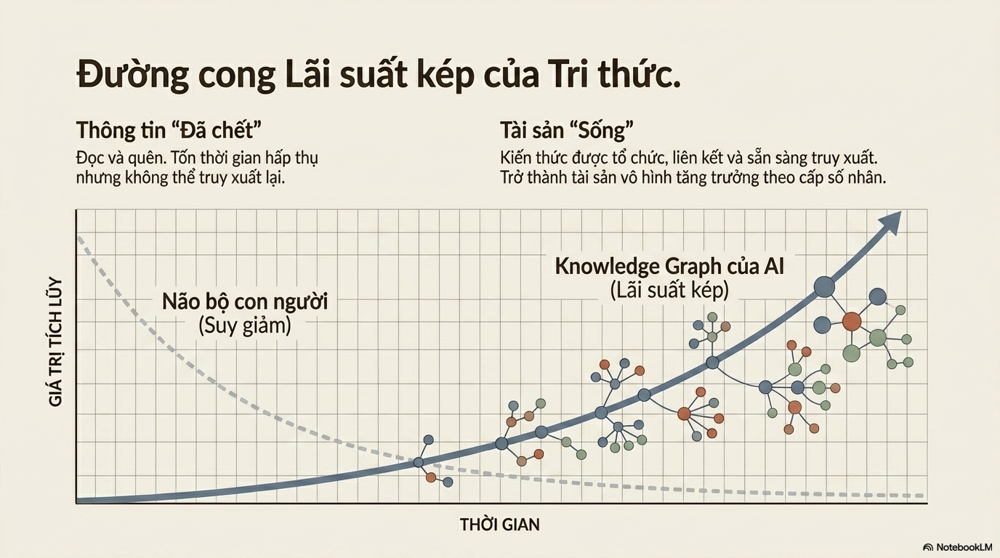
But the most intangible quantitative value is the accumulation over time . A Second Brain AI system operating for one year is not only 12 times more efficient than one operating for one month – it's far more efficient than that, because the knowledge network grows exponentially: each new note not only adds a unit of information but also creates many new links to existing information, increasing the value of the entire system.
Transform information into assets.
This is perhaps the most profound value of Second Brain AI, but also the most difficult to explain.
In the knowledge economy, information you've been exposed to, read, and learned – but can't retrieve – is essentially "dead" information. It wastes your time but creates no value. Second Brain AI transforms this "dead" information into living assets – accessible, combinable, and capable of generating new value even years after you first encounter it.
A strategic consultant who has spent five years seriously building Second Brain AI will possess an invaluable intangible asset: all of their knowledge, case studies, frameworks, and insights accumulated over those five years are organized, linked, and readily accessible. This asset cannot be stolen, does not "fade" over time like biological memory, and its value can increase exponentially as the system becomes richer.
8. Advantages and Disadvantages
Advantage
Automate tedious tasks : The hardest part of maintaining a note-taking system is the persistence, categorization, tagging, and linking. AI frees you from these tasks, allowing you to focus on content instead of managing the system.
Deep personalization : Unlike Google Search, which searches the entire internet, Second Brain AI searches within your own knowledge base—reflecting how you think, what you care about, and the specific context of your life.
Superior intelligent retrieval : Semantic search understands your intent, not just keywords. You can search using natural queries and get more accurate results than any traditional system.
Discovering unexpected connections : One of the joys of Second Brain AI is when the system points out connections between two seemingly unrelated fields, which is often the source of the most groundbreaking and innovative ideas.
Disadvantages
Tool dependency and "lock-in" risk : If you build the entire Second Brain on a proprietary platform like Notion and that platform suddenly changes pricing or shuts down, you could lose everything. Obsidian with local Markdown file storage solves much of this problem, but not every tool has the same feature.
Data overload – "graveyard of forgotten ideas" : The paradox is that without discipline, a Second Brain AI could easily become a digital garbage dump even more chaotic than before the system was established. Collecting too much data without regular filtering and review mechanisms creates a mass of information that even AI would struggle to organize.
Security and privacy risks : Second Brain contains the most sensitive information – personal thoughts, business plans, customer information, unpublished ideas. Storing all of this on cloud platforms creates clear risks. A tiered strategy is crucial: sensitive information should be kept local, while publicly available information can be moved to the cloud.
High initial setup costs : Building a well-functioning Second Brain AI requires significant time investment in the early stages – structural design, automation setup, and habit development. Many people give up before reaching the stage where the system starts delivering value.
9. How can it be built and used most effectively?
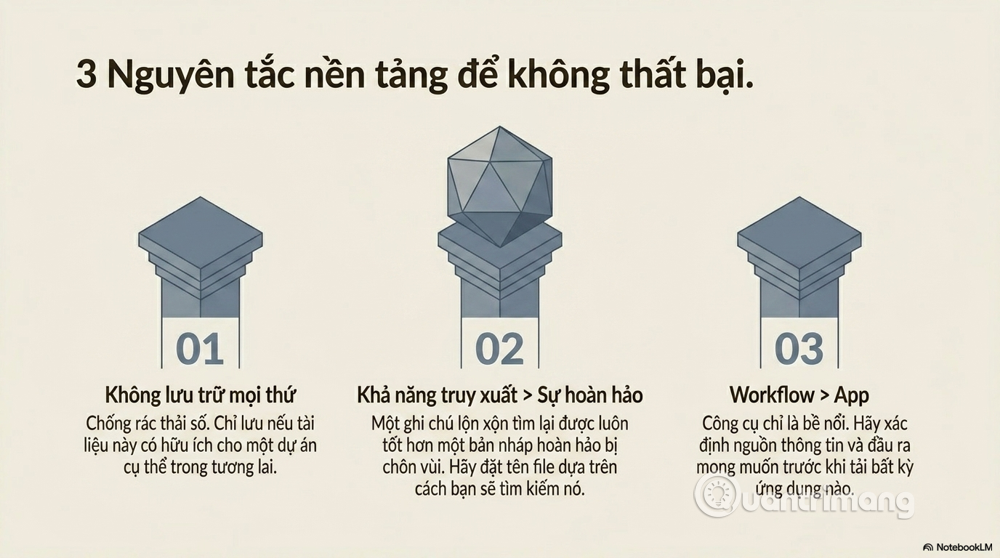
Three fundamental principles
Rule 1: Don't store everything.
The idea of "capture everything" sounds appealing, but it's actually a trap. The best system is a carefully curated one – where every note has a reason to exist. A practical criterion: "Could this be useful to someone working on this topic in the future?" If the answer is "not sure," let it go.
Principle 2: Prioritize reproducibility over perfection.
An imperfect but retrievable note is always better than a perfect note that's buried. Design the system with the question: "How will I find this in two years?" – and name, tag, and write notes for that answer.
Principle 3: Design the workflow first, choose the tools later.
This is the most fundamental mistake most people make: they get caught up in experimenting with tools without ever sitting down and really thinking about their workflow. Answer these questions first: Where does my information come from? In what circumstances do I typically retrieve information? What output do I want to produce from Second Brain? Once you have the answers, choosing the right tool will become much clearer.
Framework PARA + CODE to get started
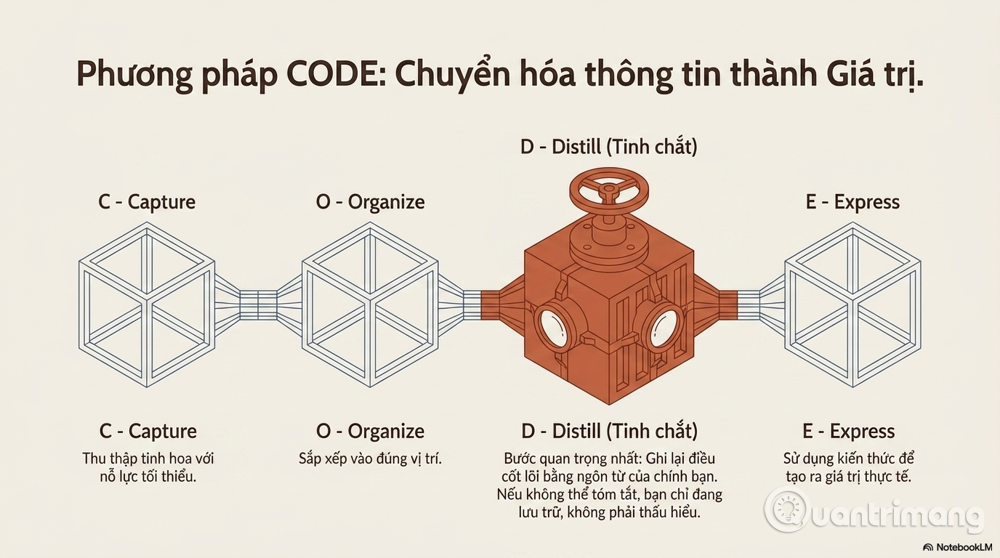
For beginners, I recommend combining two proven frameworks :
PARA for organizational structure (as explained in section 4).
Tiago Forte's code for the information processing workflow:
- Capture : Gather what's important
- Organize : place in the correct position in PARA
- Distill : concentrate – record the most important things in your own words.
- Express : used to create value (writing, presenting, making decisions)
Step D (Distill) is often overlooked but is the most important. When you have to summarize an idea in your own words, you are truly understanding it – not just storing it.
Automation with n8n and tools
To reduce friction in system maintenance, automation is key. n8n – an open-source automation tool – allows you to create automated workflows such as:
- When a new email with the "to-read" label arrives, it is automatically saved to the Notification inbox.
- When Kindle Highlight is synced, flashcards are automatically created in Anki.
- When the meeting ends → automatically prompts you to fill in the meeting notes.
Standardized prompts are another important concept. Instead of asking the AI a different question each time, create a set of template prompts for frequently performed tasks:
- "Summarize this article using the format: [Problem] → [Solution] → [Apply to me]"
- "Compare it with what I already know about [related topic]"
- "Create 3 questions to check if I truly understand this content."
Regular reviews are a habit that keeps systems alive – not just alive. Suggested review schedule:
- Daily (5 minutes): Process inbox messages, move them to the correct location in PARA.
- Weekly (30 minutes): Review new notes, create links, check progress of active projects.
- Monthly (1-2 hours): Review the Areas, archive what is no longer active, identify patterns and broader insights.
10. The Future of Second Brain AI
AI has "long-term memory".
One of the biggest limitations of current AI models is the lack of "persistent memory"—memory that endures across conversation sessions. But this is changing rapidly. AI systems are being equipped with better memory for users, preferences, and interaction history—essentially, AIs are learning to become your true "Second Brain," not just a smart search engine.
This trend will create a completely new kind of AI: not AI that knows everything (like Google), but AI that knows everything about you and your specific knowledge. This level of personalization is something no current tool can offer to the extent we can expect in the next few years.
Personal knowledge graph – your "brain map"
Currently, Obsidian's Graph View has demonstrated some of the power of knowledge graphs – a visual map of how your ideas and notes are linked together. In the near future, these knowledge graphs will become more dynamic – self-updating as you learn more, automatically detecting contradictions in your understanding, and automatically pointing out "gaps" in your knowledge on a given topic.
Imagine a system that can tell you: "You've read a lot about marketing, but never taken notes on measuring marketing effectiveness – here are three readings I think will fill this blind spot for you." This is no longer science fiction – several systems are developing similar features.
Second Brain in the Knowledge Economy
On a broader scale, Second Brain AI reflects a profound shift in how the knowledge economy operates. As AI becomes increasingly capable of processing and synthesizing information, human value no longer lies in simply "knowing a lot"—but in knowing how to ask questions, how to connect ideas from different fields, and how to transform information into valuable action. Second Brain AI is the tool that enables humans to do these things better—not by competing with AI in terms of memorization, but by collaborating with AI to amplify what humans do best.
11. Conclusion
After all the above analysis, the most important thing to remember is: Second Brain AI is not an app you download and start using. It's a system – a collection of habits, processes, principles, and tools that work together to serve a clear goal.
This difference isn't just semantic. When you view Second Brain as an "app," you tend to judge it by its interface and features – and when it doesn't deliver immediate results, you move on to the next app. When you view it as a "system," you understand that its value comes from consistency over time – and you invest in it as a long-term asset.
Similar to exercise: one day at the gym doesn't make you healthier. Three months of consistent training begins to make a difference. A year of consistent training creates a transformation. Second Brain AI works on similar logic – but with the bonus that it gets smarter over time as you add more knowledge and context.
Where should we begin?
If you don't already have a Second Brain, the best starting point isn't finding the perfect tool or designing the perfect system. The best starting point is answering a simple question: "What is the most important thing that I keep having to search for every time I need it?"
The answer to that question is your first Second Brain. Start by organizing that kind of information—whether it's just in a simple Notion file or an Obsidian vault—and build from there. Perfection is the enemy of beginning.
The world is generating information at an ever-increasing rate, and the gap between those with good knowledge management systems and those without will only widen. Second Brain AI doesn't guarantee you'll be smarter – but it does guarantee that what you've learned, thought, and experienced won't be wasted. In a world where information is a core resource, that's the real competitive advantage.
You've just finished reading the article "What is Second Brain AI? Building an effective memory system in the age of AI." edited by the TipsMake team. You can save what-is-second-brain-ai-building-an-effective-memory-system-in-the-age-of-ai.pdf to your computer here to read later or print it out. We hope this article has provided you with many useful tech tips and tricks. You can search for similar articles on tips and guides. Thank you for reading and for following us regularly.
- 10 tips to strengthen memory and brain in the elderly
- 10 useful software to help you train your brain every day
- 6 simple things to help your brain get better and better
- How does daily activities affect the brain?
- You are often teased as the 'goldfish brain', do not be sad this indicates you have a brain that works very well
- 5 amazing tips to bust brain power while studying!