Table of Contents
Brain-training apps are useful when you want structured puzzles, mental arithmetic, word exercises, or a short daily challenge. They can help you practice the tasks they contain and make progress easy to track, but they should not be treated as a medical test, a proven way to raise IQ, or a method of preventing dementia.
Research on computerized cognitive training is mixed and depends on the population, program, and outcome measured. People often improve at practiced tasks, while transfer to unrelated everyday abilities is less certain. The Stanford Center on Longevity's scientific consensus cautions against turning narrow gains into broad claims, and Mayo Clinic guidance notes that there is no substantial evidence these apps prevent or slow cognitive decline.
Quick comparison
| App | Main activities | Best fit |
|---|---|---|
| Peak | Memory, attention, language, problem-solving | Varied short sessions |
| Elevate | Vocabulary, reading, speaking, mental math | English-language practice |
| Lumosity | Memory, speed, attention, flexibility | Adaptive mini-games and tracking |
| Brain School | Math, words, logic, spatial and music puzzles | iPhone and iPad puzzle fans |
| Brain Dots | Drawing and physics puzzles | Open-ended problem-solving |
1. Peak
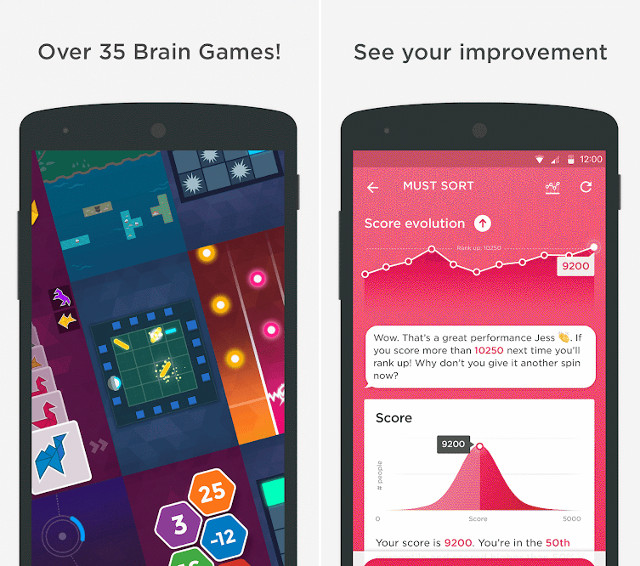
Peak combines brief games that target areas such as memory, attention, mental agility, language, and problem-solving. A daily workout selects several activities, while performance charts show how scores change over time. The variety makes it a good starting point if repeating one kind of puzzle becomes boring.
Treat the scores as measures of performance inside Peak rather than a clinical assessment. The free tier and subscription features can change, so review the current store listing before paying. View Peak on Google Play.
2. Elevate
Elevate emphasizes applied language and numeracy: vocabulary, reading comprehension, concise writing, speaking, processing speed, and mental math. It adjusts exercises based on performance and builds a personalized routine. This focus is more practical than a collection made entirely of abstract memory games.
Many language activities are designed around English, which is an advantage for learners who want that practice but a limitation for anyone seeking exercises in another language. Try the free experience before committing to a subscription. View Elevate on Google Play.
3. Lumosity
Lumosity offers adaptive games grouped around memory, attention, speed, flexibility, problem-solving, words, and math. A fit test establishes an in-app baseline, daily workouts rotate activities, and progress reports make it easy to see which games have improved.
That baseline is not a diagnosis, intelligence score, or measure of brain health. It is most useful for comparing your own results within the app under similar conditions. Lumosity has both mobile and web access, although available games and free limits may differ. View Lumosity on Google Play.
4. Brain School
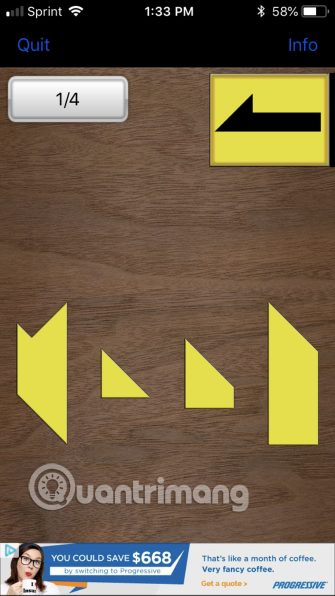
Brain School presents its puzzles as four school years with lessons, grades, and end-of-year exams. Activities cover mental arithmetic, word recognition, logic, memory, spatial reasoning, patterns, music, and general knowledge. It suits players who prefer a progression system with fixed levels rather than an endless personalized feed.
The app is currently offered for iPhone and iPad. Some questions rely on language or general knowledge, so results reflect more than memory or reasoning alone. View Brain School on the App Store.
5. Brain Dots
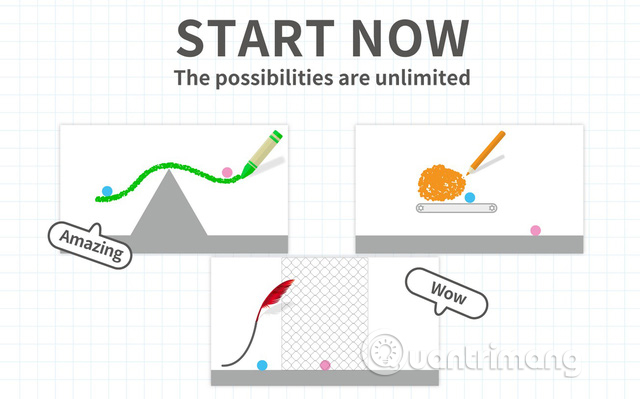
Brain Dots has one simple objective: draw lines and shapes that make a blue ball and a red ball touch. Gravity and collisions turn that instruction into an open-ended physics puzzle. Because many stages allow multiple solutions, the game encourages experimentation rather than memorizing a single prescribed method.
Brain Dots is better described as a creative logic game than a comprehensive cognitive-training program. It works offline for normal puzzle play after installation, while sharing and community features need a connection. View Brain Dots on Google Play.
How to choose an app
- Match the activity to your goal: choose Elevate for English and arithmetic practice, Brain Dots for physics puzzles, or Peak and Lumosity for mixed mini-games.
- Test the free tier: subscriptions differ in price, trial rules, available exercises, and renewal terms.
- Check accessibility: small text, timers, color-only cues, or rapid tapping can make an otherwise good app unsuitable.
- Review privacy settings: performance histories, account details, advertising identifiers, and health integrations may be collected depending on the app.
- Ignore grand promises: an entertaining challenge does not need to claim that it makes users universally smarter.
A practical 15-minute routine
- Choose two or three activities that use different skills.
- Play for 10 to 15 minutes when you are rested, not while multitasking.
- Compare trends over several weeks instead of reacting to one low score.
- Increase difficulty when a task becomes automatic.
- Balance screen-based drills with reading, physical activity, sleep, social interaction, and learning real-world skills.
If memory or concentration changes interfere with daily life, speak with a qualified health professional rather than relying on an app score. For more recreational challenges, see TipsMake's collections of intellectual games and puzzles and logic games for phones.
Related Articles
 To Think Effectively, Train Your Brain in 12 Ways Below7 minutes read
 11 Ways of Training Help the Brain Work More Effectively5 minutes read
 The Human Body Is Stronger Than the Supercomputer5 minutes read
 What to Eat to Increase Creativity: Brain4 minutes read
 How Does Daily Activities Affect the Brain4 minutes read
 Lets Train the Eye with the Brain Damage' Puzzle Pictures Below4 minutes read
Reader Comments 0
Sign in with email or Google to join the discussion.