Table of Contents
Get a clear answer to what is an MCP connector? what makes it special, including the key facts, causes, options, and practical takeaways.
As the explosion of artificial intelligence (AI) capable of interacting with browsers occurs, companies are rolling out features and connections at a breakneck pace. On March 31, Opera announced a new feature for Opera Neon designed to help AI applications connect with the browser. The tool, called MCP Connector, allows AI applications like Claude, ChatGPT, and OpenClaw to use Opera Neon to perform tasks on behalf of the user.
What Is the MCP Connector for Opera Neon?
A Bridge Between Your Browser and Your Favorite AI Tools
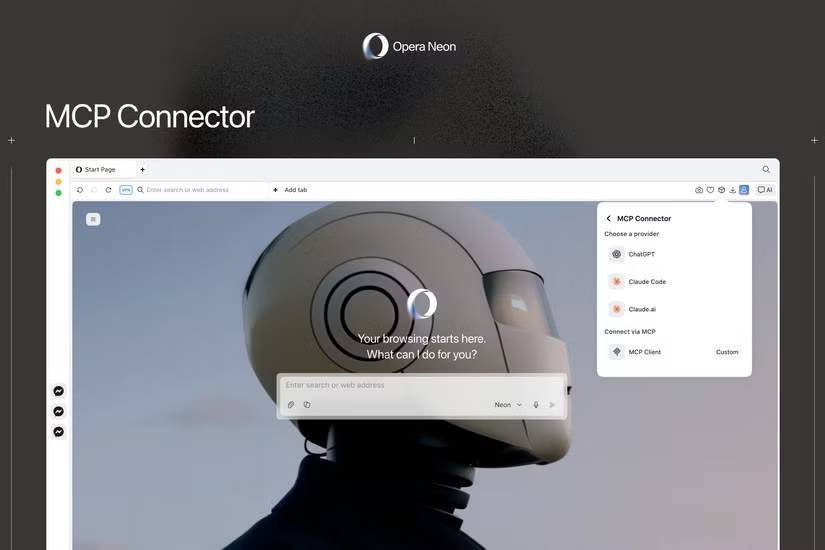
Technically, Opera Neon already has agentic AI capabilities. The browser has access to four Opera agents: Neon Do, Neon Make, Neon Chat, and ODRA (Opera Deep Research Agent). Each agent handles a specific type of request – Do uses the browser to perform tasks (such as research or shopping), Make builds objects (code, web pages, or digital assets), etc.
However, you have to be content with Opera's AI options, and if you use a client other than Opera, there will be disruptive disconnections.
With the launch of the MCP Connector, you can now directly connect your favorite AI applications to Opera Neon. For example, you can launch Claude (one of the most popular free chatbots), ask it to research and create a spreadsheet of the best headphones within your budget. Claude can then use Opera Neon to complete those tasks.
The MCP Connector uses the Model Context Protocol (MCP), a protocol originally developed by Anthropic. MCP is an open standard that facilitates connections between AI models and other tools and applications.
"Last year, we launched Browser Operator as a first step towards a browser capable of interacting with agents. Now, we are extending those capabilities to external AI clients through MCP, so they can operate directly within the browser, rather than outside," said Monika Kurczyńska, Director of Browser AI Research and Development at Opera.
What Makes the MCP Connector Special?
Fewer Barriers, More Familiarity
There are two main advantages to using your chosen agent:
- You can use the same AI ecosystem you use for everything else . If you use Claude all day, the experience will be much better when you can continue to use it for agentic tasks in the browser compared to having to rely on a different model.
- You benefit from using your own browser . Typically, when an agent wants to complete a task, it initiates a separate browser session, which can cause problems, such as needing to log in to applications and web services. With Opera Neon and the MCP Connector, if you're already logged into services like Google Drive, your chosen AI can start working immediately.
"The browser is where the workflows take place, but AI is detached from it," Kurczyńska said. "With Opera Neon, we connect popular AI applications directly to AI-enabled browsers, so they can operate where the user has been working, without needing to recreate the context . "
Opera announced that the MCP Connector is now available to all Opera Neon users. The company also plans to bring this simplified version to the Opera One and Opera GX browsers in the future.
FAQ
What Is an MCP Connector? What Makes It Special?
Get a clear answer to what is an MCP connector? what makes it special, including the key facts, causes, options, and practical takeaways.
Why does this topic matter?
Key takeaway: Get a clear answer to what is an MCP connector? what makes it special, including the key facts, causes, options, and practical takeaways.
What are the most important takeaways?
As the explosion of artificial intelligence (AI) capable of interacting with browsers occurs, companies are rolling out features and connections at a breakneck pace.
Related Articles
 Comparing Copilot connector and Power Platform connector9 minutes read
 5 Disadvantages of the USB-C Connector You Should Know7 minutes read
 Use the MCP Connector Correctly14 minutes read
 System: Managing Receive Connector -- Part 410 minutes read
 How to Use the Connectors Feature in Claude AI12 minutes read
 Cable: How to Install a Uhf Connector10 minutes read
Reader Comments 0
Sign in with email or Google to join the discussion.