Table of Contents
The sections below explain two quick online math solutions in a clear and practical way. Review the key details, examples, and considerations before applying the information.
Microsoft Mathematics: A calculation tool on Windows
With a vast array of processing commands, free Microsoft Mathematics Provides many useful tools for solving problems. Mathematics is not only a simple calculation but also a good solution for hidden equations and complex formulas.
 Solve 4 hidden 4 equations with Microsoft Mathematics.
Beyond computing power of most current pocket computers, Mathematics allows solving equations with a maximum of 6 hidden (6-equation system 6 hidden). To select the type of equation to be processed, click " Equation Solver ", select the type of equation in Solve Cell. At this point, the interface will display empty cells corresponding to the number of equations in the selected system. You enter each equation of the system to include in these cells, including the full variable. Variables are optional letters and characters on the keyboard. Finally, click Solve.
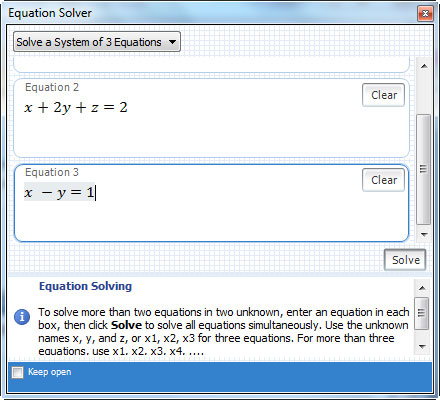 Enter the equations in the solution system.
Note that the number of characters is more than the number of system equations, and Mathematics will require to select which characters are variables, while Mathematics will be understood as a constant.
Mathematics provides a number of calculation formulas in familiar subjects such as Physics, Chemistry. so that users can simply enter values for variables and request Mathematics to find the correct values. Start by go to " Formulas and Aquations", Select the subject. At this point, the screen will display a list of the formulas that Mathematics supports for that group. Your task is to left-click the formula you want to use, select "Slove this equation", Enter the values for the variables like Mathematics, press Enter To get the results.
Especially Mathematics also has an intelligent algorithm, which helps to identify the drawing to convert into characters. Start by select Ink , use the mouse to draw on the "Write Here" area . The predicted result of Mathematics appears for you to preview, if satisfied, press Enter.
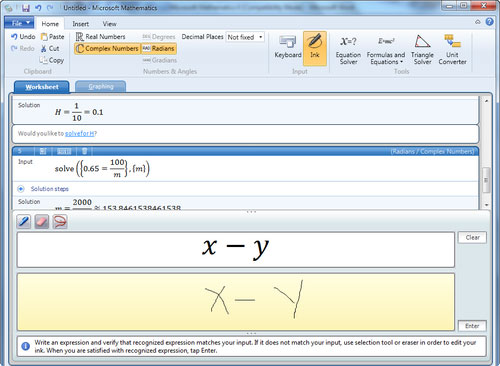 Identify brush strokes into characters.
Wolfram | Alpha: Calculating "on the cloud"
One of the mathematical forms that Wolfram | Alpha Supports very well, is calculating the derivative, integrating, solving equations, logical reasoning to find the rule of a sequence of numbers. All data to be processed All operations are stored " In the cloud" .
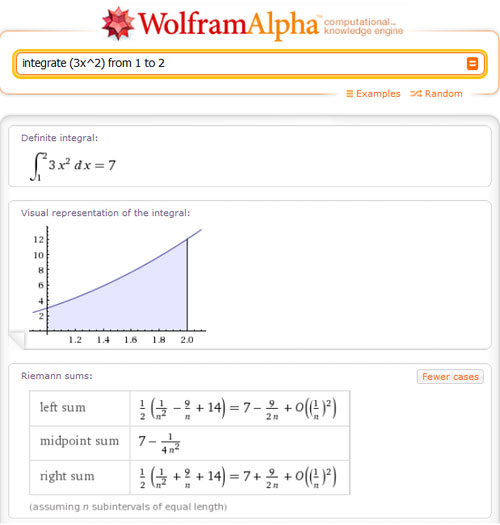 Quick integration with Wolfram | Alpha.
For Physics, Chemistry formulas, users must call to perform with a conventional keyword available in English. If you take the time to learn about these recipes and master them in Wolfram | Alpha, then Wolfram | Alpha will surely be a positive support tool for learning. In addition, in the field of Chemistry, Wolfram | Alpha also fully supports information about a substance, element.
FAQ
What is the main benefit of two quick online math solutions?
The main benefit is a clearer understanding of the topic and a practical way to apply the information covered in this guide.
What should I check before using two quick online math solutions?
Confirm compatibility, review the required settings, protect important data, and use the latest supported version whenever possible.
What should I do if the result is different?
Repeat the steps carefully, verify permissions and version differences, and consult the product's official support documentation for changes not shown in the article.
Related Articles
 The Fastest Way to Solve Online Maths3 minutes read
 Only a Genius Can Solve This Equation That Is Causing a 'Storm' Online, How7 minutes read
 5 Best Web Tools to Help You Solve Math from Simple to Complex6 minutes read
 How to Use Coc Coc to Solve Math Problems Online4 minutes read
 Effective Mobile Math Solutions6 minutes read
 AI Math Scanner- Math Solution10 minutes read
Reader Comments 0
Sign in with email or Google to join the discussion.