Table of Contents
This guide covers please download vndoc's exercises app to make learning easier with practical context and easy-to-follow details. Use it to understand the subject and apply the information confidently.
Studying with children or letting them learn by themselves is quite a problem, especially when there is a cognitive gap between parents and children. We do not always know how to solve a child's problem according to what the child is learning, then an exercise guide will be helpful and save a lot of time. Children can also consult themselves instead of disturbing their parents.
- The way to teach children fast mental arithmetic of Japanese people
- Quick and accurate mental math tips that surprise you
- 11 tips to solve Math simple but extremely interesting
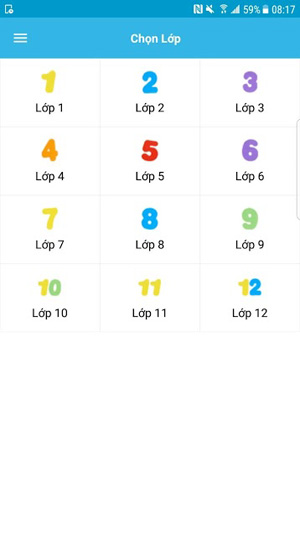
 App interface of VnDoc exercise solution
In addition, the app also has sample texts, practice writing classes with the same outline so that you can refer to a good writing style and get the best writing essays. Literary works in the secondary and high schools are also equipped with a summary of the works, all aimed at helping students to study better in literature.
VnDoc Exercise Solution app is designed to be optimized for mobile devices, to help students and parents can:
- Free to use: All of the tips, samples and good study guides of VnDoc are free to use.
- Optimal design: The app of VnDoc Exercises is designed to be optimal for mobile devices, to help them get a better learning experience.
- Easy search: Tap the search box in the top right corner and enter the name of the exercise / text you want to have the documents you need.
- Download the solution to the phone to see when there is no network: In the subject or lesson view, users just need to tap the 3 dots icon in the upper right corner, select Download offline To save the lesson to the phone. It is possible to download the entire subject or download only one lesson that you need on your device, very handy. From now on, you can comfortably view the documents you need even without a network.
- Prepare lessons for the next lesson quickly: The lesson tree is intelligently arranged according to the learning path, so students or parents can see the next lesson in the relevant article section to prepare the next lesson.
- Easy to switch between classes, subjects: Switching between classes with just one tap, quick changeover helps you save time when studying, preparing lessons.
With the aim to help students learn better, VnDoc always wants to build a free learning community. They can learn anywhere, anytime to improve their knowledge. Parents can also support their child's learning more simply through this app.
- Download the VnDoc Exercises for Android
- Download the VnDoc Exercises for iOS
In addition to this app, you can also learn free English with VnDoc that TipsMake. Com has previously introduced.
FAQ
What should I check before following these steps?
Confirm device and software compatibility, save important data, and make sure you have the required permissions, files, and account access.
Why might the process not work?
Common causes include outdated software, missing permissions, incompatible hardware, an unstable connection, or completing a step in the wrong order.
Can I undo the changes if necessary?
That depends on the tool or setting. Use built-in restore options when available, keep a backup, and record the original configuration first.
Related Articles
 Summary of JavaScript Exercises with Sample Code15 minutes read
 Synthesis of Pascal Exercises Has Prizes, from Easy to Difficult19 minutes read
 12 Exercises to Have Strong Legs for All Ages6 minutes read
 C ++ Exercises Have Solutions (Sample Code)17 minutes read
 A Compilation of Exercises on Bootstrap 56 minutes read
 C ++ Exercises About IF ELSE: Explained2 minutes read
Reader Comments 0
Sign in with email or Google to join the discussion.