Table of Contents
This updated guide explores tor browser adds ability to automatically bypass internet censorship with practical details, clear explanations, and useful takeaways. Tor Browser is a special browser that allows users to access information on the internet anonymously and ensure privacy. This is maintained by The Onion Router (Tor) network.
Tor routes traffic through nodes on the network, encrypting data at every step. It connects to its destination through an exit node that is used to relay information back to the user.
The new version 11.5 has just been released, bringing these notable updates:
Automatically Bypass Censorship
The updates in Tor Browser 11.5 focus on bypassing censorship, a process that began a year ago in version 10.5. It promises to improve the Tor connection experience.
In the new version, users no longer have to manually try bridge configurations to unblock Tor.
that is because Tor Browser version 11.5 comes with a new feature called "Connection Assist" that automatically assigns the best working bridge configuration for the user's location.
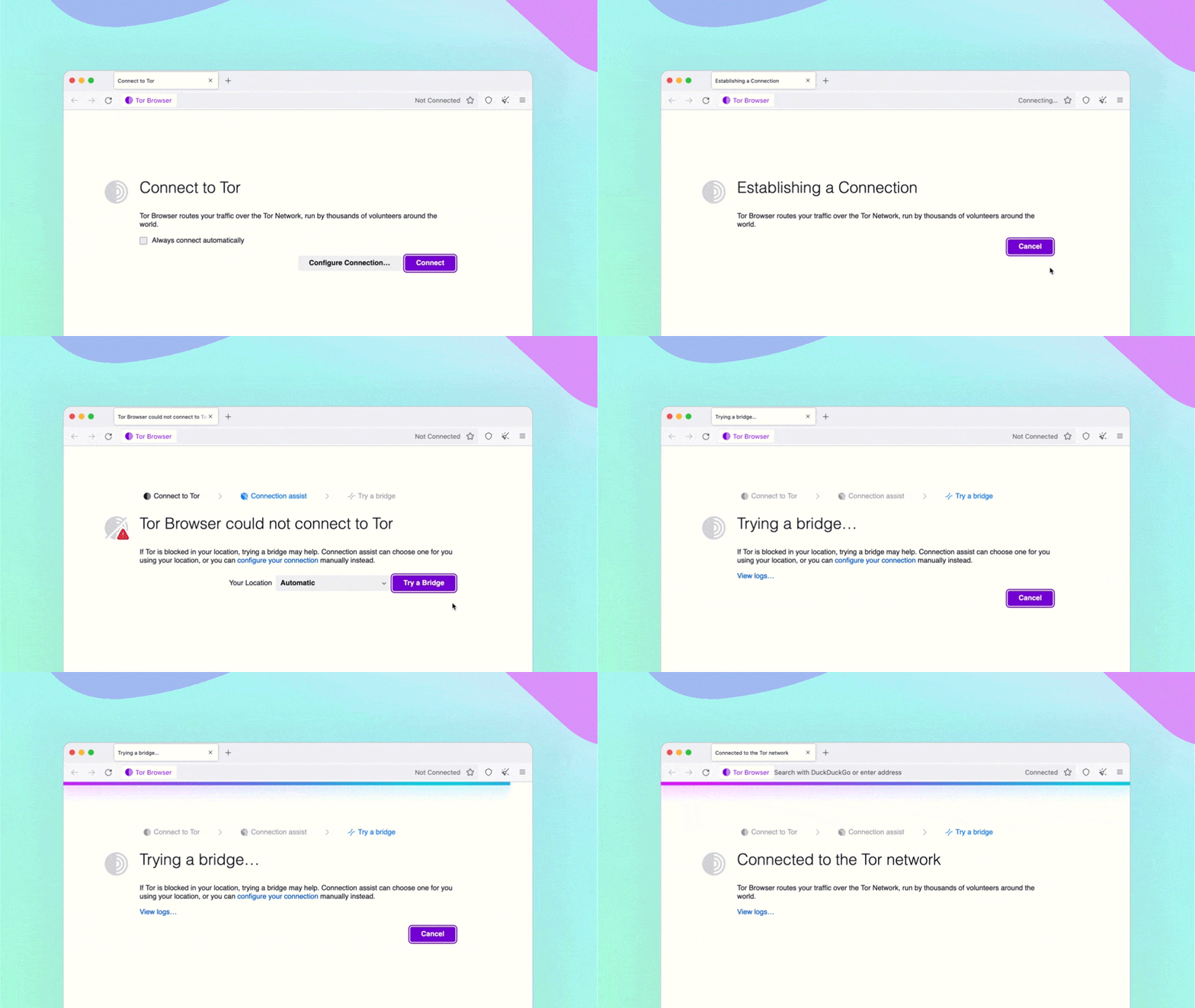
"Connection Assist automatically looks up and downloads an up-to-date list of country-specific options based on your location (with your permission)," the release notes state. Since Connection Assist is in early development, Tor is keen to get feedback and reports from users to help them troubleshoot issues and improve the system.
HTTPS Is Enabled by Default
Another important new feature in version 11.5 is "HTTPS-Only Mode" being set as the default browsing mode. This allows the connection to be routed through a secure tunnel.
This way, all data exchanged between the user and the website hosting server will be encrypted to protect against man-in-the-middle (MitM) attacks and protect users from SSL tripping attacks.
The Tor team assures users that SecureDrop will continue to function despite the deprecation and replacement of the HTTPS-Everywhere extension.
More Intuitive Settings
The third significant improvement in Tor Browser 11.5 is that the Network Settings menu has been renamed to Connection Settings. The settings and interface have also been changed to make it easier for users to find and understand specific settings.
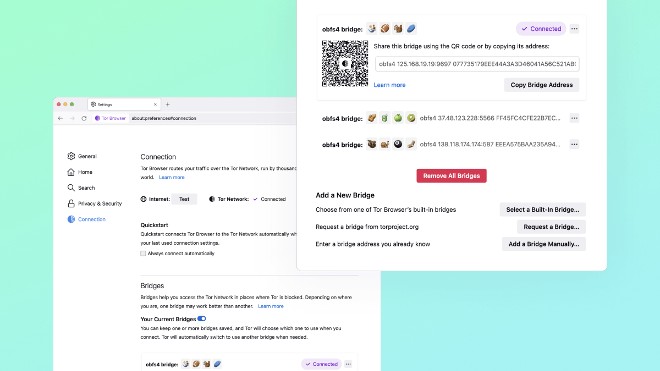
Bridge configurations and connectivity options have been redesigned to allow for quick, easy review and management.
You can use emojis on saved bridges to help you easily recognize the right bridge when you need to search.
FAQ
What is the main takeaway about Tor Browser Adds Ability to Automatically Bypass Internet Censorship?
The key is to understand the core idea, compare the available options, and apply the practical guidance that matches your situation.
What should beginners know about Tor Browser Adds Ability to Automatically Bypass Internet Censorship?
Start with the essential steps and terminology. Avoid changing advanced settings until you understand how they affect performance, privacy, cost, or compatibility.
How can I use this information in practice?
Follow the relevant section in order, test one change at a time, and confirm the result before moving to the next step or recommendation.
Related Articles
 UltraSurf - Bypass Internet Censorship Easily!: What You Need to Know13 minutes read
 3 Reasons You Should Use Piratebrowser Browser6 minutes read
 The World's Most Strict Internet Censorship Countries3 minutes read
 How the Internet Censorship Works16 minutes read
 How to Get Sim Characters Uncensored: Complete Guide7 minutes read
 How to Prevent Gifs from Automatically Playing in the Browser5 minutes read
Reader Comments 0
Sign in with email or Google to join the discussion.