Table of Contents
This updated guide compares top free antivirus software for Windows and highlights the details that matter most. Most computer users can see that they need an antivirus program to protect their computers from modern web threats. While there are many effective antivirus programs, some of them are free by constantly asking users to upgrade to a paid version or installing some unnecessary.
To conclude this article, we will introduce some free antivirus software that are bloatware -free and require paid updates.
1. Avast Free Antivirus
Advantage
- Lots of great features
- Effective anti-virus detection
- Does not slow down the system
Disadvantages
- Restricted Password Manager

Avast is one of the biggest names in the antivirus industry. Its appeal lies in its excellent overall protection against online threats. It not only scans your device, but also checks your online network, protects your webcam, and blocks suspicious activity and downloads. On top of that, it even provides you with a VPN service for safe browsing.
Avast Free Antivirus is a free security software that you can download to your Windows device. Invisible threats lurk behind every choose, but Avast Free Antivirus acts as a powerful defender. Its innovative design effectively fights against sophisticated malware. Continuous updates enhance the extensive threat detection database, ensuring strong security for users.
This antivirus software stands out by offering its service for free compared to its paid competitors. Avast is not complacent; it is a dynamic protection tool, constantly improving its capabilities to meet the ever-evolving challenges of cybersecurity.
The latest version of the program includes multiple scanning options, a password manager, a URL filter, a network scanner, and a silent gaming feature. It also protects users from malware, viruses, ransomware, and other threats. The comprehensive solution is not limited to Windows and is available for download on Android, iOS, and macOS devices.
Overall, Avast is a reliable antivirus tool for basic protection. Check out our detailed review of this tool in the article: Avast Free Antivirus Review: Great Free Antivirus Program.
This comprehensive solution is not limited to Windows, it is available for download on Android, iOS and macOS devices.
2. Bitdefender Antivirus
Advantage
- High accuracy rate
- simple to use interface
- Reliable
Disadvantages
- Unable to schedule scan
- Limited options
Bitdefender Antivirus Free Edition is a great free antivirus software. Bitdefender is often considered one of the fastest virus scanners available. The biggest downside is that you cannot schedule scans yourself. Instead, Bitdefender Antivirus Free Edition does everything automatically. If you like to tinker, you'll be disappointed here.
Despite this, this is an antivirus that we recommend. It monitors any incoming files, as well as your browser and any potentially malicious phishing websites. Bitdefender Antivirus's interface is simple and clearly laid out, with minimal settings, so it is perfect for inexperienced PC users.
Bitdefender's approach will not appeal to everyone, and it can be frustrating not to be able to scan everything specifically, but it does mean you have less to worry about when it comes to security, and is ideal for those who aren't tech-savvy.
Refer to the detailed review of this tool in the article: Bitdefender Antivirus Free Edition Review: Lightweight, full of features.
3. AVG AntiVirus Free
Advantage
- Near perfect virus detection
- Great malware blocking
- Web security features
Disadvantages
- Limited phishing detection
- A bit slow
AVG AntiVirus Free is almost unbeatable when it comes to protection against various threats. AVG AntiVirus Free rarely reports any incorrect results. That gives you and your family complete peace of mind.
The AVG AntiVirus Free interface is similar. It simply works and is easy enough for even a child to understand. It also scans for junk files, just in case there are any problems there. The only downside is that if you use the Deep Virus Scan, things can run quite slowly. Still, it is worth doing this and the slow speed is offset by the quick removal of malware before it has a chance to infiltrate the system.
A detailed review of this tool is available in the article: AVG AntiVirus Free Review: Fast, lightweight and simple to use.
4. Sophos Home Free
Advantage
- Enterprise-grade protection
- Additional browser tools
- Central management features
Disadvantages
- Unable to schedule scan
- Limited options

Sophos Home Free is billed as a business-grade solution, but it works quite well for home setups too. It has a very simple interface, plus remote, cloud-based management tools for added flexibility.
You can run a full system scan on your PC whenever you want. Sophos Home Free uses a form of initial configuration that can only be done remotely via the Sophos website. it is a pain on your PC, but great for your kids' PCs or setting up for an elderly relative. From anywhere in the world, you can set up real-time protection, web protection, and even use a reputable download service to filter content onto that user's PC. You can initiate a scan if you're worried.
Since scanning is only accessible via the Sophos site, it is a hassle if you just want virus protection for your own PC - but if you intend to use the same software on multiple systems, keeping them all safe at once is great.
See: Sophos Home Free Review: Enterprise-grade security and antivirus product for home users for more details.
5. Panda Free Antivirus
Advantage
- Great and varied features
- Fashion interface
- Central control
Disadvantages
- Restriction settings
- Impact on system performance

Panda Free Antivirus isn't a full security suite, but it offers a range of features you cannot get elsewhere.
One of the most useful tools in Panda Free Antivirus is its USB protection. It scans your USB devices and prevents any files on them from automatically launching – a common way for systems to get infected.
Other great tools include Process Monitor , which lists all the processes currently running on your PC and lets you see exactly which ones have accessed the internet. it is like an extension to Windows' Task Manager but useful for the more technically minded. There's also Rescue Kit to help remove any malware that has infiltrated your PC and is preventing it from booting.
Panda Free Antivirus also looks pretty nice. it is stylish and has a calming feel thanks to some cool backgrounds, but that may also be why it has a bigger impact on your PC than most other options and slows things down a bit when it starts. Luckily, there's a game mode that works just like Avast, ensuring your gaming sessions aren't interrupted.
See also: Panda Free Antivirus Review: A Favorite Free Security Suite.
6. ZoneAlarm Free Antivirus
Advantage
- Advanced firewall features
- Against direct attacks
- Simple to use interface
Disadvantages
- No protection against exploit attacks
- No option to create bootable rescue disk
- Lacks many advanced features
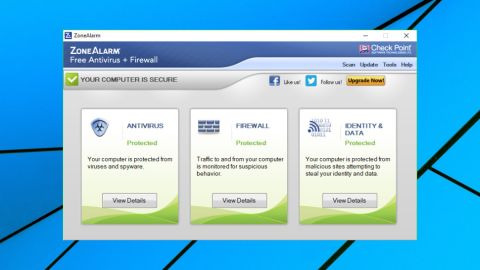
ZoneAlarm has been a trusted name in the firewall space for years. Its all-in-one antivirus and firewall solution, which combines ZoneAlarm's own services with Kaspersky (known for its excellent antivirus protection), is called ZoneAlarm Free Antivirus.
The software does a pretty good job of protecting your system, but the number of warnings it generates can be frustrating at times. ZoneAlarm Free Antivirus is a little too particular about setting Yahoo! as your default search engine, so be careful during the installation process.
That said, ZoneAlarm Free Antivirus does have some useful features built into its identity theft protection. It includes a free one-year subscription to Identity Guard's Good Start plan, which provides daily monitoring and alerts you to any significant changes. There's even a gamer mode to limit interruptions. If you want an all-in-one solution for any security concerns, It is best to give ZoneAlarm Free Antivirus a try.
Lab tests are perhaps a bit weak in proving the effectiveness of ZoneAlarm Free Antivirus, but since it is built on the Kaspersky engine, this is a relatively reliable demonstration of the software's antivirus protection capabilities.
7. Windows Security
Advantage
- Excellent protection
- Built-in on Windows 10
- Auto update
Disadvantages
- No additional features

Windows 10 includes Windows Security, which provides the latest antivirus protection. Your device is actively protected from the moment you start Windows 10. Windows Security continuously scans for malware, viruses, and security threats. Along with this real-time protection, updates are downloaded automatically to help keep your device safe and protected from threats.
See also: How to open Windows Security in Windows 10 to learn how to find this tool.
8. Comodo Antivirus
Comodo has proven itself in recent times when it comes to its protection statistics. The most recent test results from AV-Test showed an impressive 100% result. that is remarkable for a company that has seemed to fall behind a bit in the past few years.
it is not for everyone. In particular, it tries to entice you to pay to unlock more features, which can be a turn-off for novice users. Still, you'll find some handy features in there if you dig deeper. Most notably, Comodo has consistently done a great job of removing malware, as reported by PCMag. It used to be notoriously bad at detecting viruses, but that is improved a lot over the past few years.
Still, it is the sandboxing capabilities that make Comodo stand out in a crowded market. to risk running a program that you are unsure about, you can run it in the sandbox to see what happens. Any changes are not permanent, so there is no risk here. There is the option to open a fully virtualized desktop, which is great for the overly curious. Is this something everyone will use? The answer is no. If you are skeptical about a program, it is best to skip it. Still, for those who are more technically minded, Comodo may be worth a try. Usually, people have to pay for virtual sandboxing, so this is a convenient and free alternative.
You can use Comodo Dragon to force a secure HTTPS connection for the current website you're browsing and get a detailed report of all the data that is leaked from your system to the other party's system. There's also a rescue drive feature like Panda's tools, just in case the worst happens.
9. Avira Free Antivirus
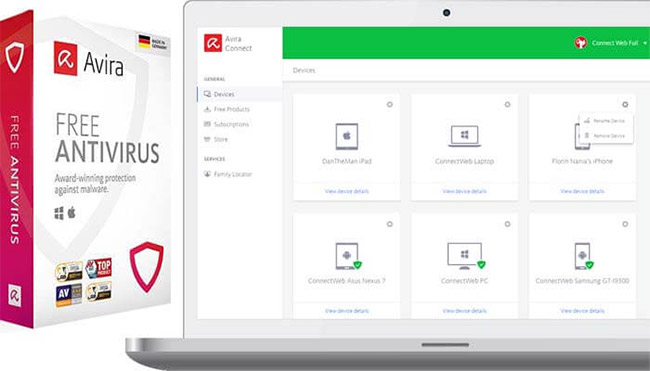
If your system is getting old and bad, it would be helpful to have a free antivirus that does not consume too many resources. that is where Avira Free Antivirus comes in handy. The program has a simple and clean interface that does not put too much strain on your hardware. Also, Avira Free Antivirus also offers additional features like ransomware detection, phishing protection, and a VPN for added security.
You actually get a security suite that runs for free. Along with real-time virus and malware detection, Avira Free Antivirus also offers malicious website filtering and tracker blocking, albeit through browser extensions.
The tool is easy enough to set up quick scans, custom scans, or anything else you'd expect from a paid alternative, like a pretty capable VPN. And unlike most security providers, Avira does not sell or share user data with third parties.
The only downside is that Avira Free Antivirus likes to annoy its users. it is full of pop-ups and ads, which is understandable for a free product, but still annoying. This makes Avira Free Antivirus really only worth considering if a free VPN is a key part of your security arsenal. Avira Free Antivirus works on Windows, Mac, Android, and iOS.
Above are the best free antivirus software at the present time that TipsMake.com wants to introduce to readers!
Hope you choose the right choice for you!
FAQ
How were the top free antivirus software for windows options evaluated?
The comparison focuses on practical features, ease of use, limitations, compatibility, and the type of user each option is most likely to help.
Which option is best for beginners?
Beginners should prioritize a clear interface, useful documentation, reliable support, and the core features needed for their first project.
Should I choose a free or paid option?
Start with a free option when it covers your needs. A paid plan may be worthwhile when you need advanced tools, commercial rights, collaboration, or professional support.
Related Articles
 Top Free Antivirus Software, No Bloatware and Requires Upgrade to6 minutes read
 3 Free and Useful Antivirus Software for Windows6 minutes read
 5 Things to Consider Before Buying Antivirus Software4 minutes read
 Should You Choose Free or Paid Antivirus Software?11 minutes read
 7 Best Antivirus Options for Windows in 20269 minutes read
 7 Best Free Antivirus Software for Mac7 minutes read
Reader Comments 0
Sign in with email or Google to join the discussion.