Table of Contents
This updated guide explains how to log in to Windows 11 without a Microsoft account with clear steps, practical tips, and useful context. When you install a new Windows 11, you will be asked to create a Microsoft account. Still, you can use a local account instead to sign in to Windows 11 without a Microsoft account. A local account does not require an email or even internet access to use.
How to Log in to Windows 11 Home Without a Microsoft Account
Step 1:
First when you go through the Windows 11 Home setup, when asked to connect to Wi-Fi, select no. If you are already connected, disconnect or forget the network .
Continue the setup and a new interface appears that says you need Internet to continue. Press Shift and F10 . Type the command below and then press Enter.
OOBEBYPASSNROStep 2:
Restart your computer and select Continue with limited setup . You can now sign in with a local account instead of a Microsoft account.
How to Log in to Windows 11 Pro Without a Microsoft Account
If you're using Windows 11 Pro, setting up a local account is easier.
Step 1:
You install Windows 11 on your computer, open the account screen and select Sign-in options .
Step 2:
Continue to select Offline account or Local account . If you are asked to log in, choose Skip for now. Finally, we create an account name and password.
How to Switch to a Local Account After Successful Windows Installation
If you have set up a Microsoft account but want to switch to a local account, you do not need to delete the entire account, just change it back.
Step 1:
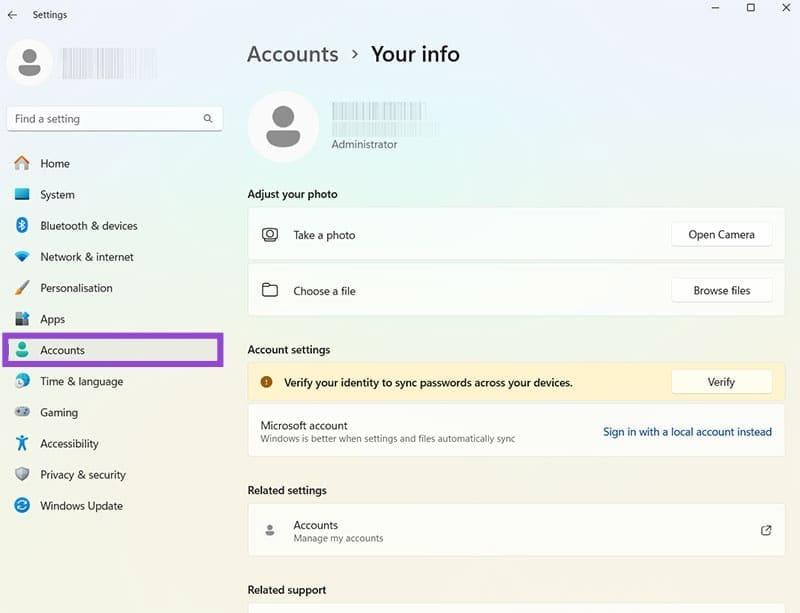
open Settings, then select Accounts and choose Your Info .
Step 2:
Find your Microsoft account and choose Sign in with a local account instead . Enter your current password to continue.
Finally we create a username, password and the local account is set up. The original Microsoft account still exists and you can sign back in at any time in the settings.
FAQ
What should I prepare before I log in to windows 11 without a microsoft account?
Review the requirements and options in the guide first. Having the correct device, app version, account access, or materials ready helps prevent avoidable errors.
How long does it take to log in to windows 11 without a microsoft account?
The time depends on the task and your setup. Most basic steps can be completed quickly, while downloads, updates, scans, or troubleshooting may take longer.
What should I do if the steps do not work?
Repeat the instructions in order, confirm that your software or device is supported, and check permissions, connectivity, and available updates before trying again.
Related Articles
 How to Log Out of Your Microsoft Account in Windows 114 minutes read
 Microsoft Continues to Tighten Windows 11 Offline Installation4 minutes read
 How to Create a Microsoft Account for Windows Phone4 minutes read
 Instructions to Transfer Microsoft Account to Local Account on5 minutes read
 Instructions for Creating the Fastest Microsoft Account3 minutes read
 Distinguish Local Accounts and Microsoft Accounts on Windows 86 minutes read
Reader Comments 0
Sign in with email or Google to join the discussion.