Table of Contents
3 Free and Useful Antivirus Software for Windows is easier to understand when the core ideas are paired with practical examples. The sections below explain the topic clearly, highlight useful steps, and point out details that can prevent common errors.
Network administration - Having a reliable antivirus software is an issue that every Windows user desires. However, these antivirus tools are often quite expensive and consume too much resources and computer memory.
Here, I will show you three free antivirus software for Windows. These software will give you the ability to protect your system and information as well as expensive antivirus software.

Note : Be sure to update your antivirus program regularly because new viruses will appear every day .
1. ClamWin
ClamWin is a standalone virus scanner, open source and scan scheduler. It does the job by scanning and removing malware that could affect your system. One of the best features for this software is that it automatically downloads updates to prevent and prevent new viruses from appearing after you install the software initially. ClamWin is the simplest antivirus software among the three software we introduced Here.
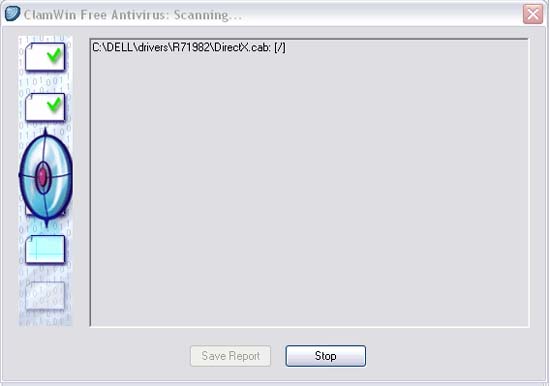
Another useful feature of ClamWin antivirus is that it integrates with Windows Explorer; In addition, there is an add-in for Microsoft Outlook that can automatically remove infected attachments. The program has no online scanner, this is a shortcoming because users often access the Internet when turning on the computer.
Another problem with ClamWin is that the software will not automatically scan a file for viruses. To scan for viruses, you must perform this process. And making antivirus scanners useful, you need to have a scanner to prevent malware from entering your system from the Internet browser.
You can download or search for other information about ClamWin here.
2. AVG Free
AVG is an antivirus and antispyware software that can protect users against viruses, spyware, adware, and trojans created for Windows. Like ClamWin, the software will automatically search for new viruses daily. However it has an advantage other than ClamWin that is able to scan online with real time. It also has a scheduler, to help you set up and change the time frames for the virus scanner to run.
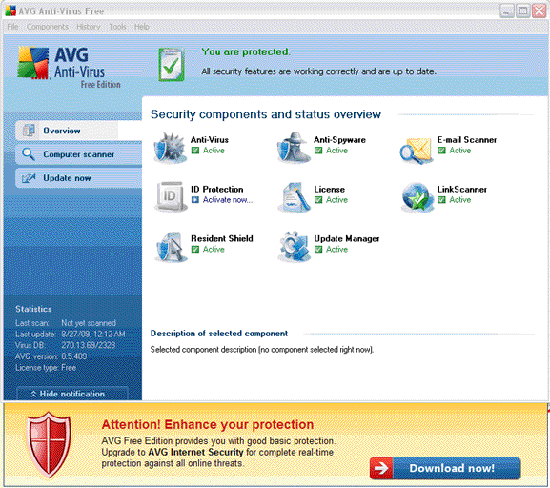
One of the biggest disadvantages with AVG Free is that the software does not protect users against identity theft, hackers, attacks, infected downloads, instant messages being infected and spam. If you want to protect your system to deal with these types of attacks, you must upgrade to a paid service. In addition, the free version does not allow you to get technical support from AVG in case you encounter a problem, this is a disadvantage of the software because that is what users need. provided even if they use it for free. AVG Free has a useful function that has enough authority to protect your computer, but there are some limitations.
Download and search for other information about AVG Free here.
3. AntiVir Personal 9
AntiVir Personal 9 can scan both internal and external hard drives. This antivirus software has a very popular ' Advanced Heuristics Analysis and Detection ' technology, which provides new levels of virus detection and removal by smart analysis of viruses and not viruses. ClamWin and AVG Free do not have such technology.
In addition, AntiVir is capable of allowing users to remove viruses with a button. When you open the program, AntiVir will display the overview page of the last scan, the last update and what version you are using. The software has an internal event log to show detailed information about the entire system. AntiVir also reports that you can check your system and how the software is protecting it.
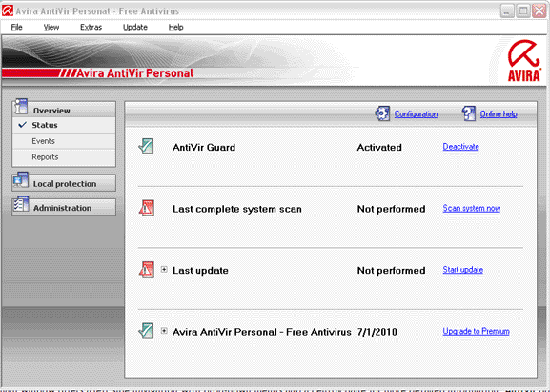
Among these three software, AntiVir seems to provide many of the same functions as most paid antivirus software. It does not miss any of the necessary features for malware to take advantage of and invade your system.
Download and search for information about AntiVir Personal 9 here.
FAQ
What is 3 Free and Useful Antivirus Software for Windows?
Network administration - Having a reliable antivirus software is an issue that every Windows user desires.
Why is 3 Free and Useful Antivirus Software for Windows important?
A clear understanding of 3 Free and Useful Antivirus Software for Windows helps you make informed decisions, avoid common mistakes, and use the relevant tools or techniques more effectively.
How should beginners approach 3 Free and Useful Antivirus Software for Windows?
Start with the fundamental concepts, follow the examples step by step, and test each change in a safe environment before applying it to important systems or data.
Related Articles
 Top Free Antivirus Software for Windows15 minutes read
 Top Free Antivirus Software, No Bloatware and Requires Upgrade to6 minutes read
 5 Things to Consider Before Buying Antivirus Software4 minutes read
 Should You Choose Free or Paid Antivirus Software?11 minutes read
 7 Best Antivirus Options for Windows in 20269 minutes read
 7 Best Free Antivirus Software for Mac7 minutes read
Reader Comments 0
Sign in with email or Google to join the discussion.