Table of Contents
The right n8n alternative depends on what you are orchestrating. Zapier and Make focus on visual app automation; Power Automate, Workato, and Tray.ai target managed business integration; Activepieces offers a self-hostable visual option; Pipedream serves API-focused developers; Airflow and ZenML handle data or machine-learning pipelines; and Temporal is designed for durable application workflows.
These products overlap, but they are not interchangeable. Before migrating, identify whether you need a hosted service or self-hosting, a no-code builder or code in version control, simple event automation or long-running state, and basic collaboration or enterprise governance.
n8n alternatives compared
| Tool | Best fit | Builder and hosting | Key tradeoff |
|---|---|---|---|
| Zapier | Fast automation across common business apps | Visual, vendor-hosted | Convenient setup, but usage-based costs and complex logic need careful evaluation |
| Make | Visual workflows with branching and data transformation | Visual, vendor-hosted | Powerful canvas, but scenarios must be rebuilt when migrating |
| Power Automate | Microsoft-centric organizations and desktop automation | Low-code cloud and desktop flows | Strong ecosystem integration, but licensing can be complex |
| Workato | Governed enterprise integration | Low-code, vendor-hosted | Lifecycle and governance tools, generally aimed at larger organizations |
| ZenML | Reproducible ML and AI pipelines | Python-first, flexible infrastructure | Strong lineage and artifacts, not a general SaaS connector replacement |
| Temporal | Reliable, long-running application workflows | Code-first, self-managed or cloud | Durable execution, but requires software engineering |
| Apache Airflow | Scheduled batch data pipelines | Python DAGs, self-managed or managed service | Mature scheduling and monitoring, not intended for simple no-code triggers |
| Pipedream | Developer-led API and event automation | Prebuilt steps plus code, vendor-hosted | Quick API work without server management, but less suitable for self-hosting needs |
| Tray.ai | Enterprise integration and embedded automation | Low-code, vendor-hosted | Broad governance and connector tooling, with sales-led evaluation |
| Activepieces | Open, self-hostable visual automation | No-code, cloud or self-hosted | Accessible and extensible, but verify edition-specific enterprise features |
When should you replace n8n?
n8n is a strong option when you want a visual workflow builder, custom code, API connectivity, and the ability to run the platform on infrastructure you control. An alternative becomes attractive when another requirement dominates:
- Faster no-code deployment: a managed product with ready-made authentication may reduce setup and maintenance.
- Microsoft desktop automation: browser and desktop RPA may matter more than self-hosting.
- Enterprise governance: separate environments, role controls, auditability, and support can outweigh license cost.
- Data or ML orchestration: code-defined pipelines, backfills, lineage, and artifact tracking are different needs from app-to-app automation.
- Durable application state: a workflow that can wait for days and recover after process failures needs more than a visual integration graph.
- Simpler operations: a hosted platform removes server patching, database maintenance, scaling, and backup work.
Do not migrate solely because a workflow has become visually large. First check whether sub-workflows, naming conventions, error branches, queue mode, log retention, and test environments can make the existing n8n deployment manageable.
1. Zapier: quickest for common business apps
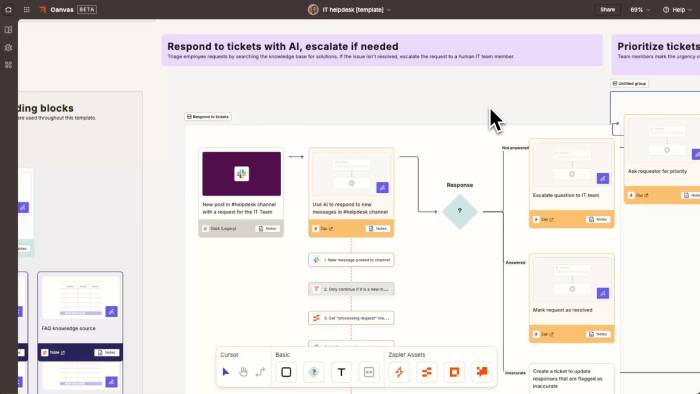
Zapier is a practical choice for teams that want to connect popular cloud applications without operating automation infrastructure. A workflow can start from an app event, schedule, form, or webhook and then run actions, filters, conditional paths, data formatting, or code steps.
Its main advantage over self-hosted n8n is operational simplicity: Zapier manages the service, app authentication, and connector updates. That makes it useful for marketing, sales, support, and administrative workflows owned by people who are not full-time developers.
Choose Zapier when
- the applications you use already have suitable Zapier triggers and actions;
- speed of deployment is more important than infrastructure control;
- business users need to build and maintain straightforward automations;
- you prefer a managed service and predictable support path.
Watch for
- how each plan counts tasks or other usage units;
- feature gates for paths, webhooks, administration, and premium apps;
- workflows that transfer large payloads or require extensive custom code;
- vendor dependence if critical processes cannot run without the service.
2. Make: visual control over branching workflows
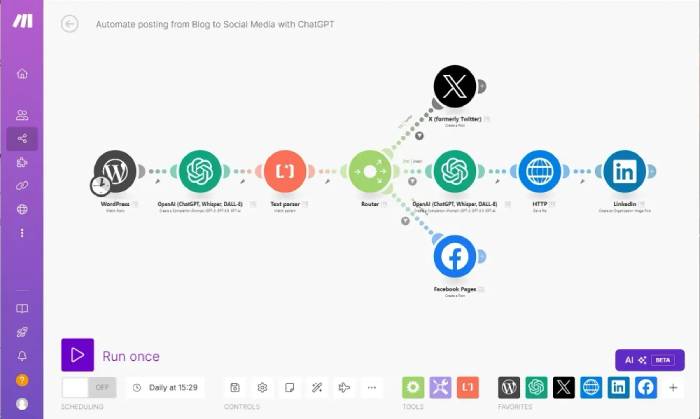
Make uses a canvas of connected modules called scenarios. Its visual representation is helpful when a process branches, loops over records, aggregates data, or maps fields between several applications. Compared with a simple linear automation builder, it exposes more of the data flow on screen.
Choose Make when
- non-developers need to see how records move through branches and transformations;
- you want hosted execution without managing n8n workers and databases;
- your workflows use routers, iterators, aggregators, schedules, and HTTP requests;
- the required apps and operations exist in Make’s connector catalog.
Watch for
- operation-based billing in scenarios that process many items;
- the time needed to rebuild and retest every n8n workflow;
- data-residency or private-network requirements;
- complex canvases that still need documentation and modular design.
3. Microsoft Power Automate: Microsoft services and RPA
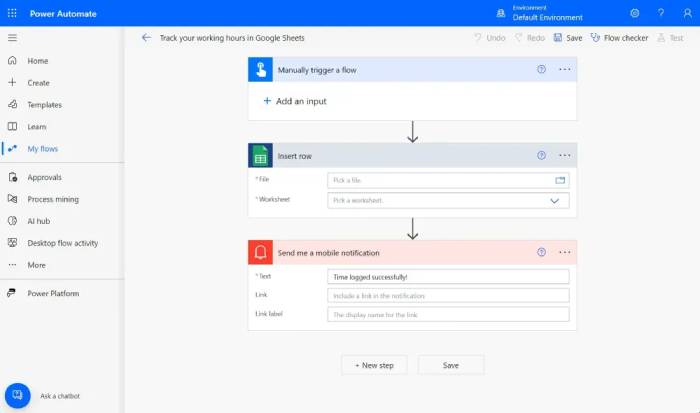
Power Automate is the most natural option for organizations already standardized on Microsoft 365, Azure, Dynamics, Dataverse, or Power Platform. Cloud flows can run automatically, on demand, or on a schedule. Desktop flows add robotic process automation for repetitive tasks in desktop software and websites.
Choose Power Automate when
- Microsoft identity, administration, and business applications are central to the workflow;
- you need approvals inside Microsoft services;
- a process must operate a desktop or legacy interface that has no useful API;
- Power Platform governance is already established in the organization.
Watch for
- the distinction between standard, premium, custom, attended, and unattended capabilities;
- licensing at the user, process, environment, and connector level;
- desktop automation that can break when an application interface changes;
- the need for dedicated environments and policies to prevent uncontrolled flow creation.
4. Workato: enterprise integration and governance
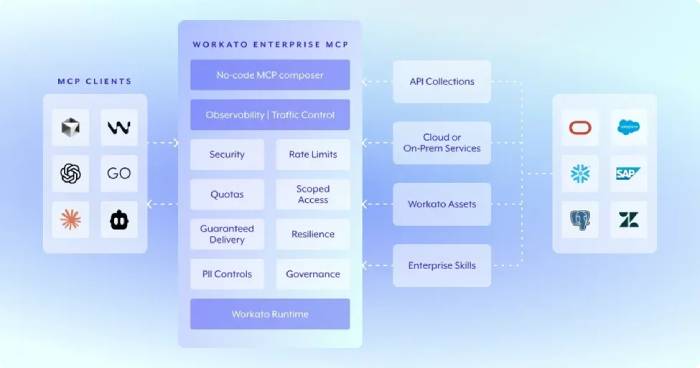
Workato is an integration-platform-as-a-service product built for managed automation across business systems. Its automations are called recipes, and organizations can organize them through workspaces, environments, reusable connections, permissions, monitoring, and lifecycle controls.
Choose Workato when
- a central integration team needs to support business users under clear governance;
- development, testing, deployment, audit, and access control are purchasing requirements;
- you need reusable enterprise integrations rather than isolated personal automations;
- vendor support and organizational controls justify a sales-led platform.
Watch for
- total cost across workspaces, usage, connectors, and optional capabilities;
- the training required to design maintainable recipes;
- vendor lock-in and migration effort;
- whether simpler workflows warrant an enterprise iPaaS.
5. ZenML: ML pipelines, artifacts, and reproducibility
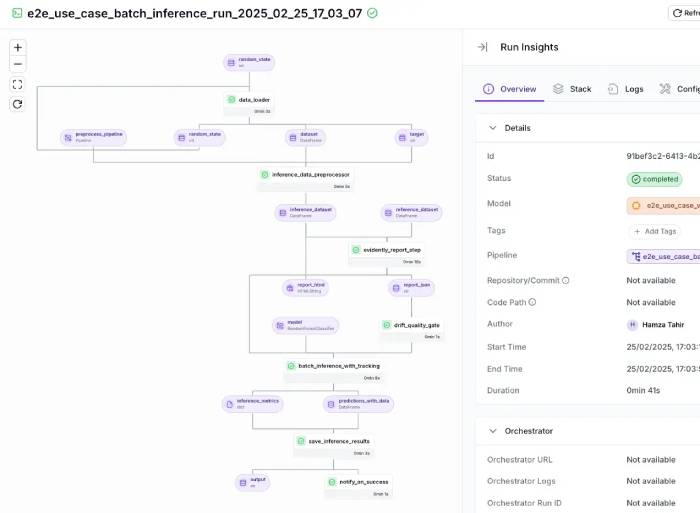
ZenML is not a direct replacement for routine app automation. It is designed for machine-learning and AI workflows in Python, with pipeline runs, metadata, artifacts, models, and infrastructure components tracked as part of the process.
Choose ZenML when
- the workflow trains, evaluates, or deploys ML models;
- reproducing a run requires code, data artifacts, parameters, and lineage;
- data scientists need local development while production uses separate orchestration infrastructure;
- pipeline definitions should be reviewed and tested as Python code.
Watch for
- the engineering needed to configure storage, orchestration, secrets, and deployment;
- the difference between ML lifecycle management and SaaS business automation;
- integration complexity with the tools already in your ML stack;
- edition and support differences before standardizing a team.
6. Temporal: durable workflows in application code
Temporal is designed for reliable, stateful application workflows. Developers write workflows and activities in supported programming languages; Temporal records event history so workflow execution can recover and continue after worker or process failures. Activities that call external services can use configurable retries and timeouts.
Choose Temporal when
- a process can last minutes, days, or longer and must survive restarts;
- application state, retries, timers, and compensation logic need to be explicit;
- workflows are part of a software product rather than a collection of office-app automations;
- developers want logic in source control with normal testing practices.
Watch for
- the learning curve around deterministic workflow code, activities, workers, and event history;
- operating a Temporal cluster if you do not use its managed cloud service;
- the absence of a no-code business-user experience comparable to n8n;
- the need to design idempotent activities and sensible retry policies.
7. Apache Airflow: scheduled batch data workflows
Apache Airflow is an open-source platform for developing, scheduling, and monitoring batch-oriented workflows. Pipelines are represented as DAGs in Python, with tasks, dependencies, schedules, callbacks, and operational settings. Its web interface helps operators inspect runs and logs.

Choose Airflow when
- pipelines run on schedules and process data in finite batches;
- backfills, dependencies, task-level retries, and operational visibility are important;
- the data engineering team is comfortable defining workflows in Python;
- you can run Airflow or choose a managed service from a cloud provider.
Watch for
- using Airflow for continuously running, highly event-driven, or interactive workloads it was not designed for;
- scheduler, worker, metadata database, upgrade, and capacity planning work;
- DAG sprawl without code standards and ownership;
- the overhead when a simple webhook automation would be enough.
8. Pipedream: API workflows with code when needed
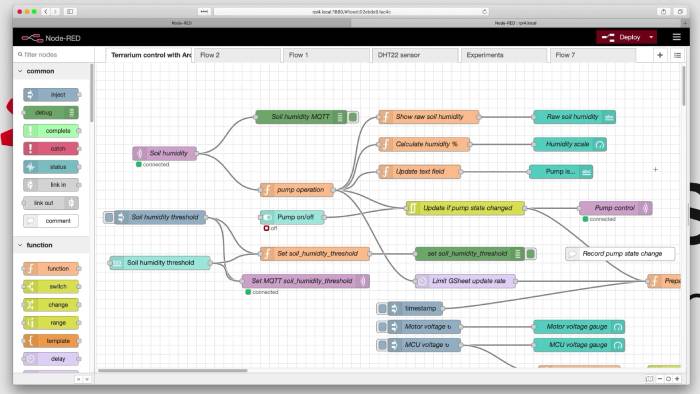
Pipedream combines event triggers and prebuilt application actions with code steps. It is useful for developers who want to connect APIs quickly, inspect event data, and write JavaScript, Python, or other supported code without deploying a separate service for every automation.
Choose Pipedream when
- workflows are triggered by webhooks, schedules, or API events;
- developers want managed authentication and execution with escape hatches into code;
- rapid integration work matters more than self-hosting the automation engine;
- the workflow is easier to express as a sequence of event-processing steps.
Watch for
- plan-specific execution limits, timeouts, and billing units;
- secret handling and logs that may contain sensitive payloads;
- maintainability when many code steps lack tests or shared libraries;
- requirements to run completely inside a private environment.
9. Tray.ai: governed enterprise and embedded integration
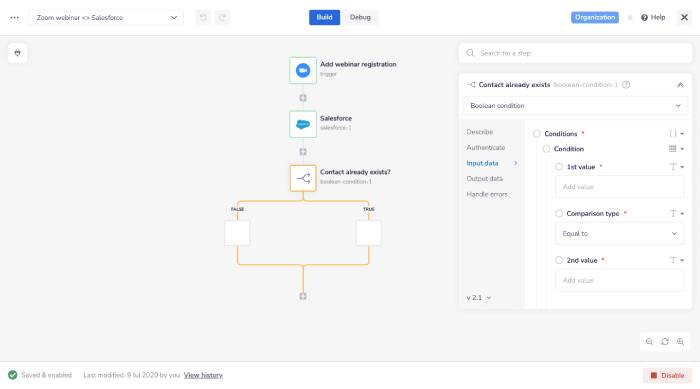
Tray.ai provides a low-code workflow platform with prebuilt connectors, HTTP access for unsupported services, workspaces, reusable authentication, triggers, data helpers, and enterprise administration. It also supports integration capabilities intended to be embedded in products.
Choose Tray.ai when
- you need managed integration across many teams or customer environments;
- embedding integration into a software product is part of the project;
- governance, connector management, monitoring, and access controls are central requirements;
- a sales-led enterprise platform matches your procurement process.
Watch for
- pricing and usage calculations for loops and high-volume data;
- workflow complexity and the need for modular reusable components;
- connector version changes and authentication maintenance;
- the effort required to migrate custom n8n nodes and scripts.
10. Activepieces: self-hostable no-code automation
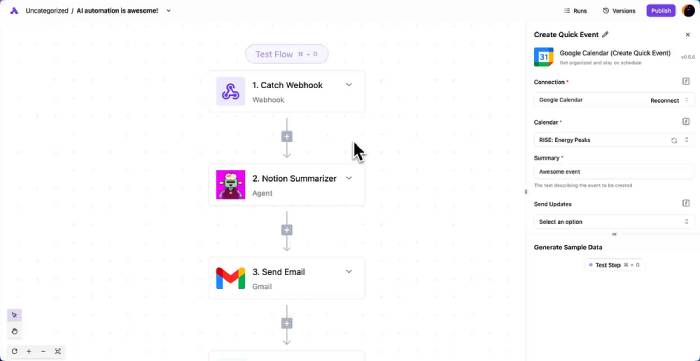
Activepieces is an open-source automation platform with a visual flow builder and extensible integrations called pieces. It can be used as a hosted service or self-hosted, which makes it a relevant alternative for teams that like n8n’s deployment flexibility but want a different builder and project model.
Choose Activepieces when
- self-hosting and a no-code experience are both important;
- developers can extend integrations in TypeScript while other users build flows visually;
- you want open components and community-contributed pieces;
- human approvals or AI steps belong inside ordinary business flows.
Watch for
- which features are part of the open-source core and which require a commercial edition;
- whether all required connectors and operations are mature enough for production;
- your responsibility for updates, backups, queues, databases, and security when self-hosting;
- migration testing for credentials, branching, error handling, and custom code.
How to choose and test an n8n alternative
- Classify the workflow. Separate business-app automation, desktop RPA, data pipelines, ML pipelines, and durable application logic.
- Document requirements. Record triggers, actions, throughput, latency, retention, data location, recovery goals, approvals, and access controls.
- Model the real cost. Include usage units, premium connectors, environments, support, infrastructure, engineering time, and migration work.
- Build a representative pilot. Test one easy flow and one difficult flow with branching, errors, secrets, and realistic payload volume.
- Test failure recovery. Disable a dependency, send malformed input, rotate credentials, and confirm alerts, retries, and replay behavior.
- Check export and ownership. Understand how workflows are versioned, backed up, reviewed, and recovered if you leave the platform.
- Plan the migration. Run old and new workflows in parallel where possible, prevent duplicate side effects, and keep a rollback path.
There is no single “best” n8n replacement. Choose the product whose operating model matches the work: visual SaaS automation, governed enterprise integration, reproducible data and ML pipelines, or reliable application code.
Related Articles
 9 ChatGPT and Generative AI API Alternatives for Developers: Top Picks and12 minutes read
 Cheap Backup Tips to Replace When You Run Out of iCloud Storage9 minutes read
 4 Garageband Alternatives for Windows 106 minutes read
 9 Best Kodi Alternatives12 minutes read
 8 Best Alternatives to Canva7 minutes read
 6 Best Icloud Drive Alternatives for iPhone/iPad8 minutes read
Reader Comments 0
Sign in with email or Google to join the discussion.