Table of Contents
This curated overview of top 7 best workstation laptops 2020 focuses on useful options, standout features, and details worth checking before making a choice.
Top best workstation laptops
- 1. MSI WS65 9TM
- 2. HP ZBook Studio x360 G5
- 3. Asus ProArt StudioBook Pro W700G3T
- 4. Dell Precision 7730
- 5. HP ZBook x2
- 6. Alienware Area-51m
- 7. Lenovo ThinkPad P1
1. MSI WS65 9TM
- CPU: Intel Core i7 / Core i9
- GPU: Nvidia Quadro T2000 / RTX 5000 Max-Q
- RAM: 16GB / 32GB
- Capacity: 512GB / 1TB SSD
- Screen: 15.6 inches (1080p / 4K)
- Size: 14.1 x 9.8 x 0.7 inches
- Weight: 1.9kg

This is the best workstation laptop of this generation. In addition to the incredible configuration above, the MSI WS65 9TM has an extremely thin and light design (by workstation laptop standards), an extremely excellent 4K display and extremely good battery life. Despite being thin and light, the MSI WS65 doesn't sacrifice the durability - typical of workstations.
It has passed several MIL-STD 810G tests, withstands sand and dust, resists shock, high and low pressures, and extreme temperatures. In terms of security, the MSI WS65 is equipped with a TPM 2.0 chip and a fingerprint sensor located in the touchpad.
2. HP ZBook Studio x360 G5
- CPU: Intel Core i5-8300H / Intel Xeon E-2186M
- GPU: Intel UHD 630 / Nvidia Quadro P1000
- RAM: 8GB - 32GB
- Capacity: 256GB - 2TB SSD
- Screen: 15.6 inches (1080p / 4K)
- Battery life: 9 hours
- Weight: 2.2kg

The HP ZBook Studio x360 G5 is the king of the 2-in-1 workstation series. It has an aluminum exterior design, military-grade durability and is powered by a powerful Xeon processor and Nvidia Quadro graphics card.
For security, the ZBook Studio features Intel vPro configuration, can be remotely controlled, has a fingerprint sensor, an IR camera for Windows Hello and HP's SureView display. The company is also adding Sure Start software, a BIOS self-repair program.
3. Asus ProArt StudioBook Pro W700G3T
- CPU: Intel Core i7-9750H / Intel Xeon E-2276M
- GPU: Nvidia Quadro RTX 3000
- RAM: 16GB - 32GB
- Capacity: 1TB - 2TB SSD
- Screen: 17 inches, 1920 x 1200
- Battery life: 6 hours
- Weight: 2.4kg

Like most workstations, the Asus ProArt StudioBook W700G3T is a 'tank'. It passes multiple MIL-STD 810G tests, withstands extreme high to extremely low temperatures, humidity, pressure and impact. In terms of security, the device is equipped with a fingerprint sensor that supports Windows Hello.
4. Dell Precision 7730
- CPU: Intel Core i5-8300H / Intel Xeon E-2186M
- GPU: Intel HD GFX / Nvidia Quadro P5200
- RAM: 8GB - 128GB
- Capacity: 500GB HDD - 8TB SSD
- Screen: 17.3 inch, 900p - 4K
- Battery life: 4 hours
- Weight: 3.4kg

If you accidentally drop this Dell Precision 7730, do not worry, it can completely withstand strong impacts such as being dropped from above. This business laptop has passed the endurance tests, including high pressure, extreme temperatures, dust, and shock according to a statement from Dell.
The Precision 7730 can protect sensitive data. Users can choose to add a FIPS fingerprint sensor in the palm rest on the machine, a standard smart card and an NFC sensor.
5. HP ZBook x2
- CPU: Intel Core i5-8250U / Intel Core i7-8650U
- GPU: Intel HD 620 / Nvidia Quadro M620
- RAM: 8GB - 32GB
- Capacities: 128GB - 512GB SSD
- Screen: 14 inches, 4K
- Battery life: 4 hours
- Weight: 2.2kg

For designers and on the go, the HP ZBook x2 is the first choice. This 2-in-1 device has a detachable Bluetooth keyboard, a cluster of 6 shortcuts that can help enhance the faster Photoshop experience. HP ZBook x2 also supports stylus, 4K display brings vivid, accurate colors.
6. Alienware Area-51m
- CPU: Intel Core i7-8700 / Intel Core i9-9900K
- GPU: Nvidia GeForce RTX 2070 / RTX 2080
- RAM: 8GB - 64GB
- Capacity: 1TB SSHD - 2TB SSD
- Screen: 17.3 inch, 1080p
- Battery life: 2 hours
- Weight: 3.8kg

The Alienware Area-51m is the king of gaming laptops and the most powerful device on this list. Such powerful configuration combined with the unique design and the ability to upgrade parts of the machine has helped Alienware Area 51-m create a foothold in the market. However, this is not a commonly used device, so it will not have many security features but other models.
7. Lenovo ThinkPad P1
- CPU: Intel Core i5-8400H / Intel Xeon E-2176M
- GPU: Nvidia Quadro P1000 / Quadro P2000
- RAM: 8GB - 32GB
- Capacity: 256GB SSD - 2TB SSD
- Screen: 15.6 inch, 1080p / 4K
- Battery life: 4 hours
- Weight: 1.8kg
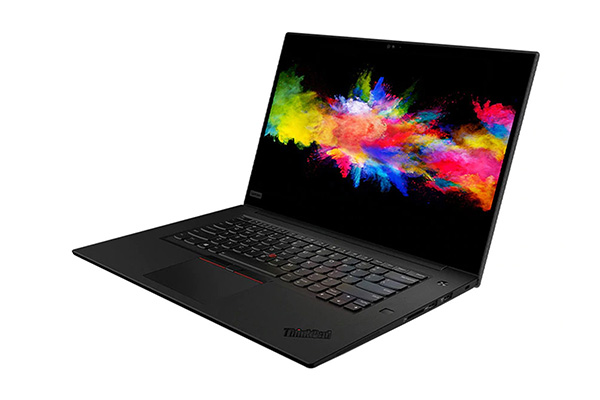
A good workstation laptop can have a hefty price tag, but the Lenovo ThinkPad P1 has appeared to be a danger to the user's pocket. The most interesting thing about this laptop is that it has a removable and interchangeable graphics card. Entrepreneurs will probably be delighted with the security suite of the ThinkPad P1. Right on the keyboard has a fast fingerprint sensor, IR webcam for Windows Hello.
Key Takeaways
Use the information above as a practical reference for top 7 best workstation laptops 2020. Review each step carefully, confirm any requirements, and choose the option that best fits your situation.
FAQ
What does this guide explain about Best Workstation Laptops 2020?
It explains the main concepts, practical considerations, and useful steps related to best workstation laptops 2020 without requiring advanced knowledge.
Who can benefit from learning about Best Workstation Laptops 2020?
This information is useful for readers who want a clear overview, practical guidance, and reliable steps related to best workstation laptops 2020.
What should I check before applying this information?
Review the requirements, confirm that your device, software, or situation matches the instructions, and back up important data before making major changes.
Related Articles
 What Is a Workstation Laptop? How Is a Workstation Laptop4 minutes read
 What Is a Workstation? What Is a Workstation Workstation That Is Different5 minutes read
 Compare Vmware Workstation Pro and Vmware Workstation Player4 minutes read
 Vmware Workstation Player - Download Vmware Workstation3 minutes read
 A Workstation vs. A Gaming PC: Key Differences10 minutes read
 Vmware Workstation Pro - Vmware Workstation Pro Download and6 minutes read
Reader Comments 0
Sign in with email or Google to join the discussion.