Table of Contents
This guide compares 5 leading Sound Amplifier Software, Increase Volume on the Best Computer, focusing on useful features, compatibility, ease of use, and overall value.
1. Add Boom 3D

Add Boom 3D is one of the most highly rated audio amplifier software on the market thanks to its good sound stimulation capabilities while still balancing the sound quality. For other software, when the sound is raised too loud, it will start to have the phenomenon of being shy, tearing and even not being full during the experience.
Add Boom 3D software has a series of specialized algorithms and has the ability to interfere strongly in the computer, so they give very good sound quality during use. Add Boom 3D software is capable of increasing the volume level by up to 150%, in some cases they can also be increased by 220% by default.
2. Sound Booster

Sound Booster provides an effective sound control solution on the computer thanks to the ability to interfere with many different information on the system. The Sound Booster tool not only supports sound amplification, but also supports the user to adjust the sound with many parameters such as Mid, Trable, Bass.
Sound Booster software currently works stably on many different Windows platforms, including: Windows 7/8/10..
3. FxSound

FxSound is the perfect solution for those who want to fine-tune the sound according to many different modes, the software is built in with a variety of custom modes such as Karaoke, Music, Movie.
In addition, the sound level on FxSound can also amplify up to 200% while maintaining the quality as default. In addition, users can also interfere with many different parameters on FxSound without affecting the quality of music when playing. The software is currently provided free of charge for the Windows desktop platform.
4. Ear Trumpet
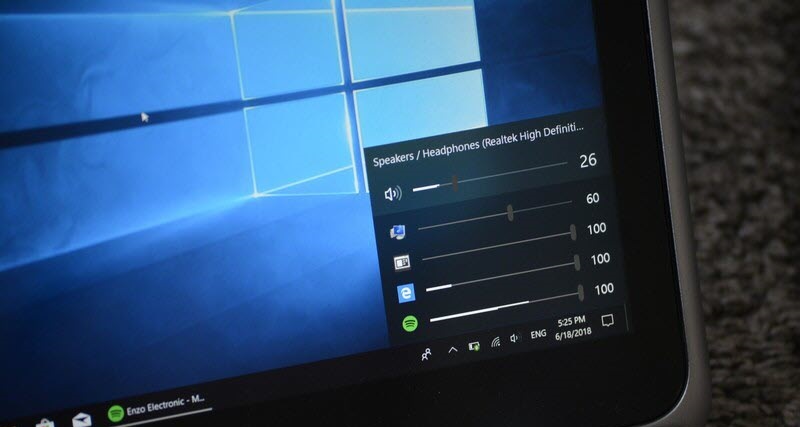
Ear Trumpet is an app available on the Windows platform and is currently released through the Microsoft Store. Ear Trumpet software has the ability to change many parameters from sources on the computer for users to easily manage the audio outputs.
In addition, they also have the ability to adjust many different audio parameters to create the best user experience.
5. Bongiovi DPS

Bongiovi DPS is the best quality audio amplifier that has a great look right now. Bongiovi DPS software is capable of up to 200% volume boost, and comes with a bunch of tweaks related to a wide variety of audio parameters.
Bongiovi DPS 'interfaces are highly regarded as they are very eye-catching and simplify all user actions.
In this article, I have shared with you the best software for amplifying sound, stimulating sound, and increasing volume on the computer.
Have a nice day!
FAQ
How should I choose among Sound Amplifier Software, Increase Volume on the Best Computer?
Compare compatibility, essential features, ease of use, security, support, and total cost rather than choosing only by popularity.
Are free options suitable for everyday use?
Free tools can be sufficient for basic needs, but advanced features, commercial use, or priority support may require a paid plan.
What should I check before installing or using one?
Verify the official source, system requirements, recent updates, privacy practices, and support for your device and file types.
Related Articles
 Top 5 Sound Amplifier Software for Computers, Laptops, PCs6 minutes read
 How to Use Sound Booster to Increase Computer and Laptop6 minutes read
 Maximize the Computer Volume with Sound Booster4 minutes read
 Instructions for Increasing Computer Volume Beyond 100%3 minutes read
 How to Increase PC Volume, Amplify Sound, Increase Computer7 minutes read
 How to Increase Speaker Volume with Sound Booster Most Effectively4 minutes read
Reader Comments 0
Sign in with email or Google to join the discussion.