Table of Contents
This guide provides a clear, practical overview of "This Gen4 NVMe SSD Has a Self-destruct Mechanism When Needed, but". It organizes the most useful details, explains important considerations, and highlights the steps or choices that matter most.
Team Group points out that organizations that rely solely on data erasure software often experience intermittent or incomplete erasures when power is lost. Their solution is to integrate proprietary 'attack' destruction circuitry directly into the Flash chip, ensuring data erasure at the hardware level.
At the same time, the intelligent software system will automatically resume the deletion process after a power failure, helping to protect confidential, classified or proprietary information to the point where it cannot be recovered even if interrupted.
Even though it's not for the average user, it's still an extremely interesting product because in the future, similar technology could be applied to mass users.
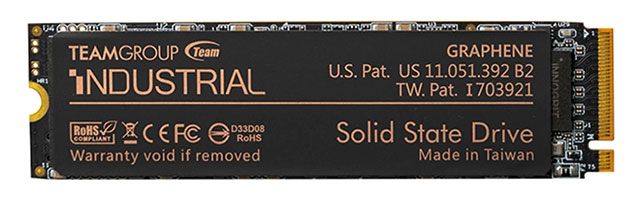
On the hardware side, the P250Q features a one-touch trigger button and multi-level LEDs. These provide real-time progress feedback—from initial command to completion—so IT staff can confirm data deletion without the need for specialized tools.
The INDUSTRIAL P250Q Self-Destruct SSD's data self-destruct feature works in the following way:
- Activate self-destruct with one button
- Smart double erase mechanism (hardware + software)
- Independent destroy circuit targeting Flash chip
- Auto resume deletion after power failure
- Multi-level LED displays real-time progress
In terms of specifications, the P250Q uses the PCIe Gen4x4 interface with NVMe 1.4 standard, achieving sequential read speeds of up to 7,000 MB/s and write speeds of 5,500 MB/s, supporting important tasks. The drive has capacities of 256GB, 512GB, 1TB and 2TB, using 112-layer 3D TLC NAND Flash memory.
|
Specifications |
Detail |
|
Model |
P250Q-M80 M.2 PCIe SSD |
|
Size |
M.2 2280 |
|
Communication & Protocol |
PCIe Gen4×4, NVMe 1.4 |
|
Capacity |
256GB / 512GB / 1TB / 2TB |
|
Flash Memory |
112-layer 3D TLC NAND |
|
Sequential speed |
Read: up to 7,000 MB/s Write: up to 5,500 MB/s |
|
Durability & Reliability |
MTBF: > 3 million hours P/E cycle: 3K times |
|
Shock resistant |
Operation: 50G/11ms (MIL-STD-202G) Idle: 1,500G/0.5ms (MIL-STD-883K) |
|
Anti-vibration |
Operation: 7.69 Grms, 20–2,000 Hz (MIL-STD-810G) Idle: 4.02 Grms, 15–2,000 Hz |
|
Operating temperature |
0°C to 70°C |
|
Storage temperature |
–40°C to 85°C |
|
Humidity |
5% ~ 95% |
Along with the P250Q, Team Group was also granted a US patent 12283335 B2 for its wide-temperature M.2 SSD technology. This technology automatically adjusts data transfer speeds across three thermal zones, maintaining stable operation in environments from 85°C to 105°C without throttling.
FAQ
What does this guide cover?
This guide explains this gen4 nvme SSD has a self-destruct mechanism when needed, but, including the main steps, important details, and practical considerations.
Who is this guide for?
It is designed for readers who want a clear, practical overview and a reliable process they can follow without unnecessary complexity.
What should you check before getting started?
Review the requirements, confirm that your software or device is up to date, and save any important data before changing settings.
Related Articles
 7 Things You Should Check Before Buying Any Nvme SSD: Practical Guide9 minutes read
 6 Simple Ways to Get More Performance from Your NVMe SSD9 minutes read
 How to Install SSD Hard Drive NVMe M. 2?4 minutes read
 Why Use Sata SSD: Reasons to Use Sata SSD Hard Drive8 minutes read
 Nvme 2.0 Protocol Supports Both Pcie-connected Hdds3 minutes read
 Google Allows Email to Be Self-destruct in Gmail Updates3 minutes read
Reader Comments 0
Sign in with email or Google to join the discussion.