Table of Contents
This guide answers "Should I Use an SD Card as a Memory Expansion Solution for My Laptop?" with a clear explanation, practical context, and the details that matter most.
Speed: the biggest weakness
Even the fastest SD cards available today are much slower than the SSDs found in most laptops, and sometimes even slower than traditional hard drives. Still, they're a good option for storing some files, especially on laptops with no other upgrade options. As long as you understand the pros and cons of SD cards and choose the right one, they're a useful expansion solution.
Choose the right card for your needs Don't use an SD card for all types of data on your computer. The slower transfer speeds are only suitable for certain types of data; many apps and games will slow down significantly (or not run at all) on an SD card. That's why the SD Express standard was created, but most laptop card readers don't support it.
- Mid-range/low-end laptops typically use eMMC memory or SATA SSDs with sequential read speeds of around 300–600MB/s.
- High-end laptops often have significantly faster NVMe SSDs. For example, the MacBook Pro with M4 Pro chip reaches ~6,400MB/s.
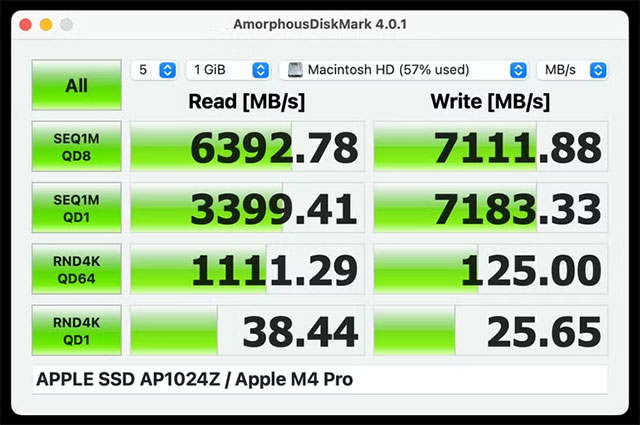
Compare:
- The fastest full-size SD cards (like the SanDisk Extreme Pro) achieve sequential read/write speeds of ~300MB/s.
- Most SD/microSD cards are slower: The 64GB SanDisk Extreme A2 card on my MacBook doesn't even hit the advertised 92MB/s read speed.
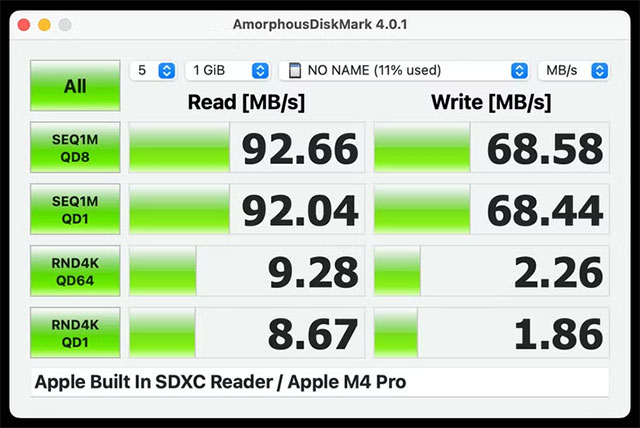
When to use SD card:
- Documents and small files
- Photos, videos, movies (but transferring movies will be very slow)
- Retro emulators (pre-PS2 consoles, DOSBox, MAME.)
- Old PC Games
- Offline music library
- Offline Wikipedia database (using Kiwix)
When you SHOULD NOT use an SD card:
- Modern PC Games
- Video editing
- Data Backup
There are exceptions, but the list above gives you a better idea of what SD cards can do for your laptop. It's not a useless option, but it has more drawbacks than you might think.
Select high speed card
Not all SD cards are created equal. When speeds are limited, it's important to use the fastest card possible. The main spec to look for is the Application Performance Class, denoted by A1 or A2 on the card. This ensures the card has better random read/write performance — important when transferring files repeatedly or running software directly from the card.
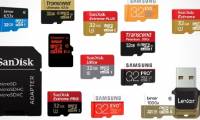
- If your laptop has a microSD slot: Choose a card like the Samsung EVO Select A2 or SanDisk Extreme Pro A2.
- If your laptop has a full-size SD slot: Check out the SanDisk Extreme Pro or Samsung Pro Ultimate card.
If you have an A1/A2 card available, it should work, but don't expect much from an old or "no-name" card. You can test the card's speed with CrystalDiskMark (Windows) or AmorphousDiskMark (Mac).
Note the physical dimensions
- Laptops with microSD slots (some Chromebooks) often allow the card to fit inside the chassis.
- Full-size SD slot makes the card protrude → easy to damage the card/slot if something gets in the way.
For laptops with full-size SD slots, the best solution is to use a BaseQi adapter (or similar) in conjunction with a high-speed microSD card. This way, the card doesn't (or barely) stick out of the laptop. Of course, SD cards aren't the only option for expanding your laptop's storage. You can:
- Upgrade your SATA, M.2, or NVMe drive if your laptop has an empty slot (many gaming/workstation laptops have ≥ 2 drive slots).
- Consult your machine model/repair manual for more information.
Swapping out internal storage is a pain (especially when moving OSes), but internal storage is always significantly faster than SD cards. You can also use ultra-thin USB drives (like the Samsung FIT Plus). They are often faster than SD cards, but they take up a USB slot and still stick out.
SD card slots are still one of the most viable options when modern laptops lack expansion ports. However, keep in mind its limitations and always consider alternatives like upgrading the internal drive or using USB.
FAQ
What should you know about speed: the biggest weakness?
Even the fastest SD cards available today are much slower than the SSDs found in most laptops, and sometimes even slower than traditional hard drives. Still, they're a good option for storing some files, especially on laptops with no other upgrade options. As long as you understand the pros and cons of SD cards and choose the.
What should you know about select high speed card?
Not all SD cards are created equal. When speeds are limited, it's important to use the fastest card possible. The main spec to look for is the Application Performance Class, denoted by A1 or A2 on the card. This ensures the card has better random read/write performance — important when transferring files repeatedly or running.
What should you know about note the physical dimensions?
Laptops with microSD slots (some Chromebooks) often allow the card to fit inside the chassis.
Related Articles
 Nano Memory Card Memory Card, Solution for Smartphones Not Equipped with Memory Card Slot3 minutes read
 How to Fix Laptop Not Recognizing SD Memory Card6 minutes read
 What Is the Function of Memory Card? Features, Uses, and Key Details7 minutes read
 How to Repair a Corrupted Memory Card: Step-by-Step Guide10 minutes read
 Which Good Memory Card Companies Should Buy the Most Today?8 minutes read
 Buy Genuine Memory Cards, Cheap Where Hanoi && Ho Chi Minh City?7 minutes read
Reader Comments 0
Sign in with email or Google to join the discussion.