Table of Contents
Strafe codes can grant EXP and Krones in the Roblox parkour game by STRAFEWORKS. Open the game's shop and use its Codes tab to redeem them. They do not replace learning the movement controls or guarantee that an expired promotion will work.
Strafe codes to try
The codes below are listed by Roblox Den, whose retrieved list was checked in September 2026. They have not been redeemed on your account, and availability can change. Read the in-game response to confirm the actual reward.
| Code | Listed reward type |
|---|---|
STRAFE2026 | EXP and Krones |
EARTH-LOVER | EXP and Krones |
HELLO_MRGUIDER | Krones |
OVERGROWTH | EXP and Krones |
E-TWIN-SR | EXP and Krones |
E-TWIN-JR | EXP and Krones |
READY4RUINS | EXP and Krones |
RUNNERCENTRAL | EXP and Krones |
TAKEFIVE | EXP and Krones |
SILVERSSECRET | EXP and Krones |
STERLINGSILVER | EXP and Krones |
SMELL-O-VISION | EXP and Krones |
THEGIVINGTREE | EXP and Krones |
CONNORWHO? | EXP and Krones |
FREETRUESQUIMBLER | EXP and Krones |
SNEAKYSNEAKY | EXP and Krones |
MAGPIEBESTDEV | EXP and Krones |
ZIPISAWESOME | EXP and Krones |
Do not treat every published code as a bonus. Roblox Den reports that CHARITY removes one Krone instead of adding currency, so it is omitted from the reward list. Older entries such as STRAFE2025 are also omitted where their current status is unclear.
How to redeem a Strafe code
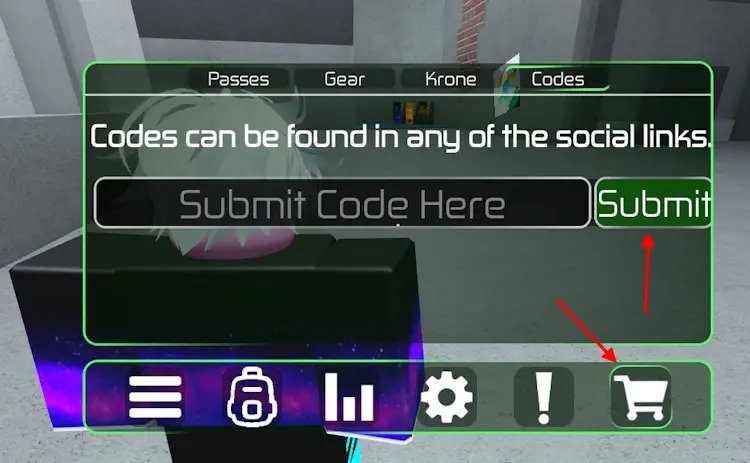
- Open Strafe by STRAFEWORKS in Roblox. Use these Roblox installation basics if you need to set up the app first.
- Select the three-bar menu in the upper-left corner.
- Open the shop using the shopping-cart button.
- Select the Codes tab.
- Paste one code into the field and select Submit.
- Check the response and your EXP or Krone balance before submitting another code.
The game is updated over time, so the current button layout may differ from the screenshot. Keep punctuation such as the question mark in CONNORWHO? and the hyphens in E-TWIN-SR.
If redemption fails
Check for extra spaces and typing errors, then confirm you are in the correct game. “Already used” means that account has claimed the code before; “invalid” can mean a typo or an ended promotion. Rejoining may help a connection problem but cannot revive an expired code. If the whole game runs poorly, see Roblox lag troubleshooting.
For new announcements, follow the developer links on the official Roblox listing. Enter promotional codes in the game, and never give another site your Roblox password to claim EXP or Krones.
Related Articles
 How to Redeem Roblox Slap Codes and a List of the Latest Codes6 minutes read
 The Latest Roblox Codes for April and How to Enter Roblox Promo Codes 20265 minutes read
 Latest Plants vs Brainrots Roblox Codes: Complete Guide4 minutes read
 How to Redeem Roblox Anime Crusaders Codes and the Latest List of Codes9 minutes read
 The Latest Reawakened Code and How to Redeem It4 minutes read
 Latest Evade Roblox Codes and How to Redeem Codes4 minutes read
Reader Comments 0
Sign in with email or Google to join the discussion.