Table of Contents
Opera is rolling out a major update to its Opera One browser on iPhone, designed to tackle the clutter caused by having too many tabs open.
The new system offers a grid and list view, allowing you to choose how you view your tabs, as well as the ability to group them into color-coded collections for different projects. Another new feature is a search option that makes it easy to find a tab you had open a few days ago, just by typing in the title or URL of the page.
This update isn't just for tabs. Opera also adds quicker access to the built-in Aria AI, which is located right in the bottom bar for one-tap access. You can also customize the menu to bring the features you care about closer.
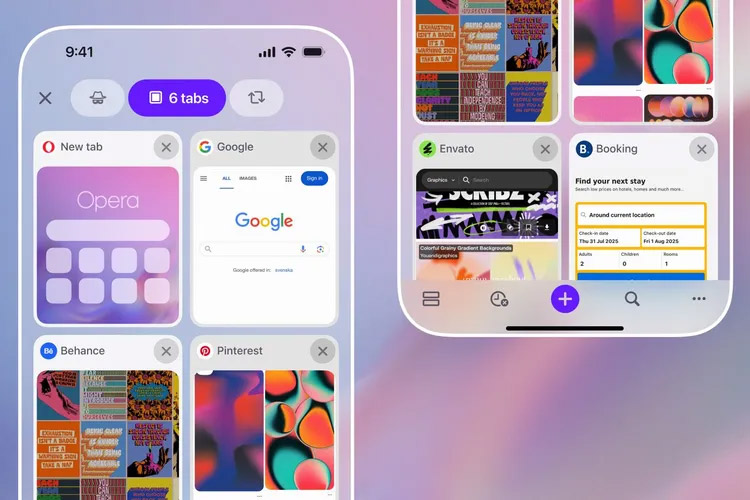
Opera for iPhone has added features that make it easier to manage your tabs. You can now group them by topic and quickly search through the list when you need them.
Final Thoughts
Overall, Tabs on iPhone Are Easier to Manage with Opera is best understood by considering the main facts, practical context, and limitations together. Use the details above as a clear starting point and confirm time-sensitive information when necessary.
FAQ
What does this article explain about Tabs on iPhone Are Easier to Manage with Opera?
Opera is rolling out a major update to its Opera One browser on iPhone, designed to tackle the clutter caused by having too many tabs open.
What should you know about the key details?
The new system offers a grid and list view, allowing you to choose how you view your tabs, as well as the ability to group them into color-coded collections for different projects.
Should time-sensitive details be verified?
Yes. Software features, game codes, product specifications, prices, and research findings can change. Confirm important details with an official or primary source when accuracy affects your decision.
Related Articles
 Opera Android Updates New Features for Tabs2 minutes read
 How to Use Switch Workstation to Manage Tabs on Chrome3 minutes read
 How to Create Different Workspaces on Opera3 minutes read
 Opera's Flow Usage to Connect Open Tabs on Computers and Phones4 minutes read
 Opera Launches Opera Mini Browser 6.56 minutes read
 There Is an Official Version of Opera Touch for iPhone, Download and Experience3 minutes read
Reader Comments 0
Sign in with email or Google to join the discussion.