Table of Contents
Windows 11 Insider Preview 26220.5790 is now available on Dev. This test build comes with better dictation and an improved USB webcam. But the problem is that you need a Copilot+ PC to take advantage of the new features.
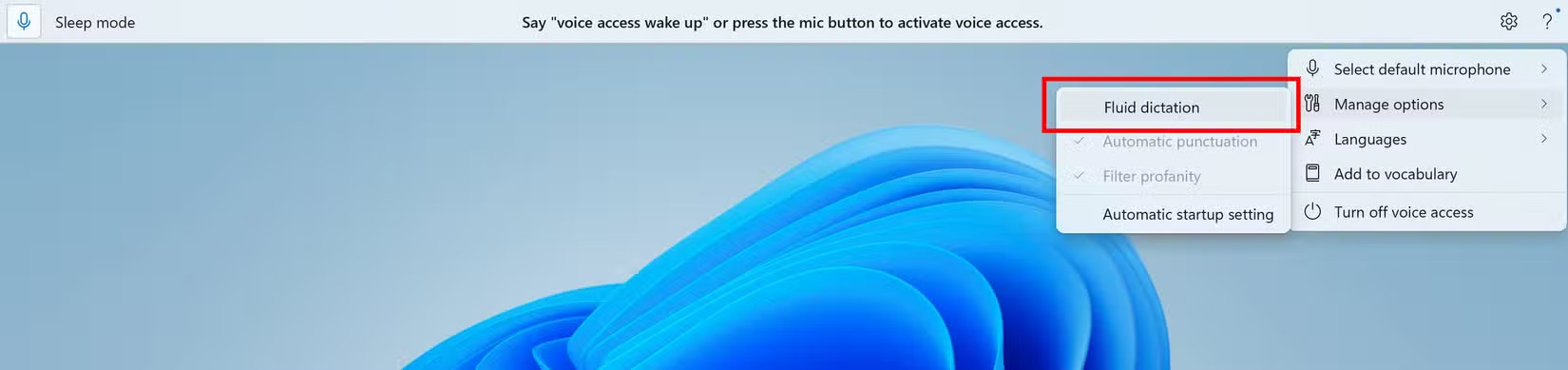
The 'fluid dictation' feature is designed to make voice dictation smoother and smarter by automatically correcting errors like grammar, punctuation, and even extra words. It's all powered by on-device language models (SLMs). You can use it in any text app, but it's disabled in secure fields like entering a password or PIN to protect privacy.
The great thing is that you can just say "turn on (off) fluid dictation" to turn it on/off whenever you want. Unfortunately, this feature is only available to those who own a Copilot+ computer.
Along with improved dictation, Microsoft is also rolling out Windows Studio Effects. If your computer supports Copilot+, you'll get AI-powered camera enhancements with more hardware, including USB webcams or the built-in rear camera on laptops.
This webcam update won't be available to all Insiders right away. Instead, the driver update will roll out to Intel-based Copilot+ computers first, with updates for AMD and Snapdragon models coming in the coming weeks.
In addition to the PC-specific updates to Copilot+, the new build includes a number of other changes and fixes that are gradually rolling out to Insiders on the Dev Channel. For example, File Explorer Home now has hover gestures, so when you hover over a file, you'll see commands like "Open file location" and "Ask Copilot about this file." However, this feature currently requires you to sign in with a Microsoft account, which supports work or school accounts, first.
Final Thoughts
The development covered in this article is worth following, but specifications, dates, and feature details may change until the relevant company or organization publishes an official confirmation.
FAQ
What is the main development covered in this article?
Windows 11 Insider Preview 26220.5790 is now available on Dev. This test build comes with better dictation and an improved USB webcam. But the problem is that you need a Copilot+ PC to take advantage of the new features.
What should you know about the key details?
The 'fluid dictation' feature is designed to make voice dictation smoother and smarter by automatically correcting errors like grammar, punctuation, and even extra words. It's all powered by on-device language models (SLMs).
Is every reported detail officially confirmed?
Not necessarily. Product leaks, preview builds, research reports, and early announcements can change. Confirm important specifications, dates, and availability through an official source before making a decision.
Related Articles
 Text: How to Dictate in Windows 104 minutes read
 Find Out How to Fix Faulty Dictation on Apple Watch: Key Facts6 minutes read
 How to Write Text by Voice on macOS3 minutes read
 Apple Watch Dictation Not Working? Here's the Fix: Key Facts8 minutes read
 10 Features on Windows 10 Are Most Users Require9 minutes read
 How to Write Voice Text on Dictation. Io4 minutes read
Reader Comments 0
Sign in with email or Google to join the discussion.