Table of Contents
SSID Cloaking - Safe or Unsafe? is easier to understand when the core ideas are paired with practical examples. The sections below explain the topic clearly, highlight useful steps, and point out details that can prevent common errors.
Many organizations use SSID cloaking as a mechanism to add security layer to WLAN. This technique requires all users to have knowledge of the SSID to connect to the wireless network. Typically SSID is considered to enhance WLAN security, and is the best practice recommended by PCI Data Security Standard. However, it also significantly reduces the security effectiveness of wireless LANs (WLANs). Giving a false sense of security Previous wireless networks deployed SSID cloaking as a means to prevent unidentified users from accessing the network. However, this technique has never been used as an authentication mechanism. Some organizations accept distribution of cryptic SSIDs in a shared secret style. Some tools such as ESSID-Jack or Kismel are responsible for monitoring and reporting the situation of SSIDs on legitimate stations, thus leaving traces to allow an attacker to see the origin of SSID and easily circling security mechanisms to penetrate the network. 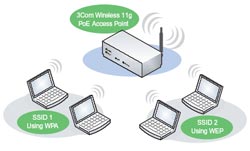 Confusing users When the network SSID is masked, users cannot refer to the list of suitable wireless networks for WLAN. From there make them choose and log in to another network and leave vulnerabilities on the client side. Some US states consider this as an illegal computer intrusion. Attempts to impersonate AP Some attack tools like KARMA take advantage of advanced WLAN exploration techniques used by wireless clients. When a station probes for WLAN in the priority list (PNL), the station itself will trace the SSID to the listening attacker. KARMA-style attacks use the SSID detected to impersonate WLAN as a lure to manipulate the operational station to the attacker. For Windows XP SP2 users who have updated the hotfixes on Microsoft's KB917021 page, Windows workstations change the operating method when exploring wireless networks. Users and administrators can bookmark categories on PNL as 'nonbroadcast' (without promotion). When the 'Connect even if this network not broadcasting' option is not selected, the workstation will not reveal SSID information despite network exploration, limiting the KARMAL attack type. However, for the workstation to identify the appropriate network, the AP must disable the SSID mask function. Otherwise, they will return to active network exploration, making SSID cloaking a less secure option. Although SSID cloaking appears to be a very attractive mechanism to support WLAN security, it really reduces the security of corporate wireless wireless networks.
FAQ
What is SSID Cloaking - Safe or Unsafe??
Many organizations use SSID cloaking as a mechanism to add security layer to WLAN.
Why is SSID Cloaking - Safe or Unsafe? important?
A clear understanding of SSID Cloaking - Safe or Unsafe? helps you make informed decisions, avoid common mistakes, and use the relevant tools or techniques more effectively.
How should beginners approach SSID Cloaking - Safe or Unsafe??
Start with the fundamental concepts, follow the examples step by step, and test each change in a safe environment before applying it to important systems or data.
Related Articles
 What Is Cloaking? Should You Use Cloaking Techniques in SEO?4 minutes read
 What Is Unsafe Rust?6 minutes read
 SSID: What It Is and How to Turn Off, Turn on, Change It in Wi-Fi Network4 minutes read
 What Is SSID: Learn SSID and Wireless Network5 minutes read
 How to Turn Off the Router's SSID for Better Security3 minutes read
 Wi-Fi Security Is Better Than Hiding the Ssid7 minutes read
Reader Comments 0
Sign in with email or Google to join the discussion.