Table of Contents
Today, Spotify has improved its AI DJ feature and added a feature that many people have surely been waiting for a long time.
While most music streaming apps today have similar features, one unique feature you will find on Spotify is AI DJ. If you haven't tried it yet, AI DJ is a feature that Spotify announced in 2023 and is a personalized AI guide that analyzes your listening history and preferences to choose the right music.
DJs don't just create playlists and play music that Spotify thinks you'll like, they also add commentary between tracks, making the experience more personal and immersive. Today, Spotify is improving its AI DJ feature and adding a feature that many have been waiting for.
- Why is Apple Music AutoMix better than Spotify AI DJ?
You can now text music requests to Spotify's AI DJs
As announced in a post on Spotify's For the Record blog, you can now send text message requests to an AI DJ. With this feature, you can tell the DJ exactly what kind of music you want to hear, or ask it to play a certain genre, mood, or even an artist you've really enjoyed lately.
Spotify claims this is one of the most requested features on social media platforms, so it's great to see the company finally deliver. Earlier this year, in May, the company announced that DJs could take music requests by voice.
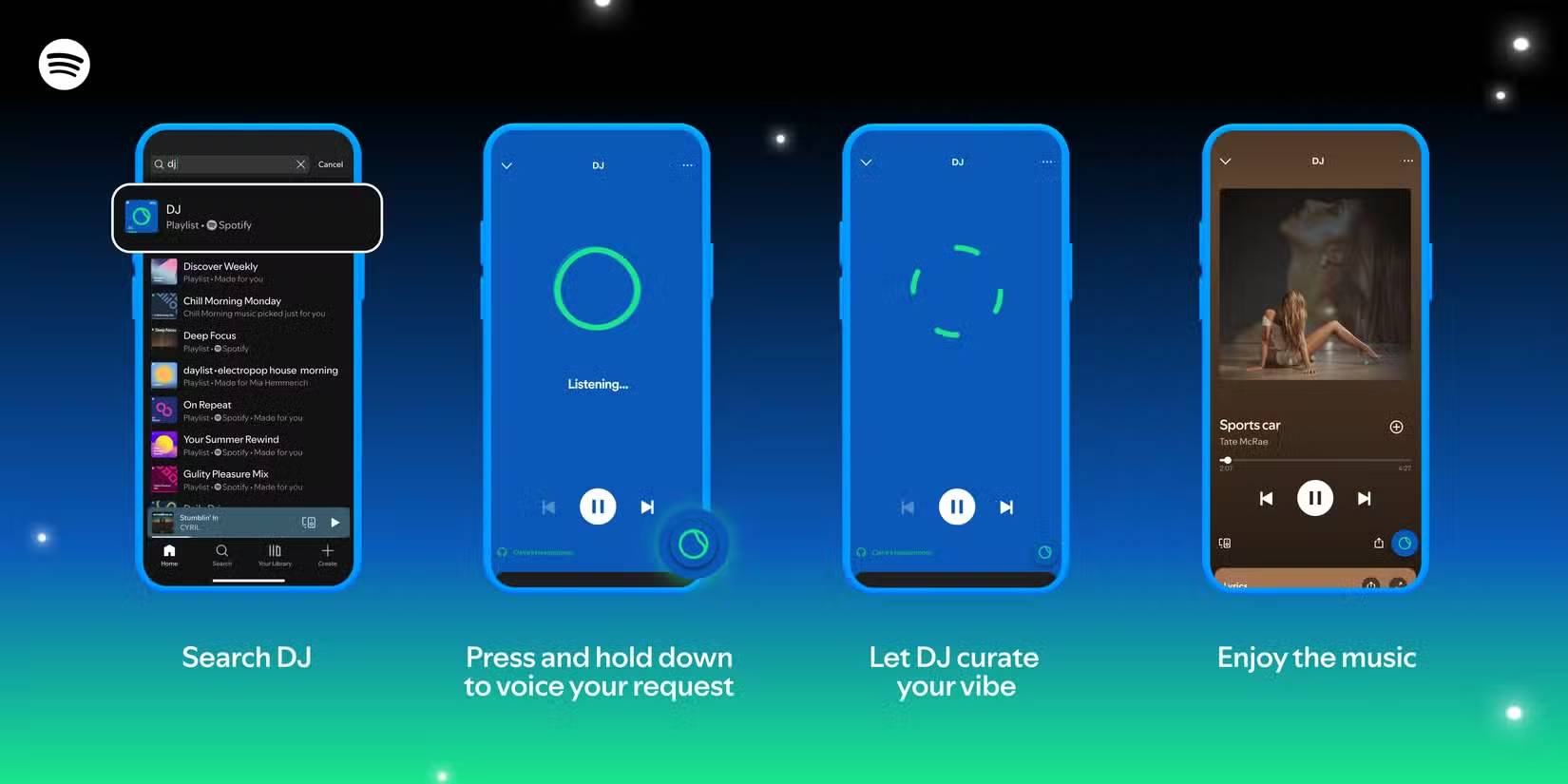
While this is a great addition and makes the feature feel a lot more personal, speaking and giving commands isn't always convenient, especially when you're in a quiet place. For example, people often use the AI DJ feature to listen to music while in class, and asking it to play a certain song loudly isn't ideal. The only options are to keep skipping tracks until you finally find one you like (which defeats the purpose of the feature) or simply listen to one of your own playlists.
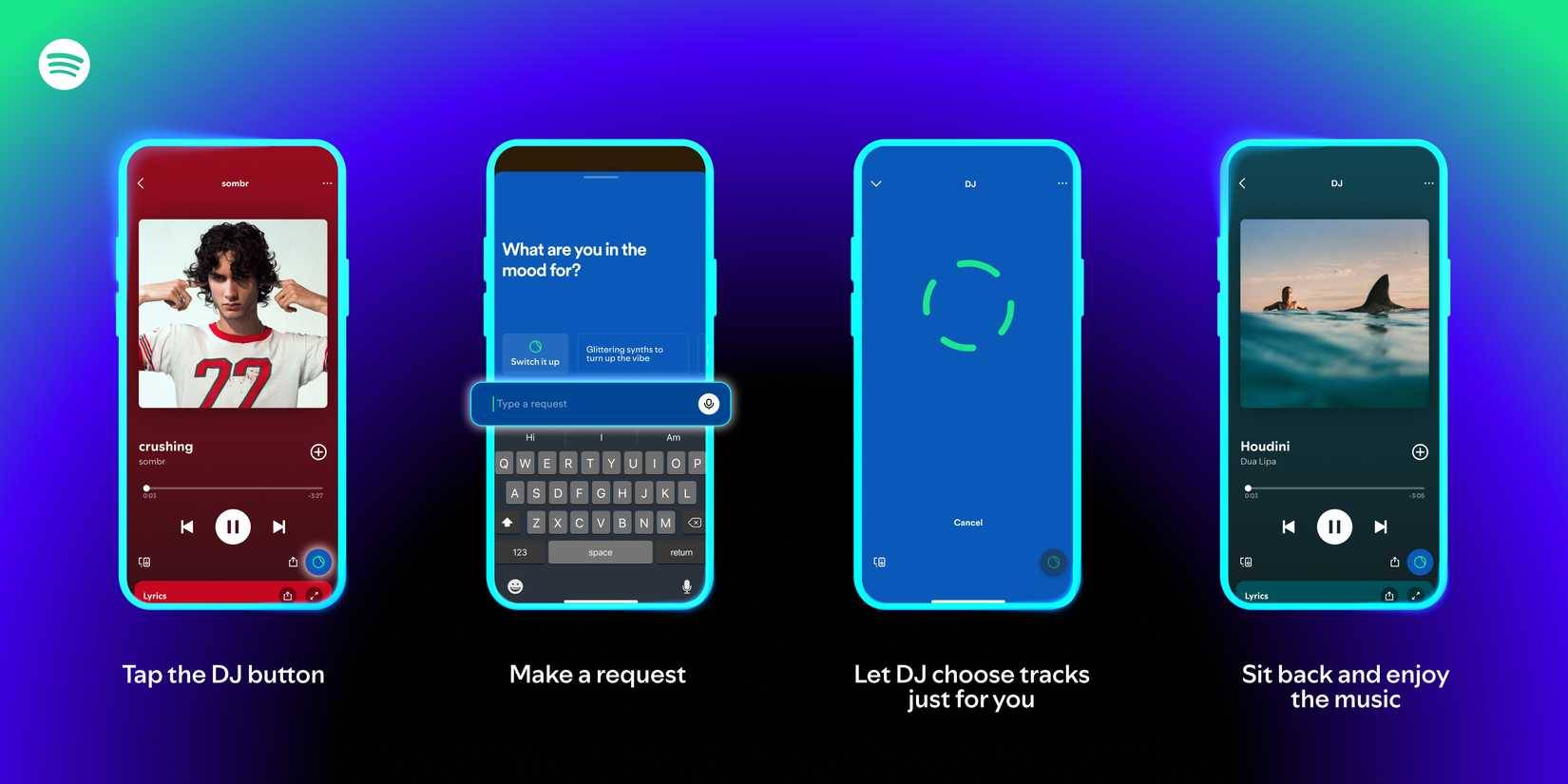
Starting today, you can enter music requests in both English and Spanish. In addition to entering your own requests, DJs now offer three personalized request suggestions. These are basically suggestions you can use to quickly set the mood, whether you want something upbeat, relaxing, or completely different from what you're used to hearing.
The process for sending a text request to an AI DJ is the same as giving a voice command. All you have to do is open the DJ feature by going to the Search tab at the bottom of the page and searching for a DJ or tapping on a DJ playlist. Then, just tap the DJ button in the bottom right corner and type in what you want to hear instead of saying it out loud.
DJs is a feature that's only available to Spotify Premium users in 60 regions, meaning this update will also be limited to users in those markets for now.
FAQ
What should you know about Spotify just gave its AI DJ the upgrade every user was asking for?
In practical terms, today, Spotify has improved its AI DJ feature and added a feature that many people have surely been waiting for a long time.
Why does Spotify just gave its AI DJ the upgrade every user was asking for matter?
The article highlights that today, Spotify is improving its AI DJ feature and adding a feature that many have been waiting for.
What is the main takeaway?
The main takeaway is that why is Apple Music AutoMix better than Spotify AI DJ.
Related Articles
 How to Register for a Spotify Account to Listen to Music Online7 minutes read
 Spotify Releases Native ARM Apps for Windows3 minutes read
 Tips to Copy Entire Playlists on Spotify3 minutes read
 How to Create a Random Playlist on Spotify4 minutes read
 Instructions to Turn Off the Spotify Canvas Feature3 minutes read
 How to Listen to Offline Music on PC with Spotify5 minutes read
Reader Comments 0
Sign in with email or Google to join the discussion.