Table of Contents
This guide covers sony vaio fw351j // h, cheap bluray laptop with practical context and easy-to-follow details. Use it to understand the subject and apply the information confidently.
 Sony Vaio FW351J / H looks quite similar to the previous FW series.
FW351 brings an elegant and attractive design with the Bluray premium feature of a hi-end laptop line. The machine has a sturdy shape and bends the near edge that connects to the back of the LCD screen. The shell is adorned with a gray and silver color scheme that forms the same Titan gray feature as the Apple MacBook Pro. However, the FW351 external speaker set does not place on either side of the keyboard like an Apple product but on the keyboard that connects the LCD screen. Charging plug is located at the junction of the camera body and LCD. On the right is the power button with the light green even when the device is operating or in standby mode. Flat, spacious keyboard and comfortable tilt for hands are always the attraction of new Sony Vaio laptops. Leaning to the right on the keyboard are shortcuts to controlling the media app.
 The keyboard of the machine creates a natural angle that is quite comfortable for hands.
This device is integrated with Blu-ray drive to satisfy the needs of mobile entertainment with high definition video (HD). The 16. 4-inch widescreen supports the 16: 9 standard for watching movies, but the maximum resolution is only 1, 600 x 900 pixels, much lower than other 16-inch competitors like the Dell XPS 16 (1920 x 1080). Pixel). Although it supports Blu-ray reader, the above parameters are not ideal for enjoying Full HD movies. Products are also integrated by Sony many apps for media such as MusicBox to analyze and divide collections by time, genre. In addition, Intervideo WinDVD BD is an indispensable program for submission. Play Blu-ray videos. The machine has the advantage of 4 USB ports to satisfy all needs for connecting to universal mobile devices. In addition, the FireWire port for high-speed data transmission via peripheral devices and SD / SDHC memory card slot, Memory Stick is also indispensable. In addition, to better respond to the display of Full HD movies, the HDMI port supports connecting to LCD TVs. If only $ 1, 000 is available, this is the best option for mobile entertainment collections. But the requirement requires both good handling performance and this product is still limited.
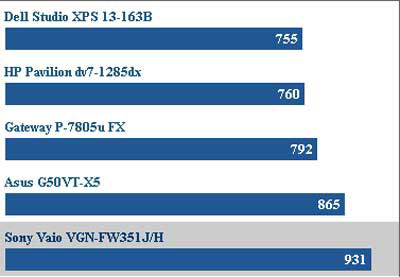 Compare the ability to handle multitasking between Sony Vaio FW351J / H and Some other machines have the same price (in seconds-the number Small equivalent to the higher processing capacity).
To get an attractive price, the FW351 is only integrated with the 2. 0 GHz Intel Core 2 Duo T6400 processor, which is much slower than the laptops on the market that cost between $ 900 and $ 1, 200. If looking for a more optimal processing machine with the corresponding amount, the Gateway FX P-7805 is the best choice, especially for gamers. FW351 was created to optimize price and satisfy all mobile entertainment needs. In addition, RAM has 4 GB capacity but only in DDR2 standard that supports 800 Mhz clock. Graphics chip integrated right on Intel's board dedicated to HD Mobile Intel 4500MHD standard.
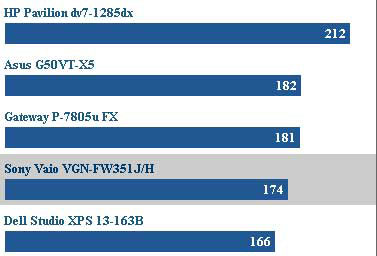 Battery length between Sony Vaio FW351J / H and other devices when playing video.
The included 6-cell battery can run the device for 2 hours and 54 minutes with video playing. This parameter is lower than many other laptops with the same configuration. Battery life can also be longer if you only use the device to browse the web and run office apps. The device is sold in Vietnam for about $ 1, 254. Advantages - Integrated vertical Bluray head - Attractive design - Shortcuts for special multimedia controls. Recommended points - Poor performance compared to other machines of the same price. - Screen resolution is not suitable for Full HD.
FAQ
What should I check before following these steps?
Confirm device and software compatibility, save important data, and make sure you have the required permissions, files, and account access.
Why might the process not work?
Common causes include outdated software, missing permissions, incompatible hardware, an unstable connection, or completing a step in the wrong order.
Can I undo the changes if necessary?
That depends on the tool or setting. Use built-in restore options when available, keep a backup, and record the original configuration first.
Related Articles
 Sony Recommends That Vaio Fit Laptop Has an Explosion Hazard3 minutes read
 Sony Vaio Fit - Laptop 'Premium Design, Popular Price'4 minutes read
 Sony Demonstrated the First 3D Laptop4 minutes read
 The World's Lightest VAIO TT Laptop4 minutes read
 Sony Released the Colorful VAIO E3 minutes read
 Vaio Signature Laptop for Christmas3 minutes read
Reader Comments 0
Sign in with email or Google to join the discussion.