Table of Contents
An “AI laptop” is not a single type of computer. The label can describe anything from a conventional laptop that runs cloud-based AI in a browser to a system with a neural processing unit (NPU) for on-device effects. The right choice depends on where your software runs and whether it needs an NPU, a powerful GPU, a large amount of memory, or simply a reliable internet connection.
Start with your applications, not the AI badge on the box. A lightweight office user and a developer running local language models have very different hardware needs.
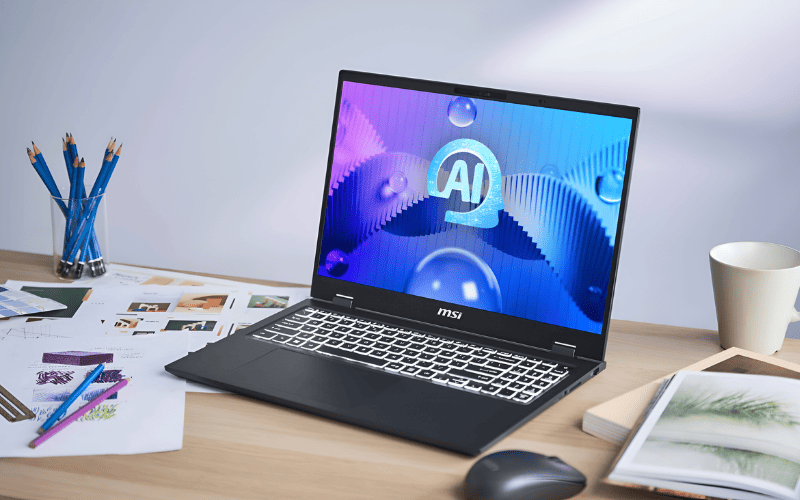
What makes a laptop an AI laptop?
Most modern laptops can use online AI services because the processing happens in a data center. Browser-based chatbots, cloud image generators, and online transcription tools therefore do not require a special NPU.
On-device AI is different. It performs some or all of the work locally, which can reduce latency, allow selected features to work offline, and keep the source data on the computer when the application is designed that way. Local processing is handled by one or more of these components:
- CPU: The general-purpose processor. It runs the operating system, applications, and AI workloads that are not optimized for another processor.
- GPU: A highly parallel processor used for graphics and many demanding AI tasks. A discrete GPU is often more important than an NPU for local image generation, model training, 3D work, and some video tools.
- NPU: A Neural Processing Unit designed for efficient, sustained AI inference. It is commonly used for camera effects, noise suppression, transcription, and other supported features without loading the CPU or GPU as heavily.

Copilot+ PC is a specific Windows category
“AI PC” is a broad marketing term, while Copilot+ PC has defined hardware requirements. Microsoft currently specifies a compatible processor with an NPU capable of at least 40 trillion operations per second (TOPS), at least 16GB of memory, and at least 256GB of storage. Feature availability can still depend on the processor, Windows version, region, language, and application.
A computer can run Copilot in a browser or use other AI software without being a Copilot+ PC. Likewise, meeting the Copilot+ threshold does not make a laptop suitable for every local AI workload.
Who benefits from an AI-focused laptop?
An NPU-equipped laptop is worth considering if you regularly use supported on-device camera effects, live captions, audio cleanup, transcription, or other tools designed to use the NPU. It can also make sense when battery efficiency and offline processing are priorities.
A more powerful GPU and extra memory matter more if you edit high-resolution video, create 3D content, generate images locally, run large local models, or develop software with GPU-accelerated frameworks. Read Offline AI vs. online AI before paying for hardware intended for local processing.
You may not need an AI-branded laptop if your work is mainly email, web browsing, documents, and cloud AI. In that case, prioritize build quality, display, keyboard, battery life, and a modern CPU. An NPU is useful only when your applications can use it.

Seven criteria that matter when choosing
1. Check software and processor compatibility first
List the programs, plug-ins, peripherals, and development tools you rely on. Then verify their operating-system and processor support. Windows on Arm compatibility has improved, but specialized drivers, older plug-ins, some games, and certain business tools may still require checking. On a Mac, confirm that essential applications run natively on Apple silicon; Apple advises checking with developers because Rosetta support will change in future macOS releases.
Developers should also verify the exact AI framework, acceleration backend, and model format they plan to use. Hardware specifications are not helpful if the software stack cannot access the accelerator.
2. Treat NPU TOPS as a threshold, not a complete score
TOPS indicates peak throughput under particular conditions. It does not by itself measure responsiveness, accuracy, memory capacity, or application support, and numbers may not be directly comparable across architectures. First confirm that the NPU meets a platform requirement such as Copilot+, then look for tests of the actual application you use.

3. Match the GPU and video memory to the workload
Integrated graphics are sufficient for office work, media playback, light photo editing, and NPU-assisted features. A discrete GPU is more appropriate for demanding creative applications, 3D rendering, gaming, and many local generative-AI tools.
For local AI, check how much dedicated video memory the model requires and whether the software supports the GPU vendor. Do not choose solely by a GPU model name: laptop power limits and cooling can make two systems with nominally similar graphics perform differently.
4. Buy enough memory and storage
For a new general-purpose laptop, 16GB of memory is a practical floor. Consider 32GB for professional photo or video work, software development, several virtual machines, or moderate local AI. Larger local models and complex projects can justify 64GB or more, but capacity should follow measured requirements.
A 512GB SSD is workable for office and cloud-based use. Choose 1TB or more if you keep source video, games, virtual machines, datasets, or local models. Many thin laptops have soldered memory and non-upgradeable storage, so check before buying.
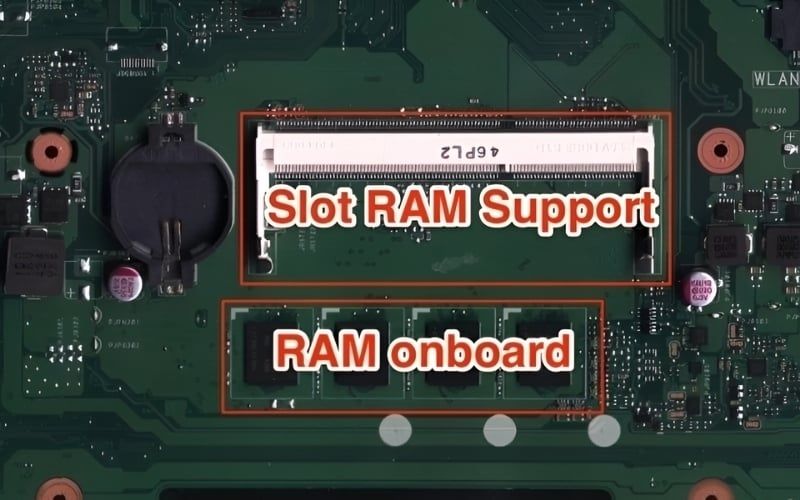
5. Evaluate battery life, cooling, and sustained performance
NPUs can handle supported tasks efficiently, but they do not make every workload low-power. A discrete GPU running a local model or rendering video can drain the battery quickly. Compare independent tests that resemble your workload and note whether the laptop was tested at the same performance setting.
Cooling affects speed and comfort during long jobs. Check fan noise, surface temperature, and sustained performance rather than relying only on a short benchmark.
6. Do not neglect the display, camera, microphone, and ports
Creators should check color-gamut coverage, calibration, resolution, brightness, and whether the display uses a glossy or matte finish. Frequent callers may value a sharp webcam, good microphones, and supported background or eye-contact effects. Microsoft lists the NPU-assisted options available through Windows Studio Effects, but the exact set varies by device.
Confirm that the laptop has the monitor outputs, USB ports, card reader, network options, and charging support you need. A compact laptop may require a dock, which adds cost and desk clutter.

7. Check upgradeability, repair options, and warranty
Find out whether the SSD, memory, battery, and wireless card can be replaced. Review the warranty terms and local service options, especially for a laptop used professionally. A slightly slower computer that can be repaired quickly may be a better business purchase than a thinner model with no practical upgrade path.
Recommended priorities by use case
| Use case | Prioritize | Usually unnecessary |
|---|---|---|
| Office, study, and travel | Modern efficient CPU, 16GB memory, 512GB SSD, good keyboard and battery; supported NPU if you use its features | High-end discrete GPU |
| Photo, video, and design | Application-certified CPU/GPU, enough video memory, 32GB or more system memory, 1TB or more storage, accurate display | Choosing by NPU TOPS alone |
| Development and local AI | Framework and operating-system compatibility, GPU/video memory or supported accelerator, 32–64GB or more memory, ample SSD space | Assuming every model runs well on an NPU |
| Gaming with occasional AI | GPU performance, cooling, display response, upgradeable storage | Paying extra for an NPU while compromising the GPU |
Windows or Mac for AI work?

Windows offers the widest hardware range, including thin Copilot+ PCs, gaming systems, mobile workstations, and laptops with discrete GPUs. It is often the practical choice for Windows-only business software, broad game compatibility, and AI tools that specifically require a supported Windows or GPU stack. If considering an Arm-based model, check every critical application and peripheral.
A Copilot+ badge can be useful when you want features tied to that platform. See this Copilot+ laptop overview for an example of how the category differs from an ordinary notebook, but compare current models rather than treating one device as a universal recommendation.
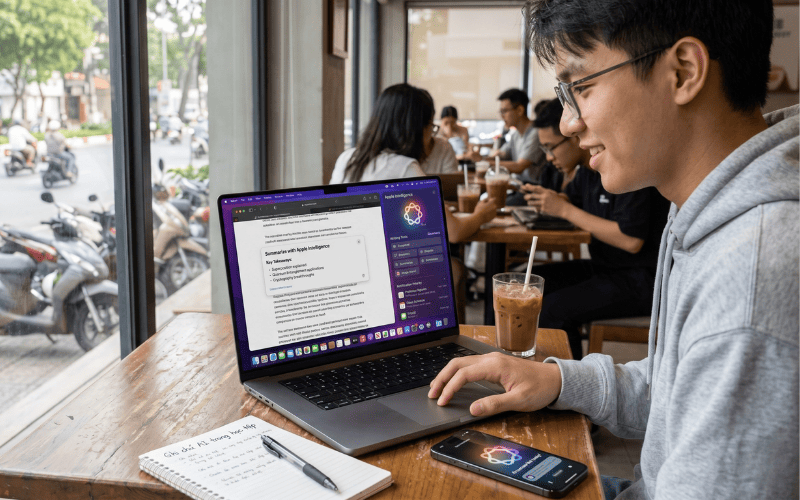
Current Macs use Apple silicon with integrated CPU, GPU, and Neural Engine components. They offer unified memory and close hardware-software integration, but memory generally cannot be upgraded after purchase. Apple Intelligence requires a Mac with Apple silicon, along with a supported macOS version, language, and region. A Mac can suit creative work and Apple-focused development, but CUDA-dependent workflows, Windows-only tools, and some games may point to Windows instead.
| Question | Windows | Mac |
|---|---|---|
| Hardware choice | Very broad range of processors, GPUs, sizes, and repair options | Smaller, tightly integrated Apple-silicon range |
| Local AI | Strong choice when software supports the selected GPU/NPU; verify x86 or Arm compatibility | Unified memory can help supported workflows; verify framework and model support |
| Gaming | Generally broader game and discrete-GPU support | Improving, but catalog and compatibility remain more limited |
| Upgrades | Varies widely by model | Memory is not user-upgradeable; choose capacity at purchase |
Common buying mistakes
- Paying for an AI label without naming a use case: Identify the features or applications you expect to run.
- Assuming more TOPS means a faster laptop: NPU throughput says little about CPU, GPU, storage, display, or cooling quality.
- Confusing an NPU with a powerful GPU: The processors are optimized for different workloads.
- Ignoring memory capacity: Local models, large media projects, and virtual machines can exceed 16GB quickly.
- Forgetting compatibility: Check operating system, processor architecture, drivers, plug-ins, frameworks, and peripherals.
- Relying on claimed maximum battery life: Look for tests using comparable settings and applications.
Checklist before you buy

- Write down the three most demanding applications you will run.
- Decide whether each AI feature is cloud-based, NPU-assisted, GPU-accelerated, or CPU-only.
- Confirm operating-system and processor-architecture compatibility.
- Check the NPU requirement only for features that need it.
- Match GPU video memory and system memory to real application requirements.
- Allow enough SSD space for models, source files, caches, and future updates.
- Compare sustained performance, battery tests, fan noise, display quality, and ports.
- Verify upgradeability, repair service, return policy, and warranty.
The best AI laptop is the one that runs your actual software well. For cloud AI and everyday work, a balanced conventional laptop may be enough. For Copilot+ features, choose hardware that meets Microsoft’s current requirements. For serious local AI, prioritize software compatibility, GPU or accelerator support, memory capacity, and cooling over the marketing label.
Related Articles
 How to Find and Download Computer Drivers in 3 Steps11 minutes read
 Do You Know How to Choose a Laptop to Buy?9 minutes read
 How to Stop Giving Terrible Advice: Step-by-Step Guide13 minutes read
 How to Buy a Laptop: Choose the Right Laptop for You14 minutes read
 Advice That Sounds Helpful but Can Actually Be Counterproductive6 minutes read
 How to Choose Laptop CPU That Meets the Needs (Part 2)14 minutes read
Reader Comments 0
Sign in with email or Google to join the discussion.