Table of Contents
This article provides a clear overview of Search Tips on Google, with the main facts, useful context, and practical details organized for easy reading.

To search on Google, just visit http://www. google. com.
Here are some Google search tips:
1. Remove a Word from the search results.
When using diacritical marks - Google will display all web pages containing keywords to search but not remove words.
Syntax
Syntax: Keywords - Words to remove.
- For example: Enter in the search box on Google the following keyword: soldering tin - machine. As a result, Google returns all websites that contain tin but not from the application that comes with the content.
2. Must necessarily contain a certain Word in the search results.
By using the + sign Google will find all webpages containing the search term and must include the required words in the search results.
Syntax
Syntax: Keywords + Words necessarily have.
- For example: Enter in the search box on Google keyword: soldering tin + machine. As a result, Google will return all the search values with the soldering iron included from the application required.
3. Display shortened keywords to search.
Use the asterisk * to represent a certain character when the search term is too long.
Syntax
Syntax: Keyword * Keyword.
- Example: Type in the search box on Google keywords: machine * tin. As a result, Google will return all search values from the soldering iron in the content.
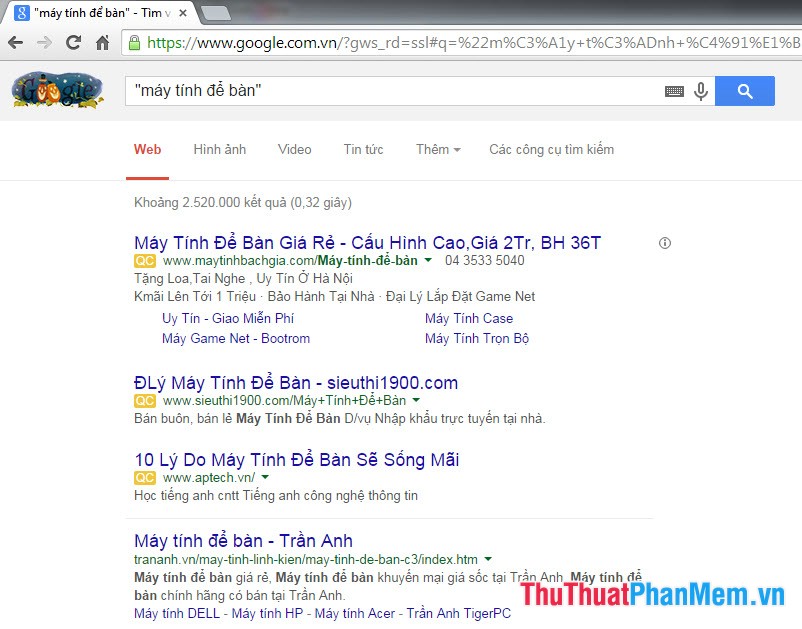
4. Find exact search keywords.
Use "" quotation marks to display exact results that contain the search term.
Syntax
Syntax: " Keyword ".
- For example: Enter in the search box on Google the keyword: " desktop ". As a result, Google will return all search values that contain from the desktop in the content.
5. Search for keywords based on site title.
Using the intitle parameter: Google will find out all webpages containing the title containing the keyword to search.
Syntax
Syntax: intitle: Keyword.
- For example: Enter in the Google search box keyword intitle: software tips. As a result, Google will return all search values containing the software tricks keyword on the site title.
6. Find keywords in a specific domain name.
By using the site parameter: Google will indicate pages containing keywords in a specified domain name without paying attention to the addresses of other websites.
Syntax
Syntax: Keyword site: Domain name
- Example: Type in the search box on the Google Keyword PDF site: PDF. vn. As a result, Google will return all search values containing the PDF keyword on the website PDF. vn.
7. Find keywords by in the address (URL) of the website.
Using the inurl parameter: Google will find web pages with link addresses that contain the key words.
Syntax
Syntax: inurl: Keyword.
- For example: Enter in the search box on the keyword inurl: truyenvui in Google. As a result, Google will return web pages that have the Word truyenvui in its link address.
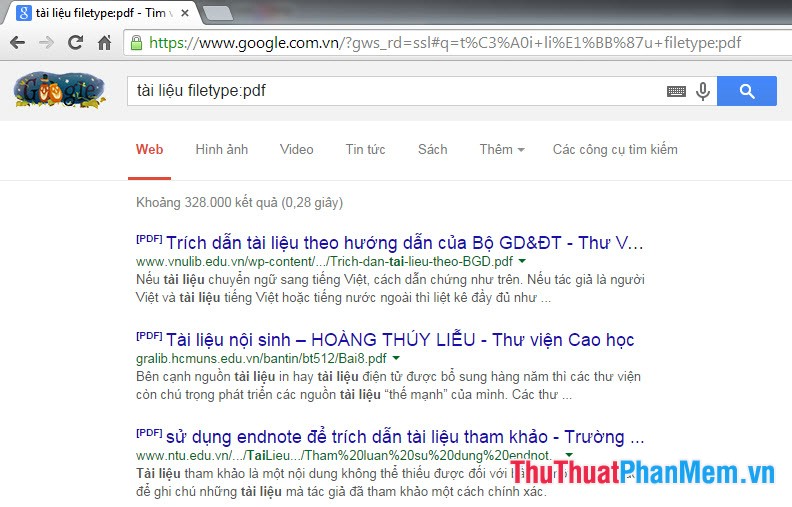
8. Find File: Using the filetype parameter.
Google will find webpages with the file with the specified extension and the same name as the keyword to search.
Syntax
Syntax: Keyword filetype: Extension.
- For example: Enter in the search box on Google keyword filetype document: PDF. As a result, Google will display all the files with the extension PDF as containing the Word document.
9. Search for web pages that contain related keywords.
Using the Interest parameter: Google will find sites with similar keywords.
Syntax
Syntax: related: Keyword.
- For example: Enter in the search box on Google keyword related: funny stories. As a result, Google will return all webpages related to jokes.
10. Find a website backup.
By cache parameter: Google will find the website has stopped working, but it is still stored in Google's database.
Syntax
Syntax: cache: website.
- For example: Enter in the search box on Google keyword cache: www. haivl. com As a result, Google will find the homepage of the website haivl. com has been stored in the Google database.
11. See the link address of the website.
Using the link parameter: will know which websites have links to your websites or from certain websites.
Syntax
Syntax: link: The name of the website to search.
- For example: Enter in the search box on Google the keyword link: dantri. com. vn. As a result, Google will show you all websites that link to dantri. com. vn.
12. Combine the parameters together.
Use one of the above parameters or combine multiple parameters at the same time to return results with high accuracy of the key Word.
- For example: Enter in the Google search box the keyword graphic computer filetype: PDF site: tailieu. vn. As a result, Google will return results in. PDF format files with computer graphic content on dlu. edu. vn website.
FAQ
What is the main focus of Search Tips on Google?
The article explains the most important facts, context, and practical details related to Search Tips on Google.
Who may find this information useful?
It is useful for readers who want a clear overview, practical context, and a better understanding of the subject.
What should readers verify before taking action?
Check current product versions, official requirements, regional availability, and any details that may have changed since the original publication.
Related Articles
 The Fast Google Search Tips You Should Know16 minutes read
 20 'Tips' Use Google Search Effectively, Not Everyone Knows (Part 1)11 minutes read
 20 'Tips' Use Google Search Effectively, Not Everyone Knows (Part5 minutes read
 20 Great Google Search Tips7 minutes read
 This Is the Most Effective Way to Search on Google2 minutes read
 Useful Google Search Tips You Can't Miss7 minutes read
Reader Comments 0
Sign in with email or Google to join the discussion.