Table of Contents
Interesting Secret Right on Google's Search Engine is easier to understand when the core ideas are paired with practical examples. The sections below explain the topic clearly, highlight useful steps, and point out details that can prevent common errors.
Well-known as a company that likes to tease users, Google always hides secrets inside its services. Recently, a secret has just been found in Google's search engine, which seems to welcome the upcoming Christmas and New Year.
Accordingly, when you search for ' let it snow ' (with or without quotes) on Google, the results will return as usual, but with the images of snowflakes falling on it. screen.

In addition to falling snowflakes, the steam effect will appear on the browser screen, creating a chilling feeling caused by snowflakes, similar to steam on the glass doors in cold winters.
Wait a moment, after the steam effect fills the screen, you will feel the browser screen become blurred. You can then left-click and move on the screen to create drawings, similar to using your finger to swipe up on the steam-filled mirror.
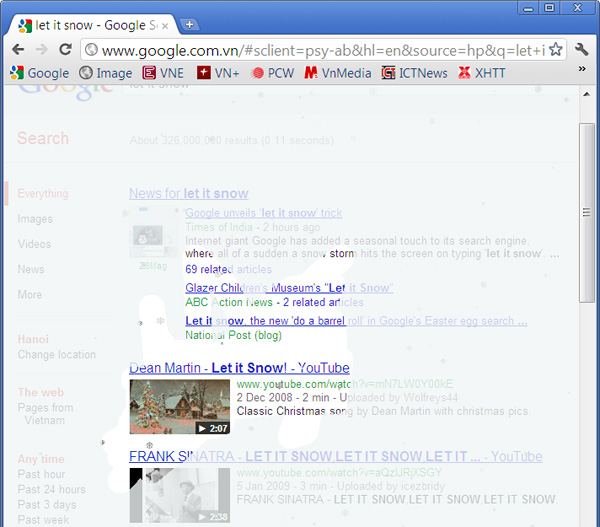
To discover this unique secret of Google, you need to use an HTML5-enabled web browser (like Chrome, Firefox and IE9), however, it's best to use Google's own Chrome browser.
This is not the only interesting secret on Google's search engine. Also, when you enter the phrase ' do a barrel roll ' (not using double quotation marks) in the Google search box and press Enter, immediately, the search results page will appear then. rotate 1 round first when in steady state.

FAQ
What is Interesting Secret Right on Google's Search Engine?
Well-known as a company that likes to tease users, Google always hides secrets inside its services.
Why is Interesting Secret Right on Google's Search Engine important?
A clear understanding of Interesting Secret Right on Google's Search Engine helps you make informed decisions, avoid common mistakes, and use the relevant tools or techniques more effectively.
How should beginners approach Interesting Secret Right on Google's Search Engine?
Start with the fundamental concepts, follow the examples step by step, and test each change in a safe environment before applying it to important systems or data.
Related Articles
 Interesting Search Engines on Google That You May Not Know Yet10 minutes read
 How to Add Custom Search Engine in Thunderbird5 minutes read
 Search Engine Explained9 minutes read
 How to Change Perplexity as Edge's Default Search Engine3 minutes read
 The Trick to Changing the Search Engine Safari Browser on Mac OS X3 minutes read
 Apple Developed Its Own Search Engine for the iPhone6 minutes read
Reader Comments 0
Sign in with email or Google to join the discussion.