Table of Contents
This updated guide explains how to Blocking Ads on Yahoo Messenger through clear steps, practical examples, and important checks that help prevent common errors.
When you open the chat window with your friends, a popup will appear covering the chat frame and it takes a few seconds for the ad to disappear.

This article will help you block Yahoo! Messenger.
Method 1: Edit the Hosts File of the Computer.
Step 1: Open Windows Explorer, find the path: C: WindowsSystem32driversetc .
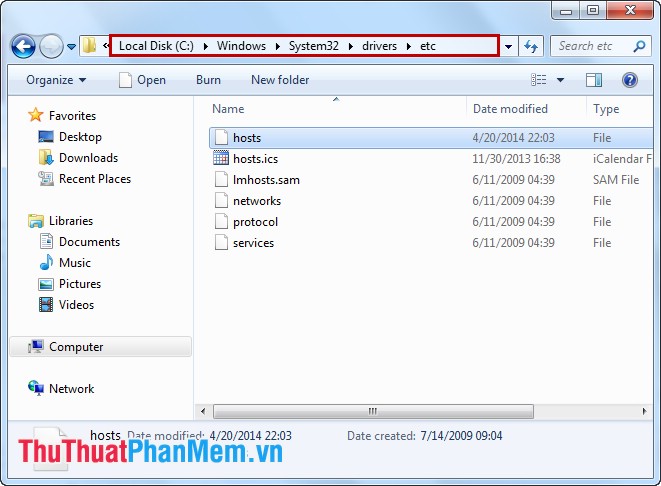
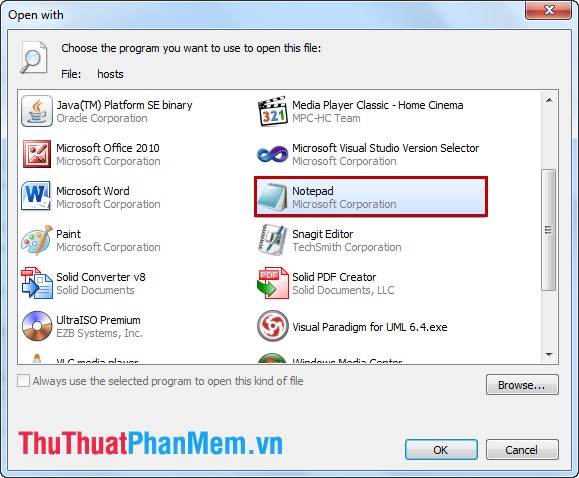
Step 2: Right-click the hosts file, select Open with -> Notepad .
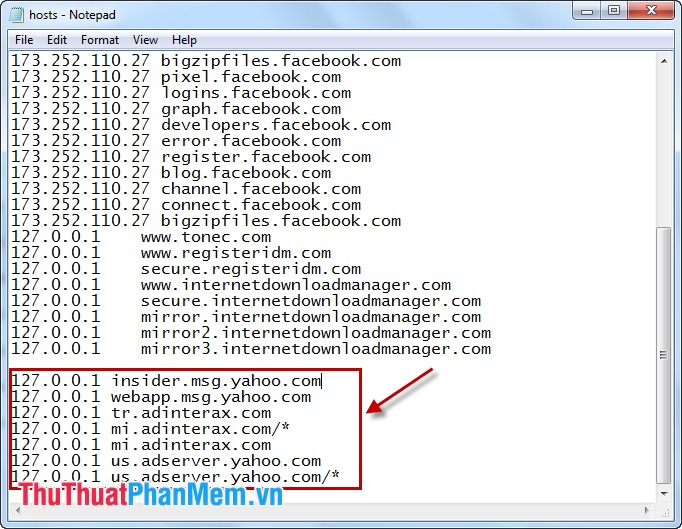
Add to the end of the following IP segment:
127.0.0.1 insider. msg. yahoo. com
127.0.0.1 webapp. msg. yahoo. com
127.0.0.1 tr. adinterax. com
127.0.0.1 mi. adinterax. com/*
127.0.0.1 mi. adinterax. com
127.0.0.1 us. adserver. yahoo. com
127.0.0.1 us. adserver. yahoo. com/*
Then save the hosts file.
Quit completely Yahoo! Messenger from the system tray and log in again.
Method 2: Set Up Popup Blocking Configuration in Internet Options.
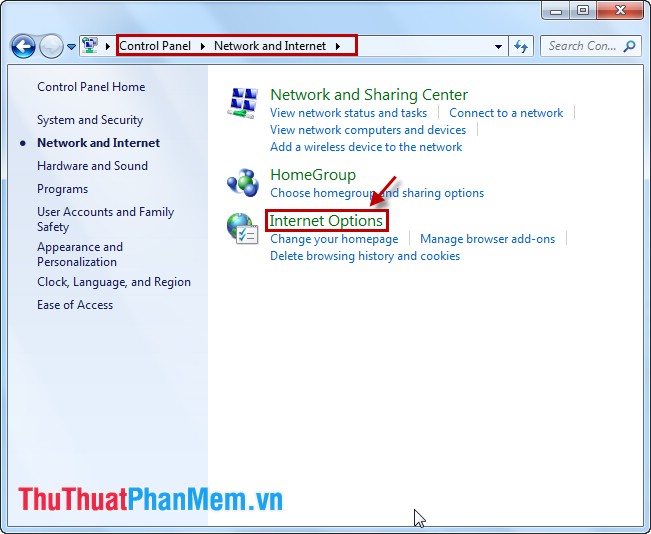
Step 1: Go to Control Panel -> Network and Internet -> Internet Options .
Step 2: Select the Security tab, select Restricted sites and click the Sites button.
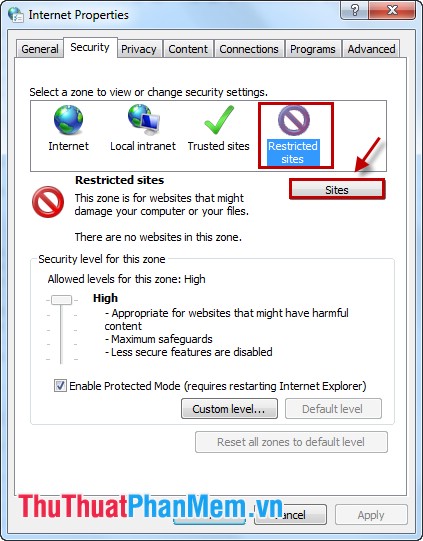
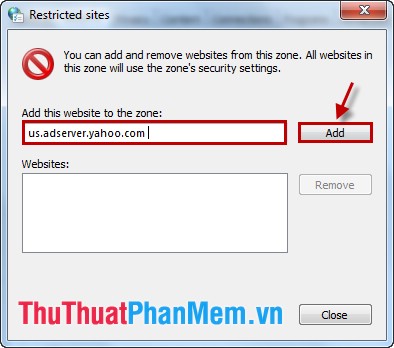
Step 3: In the Restricteb sites dialog box, enter us. adserver. yahoo. com in the Add this website to the zone box and then click Add . Click Close to close the dialog box.
You can log in to Yahoo! Messenger to check.
Also you can use software to block popup ads like AdFender.
With the above ways to block Yahoo popup ads, please choose a way to block. From now on you will no longer be annoyed because popup will no longer appear, you can freely chat with people.
FAQ
What is the easiest way to Blocking Ads on Yahoo Messenger?
Start with the requirements in this guide, then follow each step in order. Check the result after every major change so problems are easier to identify.
Can beginners follow these instructions?
Yes. The process is organized into practical steps, and you can repeat any step before moving forward.
What should I check if the method does not work?
Confirm your software or device version, permissions, settings, file format, and internet connection when the task depends on online services.
Related Articles
 The Images Are Only in the Memory of Yahoo Messenger4 minutes read
 Goodbye Yahoo! Messenger, a Time to Remember!2 minutes read
 How to Use the New Yahoo Messenger Version Does Not Install the6 minutes read
 Yahoo Chat Software Will Remove Many Features on December 144 minutes read
 Viruses Spread Through Yahoo! Messenger Re-exported2 minutes read
 Computer: New Worms Appear to Attack Both Yahoo! Messenger, Skype4 minutes read
Reader Comments 0
Sign in with email or Google to join the discussion.