Table of Contents
This guide covers Samsung series 9 second generation with practical context and easy-to-follow details. Use it to understand the subject and apply the information confidently.
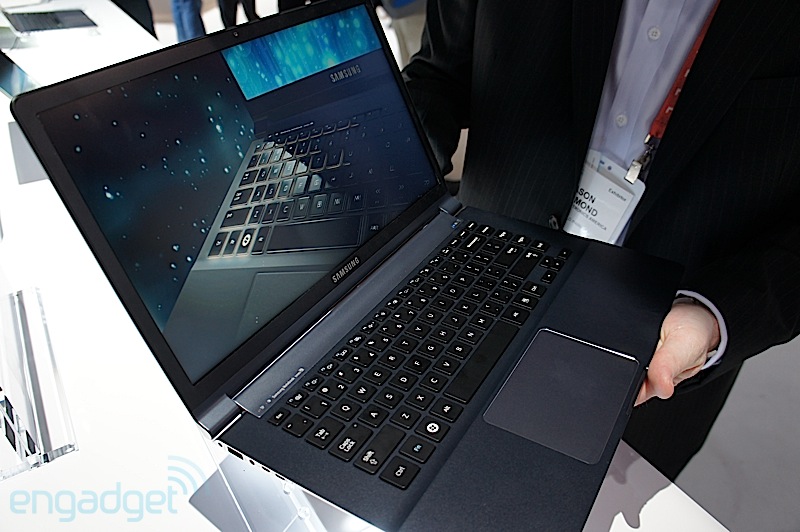 The second generation Samsung Series 9 has 180% brighter screen Photo: Engadget.
Samsung has introduced two Samsung Series 9 laptops with 13-inch and 15-inch screen sizes respectively for $ 1, 399 and $ 1, 499 respectively. Both models will be available in February this year.
Second-generation Series 9 laptop Uses Intel Core i3 / i5 processor, 8GB maximum RAM with 128GB / 256GB SSD. Both 13-inch and 15-inch models have a boot time of just 9. 8 seconds and re-open from the standby mode of 1. 4 seconds. The 15-inch model weighs 1. 58 kg, the thickness is 1. 48 cm and the operating time can be up to 10 hours.
The manufacturer uses HD + SuperBright Plus Technology for its 1, 600 x 900 resolution screen. This helps the company's new product to be 180% brighter than the first generation 9 Series. In addition, the new Samsung Series 9 screen is also coated with an anti-reflective coating and has a viewing angle of up to 160 degrees. All have the ability to adjust the light intensity to suit the surrounding environment.
Official Photos of Samsung Series 9
FAQ
What should I check before following these steps?
Confirm device and software compatibility, save important data, and make sure you have the required permissions, files, and account access.
Why might the process not work?
Common causes include outdated software, missing permissions, incompatible hardware, an unstable connection, or completing a step in the wrong order.
Can I undo the changes if necessary?
That depends on the tool or setting. Use built-in restore options when available, keep a backup, and record the original configuration first.
Related Articles
 Samsung Raised the Level of 'Terrible' for Series 93 minutes read
 Samsung Series 9 Premium Upgrades the Full HD Screen3 minutes read
 The First Ivy Bridge Ultrabook of Samsung in Vietnam4 minutes read
 How to Replace a Broken Laptop Screen4 minutes read
 Samsung Series 9 Screen Is Comparable to Retina3 minutes read
 Samsung Introduced Series 2, 4 and 6 Laptops4 minutes read
Reader Comments 0
Sign in with email or Google to join the discussion.