Table of Contents
This guide covers Samsung raised the level of 'terrible' for series 9 with practical context and easy-to-follow details. Use it to understand the subject and apply the information confidently.
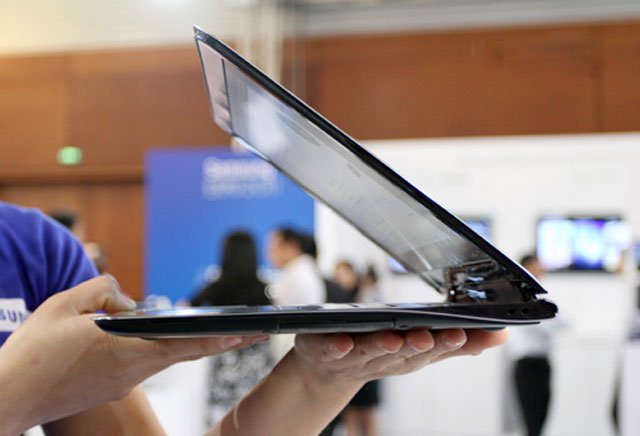 Samsung Series 9 in Vietnam. ( Photo: Tuan Hung).
Three months after its first introduction, Samsung today continues to add more powerful configuration options to the Series 9, a 13-inch screen and two options for an 11-inch screen model.
The larger screen model will have the most advanced configuration with Core i7 processor, 256GB SSD (up from 128GB previously) and maximum 6GB RAM. The 11-inch screen model also began to appear with two optional configurations with prices starting from $ 1, 050.
Here are the detailed specifications for the 5 new configurations of the Series:
Configuration of 11 inch screen version:
* NP900X1B-A01US (1, 249 USD) Intel Core i3-2357M, 4 GB RAM, 128 GB SSD. * NP900X1B-A02US (1, 049 USD) Intel Core i3-2357M, 2 GB RAM, 64GB SSD.
Configure the 13-inch screen:
* NP900X3A-A05US ($ 2, 049) Intel Core i7-2617M, 6GB RAM, 256GB SSD. * NP900X3A-B02US (1, 649 USD) Intel Core i5-2467M, 4 GB RAM, 256 GB SSD. * NP900X3A-B01US (1, 349 USD) Intel Core i5-2467M, 4 GB RAM, 128 GB SSD.
In Vietnam, Samsung has sold series 9 with configuration including Core i5-2537M chip speed of 1. 4 GHz, 4GB RAM, 128 GB SSD drive, 13 inch screen costing 34. 9 million.
FAQ
What should I check before following these steps?
Confirm device and software compatibility, save important data, and make sure you have the required permissions, files, and account access.
Why might the process not work?
Common causes include outdated software, missing permissions, incompatible hardware, an unstable connection, or completing a step in the wrong order.
Can I undo the changes if necessary?
That depends on the tool or setting. Use built-in restore options when available, keep a backup, and record the original configuration first.
Related Articles
 Samsung Series 9 Screen Is Comparable to Retina3 minutes read
 Samsung Introduced Series 2, 4 and 6 Laptops4 minutes read
 Galaxy a Series 2021: New Product, Using the Same Strategy7 minutes read
 Samsung Series 9 Second Generation3 minutes read
 Samsung's Galaxy Tab S11 Series Makes Buying an iPad a Tough Decision5 minutes read
 Samsung Series 9 Premium Upgrades the Full HD Screen3 minutes read
Reader Comments 0
Sign in with email or Google to join the discussion.