Table of Contents
This guide covers Samsung redesigned the series 3 chromebox with practical context and easy-to-follow details. Use it to understand the subject and apply the information confidently.
According to SlashGear on 3. 1, this model is codenamed XE300M22-B01US, keeping the configuration as compared to the first version announced by Samsung in May 2012, including Intel Celeron B840 1. 9 GHz processor, 4 GB RAM, 16 GB SSD and integrated Intel HD graphics.
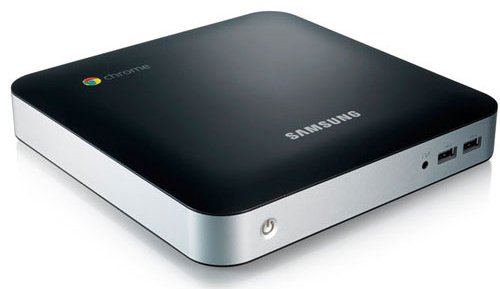 Old design of the machine.
And new design
Samsung's website does not mention a device with a Bluetooth connection. However, according to some UK retailers, the device will be equipped with Bluetooth 3. 0.
The difference of the new Series 3 Chromebox is that it has a white plastic case, which looks more rounded than the previous version. In addition, Samsung has added a small cover to cover the connection ports on the front.
In the immediate future, this version will be sold in the UK market and then to the US market.
FAQ
What should I check before following these steps?
Confirm device and software compatibility, save important data, and make sure you have the required permissions, files, and account access.
Why might the process not work?
Common causes include outdated software, missing permissions, incompatible hardware, an unstable connection, or completing a step in the wrong order.
Can I undo the changes if necessary?
That depends on the tool or setting. Use built-in restore options when available, keep a backup, and record the original configuration first.
Related Articles
 Samsung Out of Chromebox Competes with Mac Mini3 minutes read
 'Beat the Box' Samsung Chromebox Series 33 minutes read
 Samsung Upgraded Hardware for Chrome-based Computers3 minutes read
 Galaxy Tab S6 Lite Exposes Render: Design Similar to the Tab S63 minutes read
 Samsung Raised the Level of 'Terrible' for Series 93 minutes read
 Samsung Series 9 Screen Is Comparable to Retina3 minutes read
Reader Comments 0
Sign in with email or Google to join the discussion.