Table of Contents
This guide covers 'beat the box' Samsung chromebox series 3 with practical context and easy-to-follow details. Use it to understand the subject and apply the information confidently.
>>> Samsung out of Chromebox competes with Mac Mini
Samsung Chromebox Series 3 starts selling in the US market this month. The device has a price of 329 USD with configuration including Intel Celeron 867 speed 1. 3 GHz (Sandy Bridge platform), 4 GB RAM, 16 GB SSD hard drive. It has standard Wi-Fi connectivity and Bluetooth 3. 0 and connects to 3G networks of Qualcomm Gobi 3G (EV-DO / EDGE / HSPA). This product also has a DVI connector.
The Chromebox Series 3 runs Google's Chrome operating system in its 19th version. This is an operating system based on the Chrome browser and works almost always with an Internet connection. The device will store data mainly on the server online and help users to access data anytime, anywhere.
Below is a picture of Samsung Series 3 Chromebox box.
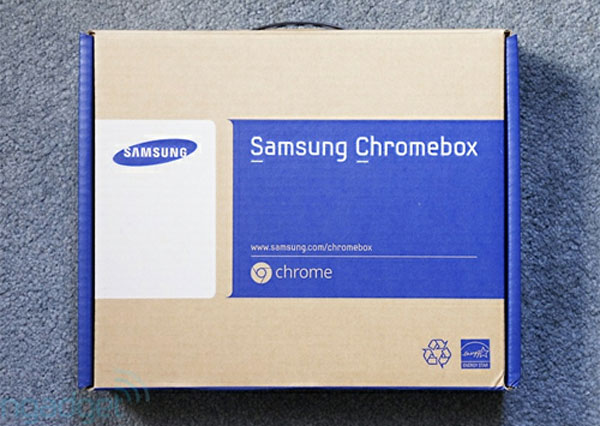 Chromebox Series 3 carrying case.
Accessories included with power cord and machine.
The device has a simple design with the Samsung and Chrome logo in front.
Bottom product.
The front edge has a power button, power jack and two USB 2. 0 ports.
Next to the Intel processor logo.
Behind the device are power jacks, kenshington, DVI, LAN, USB keys
Take shape with Mac Mini.
Inside the product.
FAQ
What should I check before following these steps?
Confirm device and software compatibility, save important data, and make sure you have the required permissions, files, and account access.
Why might the process not work?
Common causes include outdated software, missing permissions, incompatible hardware, an unstable connection, or completing a step in the wrong order.
Can I undo the changes if necessary?
That depends on the tool or setting. Use built-in restore options when available, keep a backup, and record the original configuration first.
Related Articles
 Samsung Out of Chromebox Competes with Mac Mini3 minutes read
 Samsung Redesigned the Series 3 Chromebox3 minutes read
 Samsung Upgraded Hardware for Chrome-based Computers3 minutes read
 Samsung Raised the Level of 'Terrible' for Series 93 minutes read
 Samsung Features That Make People Wonder Why Other Phones Exist9 minutes read
 Samsung Series 9 Screen Is Comparable to Retina3 minutes read
Reader Comments 0
Sign in with email or Google to join the discussion.