Table of Contents
This guide provides a clear, practical overview of review d-link dir-822: cheap Wi-Fi router for home, with useful context, important details, and straightforward takeaways for everyday readers.
Who is the D-Link DIR-822 AC1200 for?
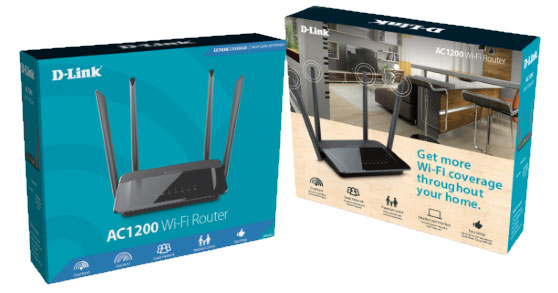
The D-Link DIR-822 is the right choice for:
- The apartment has a small area and the amount of equipment is not too large
- People on a low budget
- User does not need a USB port on the router and advanced networking features
Advantages and disadvantages of the D-Link DIR-822
Advantages
- Very affordable price (about 690,000 VND)
- Can be mounted on the wall
- Provides support for modern 802.11ac and MU-MIMO 2 × 2 transmission capabilities
- Good performance on 2.4GHz band
Defect
- There is no USB port
- WiFi has dramatically reduced performance, affecting the quality of your network experience
- WiFi performance on the 5GHz band is much lower than that of the competition
- An Internet connection faster than 100Mbps cannot be used
- Ethernet ports operate at up to 100Mbps
- It is difficult to configure when compared to routers from other brands
- D-Link uses poor security methods on the Easy Setup page
Specifications and hardware design

The D-Link DIR-822 features a single-core Realtek RTL8197DL processor running at 660MHz, 64MB of RAM, and just 8MB of storage for firmware. This processor provides support for the latest 802.11ac wireless standard and MU-MIMO 2 × 2 transmission capability.
This is a dual-band router, with a maximum theoretical bandwidth of 300Mbps for the 2.4GHz band and 867Mbps for the 5GHz wireless band. The D-Link DIR-822 features 4 integral external antennas that just move to the location you want. At the top, you also have LEDs for the status of the Internet connection, two wireless networks on broadcast, and Ethernet ports on the back of the router.
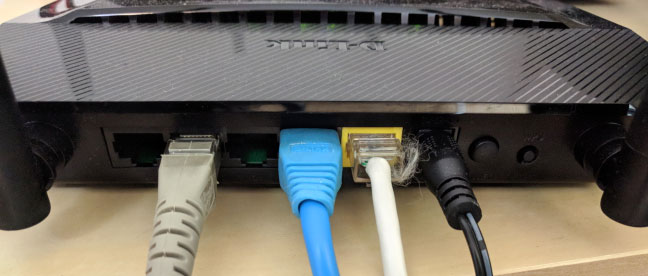
At the bottom, there are a few holes for you to hang this router on the wall. On the back panel, there are 4 LAN ports operating at maximum 100Mbps and the port that connects the router to the Internet. There, you have the power connector, the power button, and the WPS button.
In terms of size, the D-Link DIR-822 is quite small (190 x 133 x 38mm) and also weighs only 263 grams.
Conclude
The D-Link DIR-822 AC1200 is an affordable dual-band wireless router. As a result, it doesn't boast powerful hardware or advanced features. It was surprising to see that WiFi on the 2.4GHz band was quite fast for the AC1200 wireless router.
However, WiFi signal drops in performance dramatically, and WiFi on the 5GHz band tends to be much slower than other wireless routers. Also, the user interface for managing this router is old and difficult to use. For the same price, you get better options, and I recommend choosing a different wireless router.
Key Takeaways
Use the information above as a practical reference for review d-link dir-822: cheap Wi-Fi router for home. Review each step carefully, confirm any requirements, and choose the option that best fits your situation.
FAQ
What does this guide explain about Review D-link Dir-822: Cheap Wi-Fi Router for Home?
It explains the main concepts, practical considerations, and useful steps related to review d-link dir-822: cheap Wi-Fi router for home without requiring advanced knowledge.
Who can benefit from learning about Review D-link Dir-822: Cheap Wi-Fi Router for Home?
This information is useful for readers who want a clear overview, practical guidance, and reliable steps related to review d-link dir-822: cheap Wi-Fi router for home.
What should I check before applying this information?
Review the requirements, confirm that your device, software, or situation matches the instructions, and back up important data before making major changes.
Related Articles
 Top 7 Cheap Wi-Fi Routers in 201810 minutes read
 Review Tp-link Tl-wr840n: Feature-rich Wireless-n Wi-Fi7 minutes read
 How to Create and Add TP-Link ID to TP-Link WiFi 6 Router: Clear Instructions9 minutes read
 Review Tp-link Archer C50: Cheap Router with Attractive Design6 minutes read
 Tp-link Archer AX6000 Review: Lightning Fast Wi-Fi Router8 minutes read
 2 Ways to Set up Tp-link Wi-Fi 6 . Router16 minutes read
Reader Comments 0
Sign in with email or Google to join the discussion.