Table of Contents
When a generated Sheets canvas is mostly right, describe the one change you want instead of asking Gemini to “make it better.” A useful follow-up request names the target, states the change, lists what should stay the same, and gives you a quick way to check the result. This approach is especially valuable for dashboards where a small visual fix must not alter the underlying data.
Why a broad request can change too much
“Make the calendar cleaner” could mean fewer fields, more whitespace, different colors, or a new layout. If the request leaves those choices open, the result may change parts you already liked. First decide whether the issue is a label, color, chart, filter, data field, or layout. Then name the specific component in your next prompt.
Here is the canvas shown in the original lesson:
Write a prompt with four parts
- Scope: identify the exact card, chart, column, or filter.
- Change: give the replacement text or behavior.
- Keep: list the working elements and source data that must remain intact.
- Check: state what you will inspect to accept the edit.
For example, a customer tracker needs only a card heading changed:
In the existing customer tracker, change only the heading on each customer card to “Customer Name — Status.” Keep the columns, card colors, filters, and source sheet unchanged. Do not add fields. After the edit, every card should show the new heading, and the existing status colors and filters should still work.
This instruction is easier to check than “improve the dashboard.” It also makes the data boundary explicit. When you change a chart type, identify the particular chart and the data range it should keep. TipsMake has a related walkthrough on creating and adjusting charts in Sheets.
Check the result before asking for another change
Compare the requested component with its previous state, then test the parts named in the “keep” instruction. For a customer tracker, check a few cards, change a filter, and confirm that the source sheet's rows and IDs still match. If you added a row through the canvas, inspect the underlying sheet for missing or duplicate values rather than assuming the view and the data stayed synchronized.
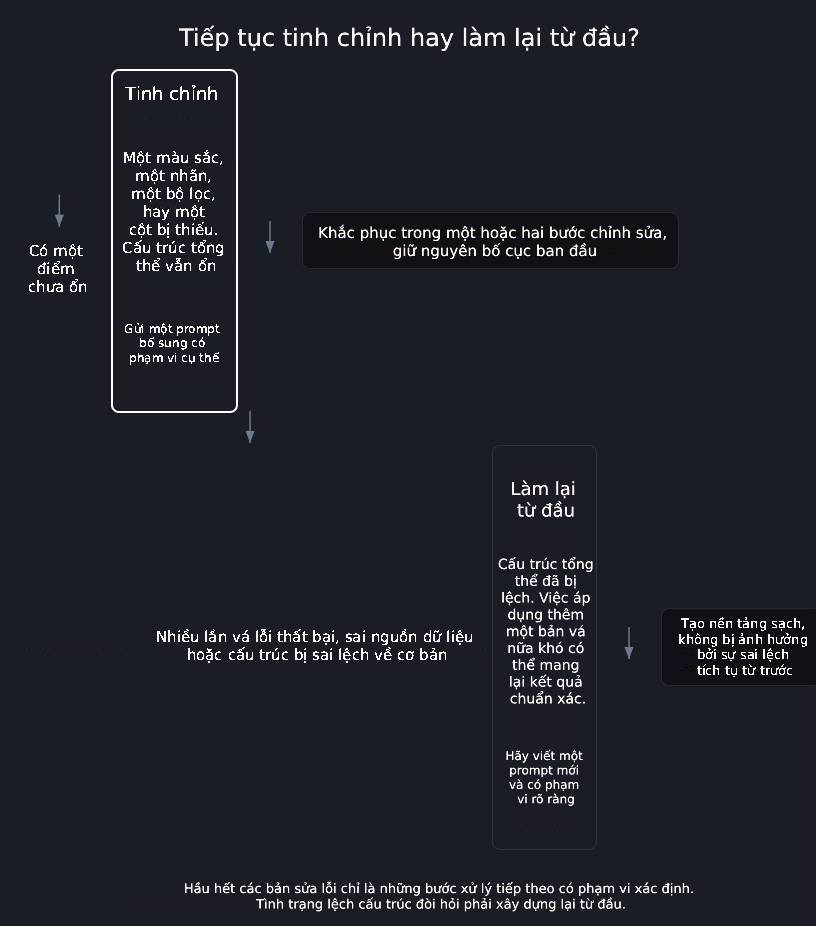
If the edit changed unrelated parts, make one corrective request naming those parts. If the entire data source or layout is wrong, make a copy of the working spreadsheet and rebuild from a clearer starting description. There is no fixed number of retries that makes rebuilding necessary; judge the scope of the damage and the effort to correct it.
A reusable follow-up template
In my existing [canvas or dashboard], change only [specific component]. Replace [current state] with [desired state]. Keep [working elements, filters, source range, and data fields] unchanged. Do not [unwanted action]. I will accept the result when [one observable check] and [one data or behavior check] both pass.
Use the template for one change at a time. If you are still setting up Gemini in Sheets, read TipsMake's guide to Gemini in Google Sheets for the broader workflow. Feature names and availability may differ by account and product version.
Check your understanding
-
Question 1:
A canvas has changed so much from your original description—wrong data source, wrong overall structure, multiple failed additional edits—that another additional statement probably won't fix it. What should you do?
EXPLAIN:
The iterative editing process also has its limitations in terms of efficiency. When the structure of the canvas is already distorted—not just in terms of color or stickers—rebuilding from scratch with clear scope is often quicker and cleaner than continuing to patch on an already flawed foundation.
-
Question 2:
Which additional statement is most likely to change exactly what you want, based on the "scope + change + element to remain + condition to accept" model learned in this lesson?
EXPLAIN:
The third option identifies the exact header, the replacement text, the parts to preserve, and a way to verify the result. The other three options are too general, forcing Gemini to guess the scope – precisely the type of statement that causes unintended side effects.
-
Question 3:
Why might a generic follow-up request like "make it cleaner and more modern" often change parts of the canvas that you didn't request to edit?
EXPLAIN:
The request leaves the target component and meaning of “cleaner” open to interpretation. A narrower instruction gives the tool a better chance of changing only the intended part.
Related Articles
 Learn About Google Sheets' AI() Function: Converting Prompts into Results7 minutes read
 Tricks Using Google Sheets Should Not Be Ignored7 minutes read
 How to Create Graphs, Charts in Google Sheets5 minutes read
 Google Sheets: Things You Need to Know Before Using It6 minutes read
 How to Align Spreadsheets Before Printing on Google Sheets3 minutes read
 Familiarize Yourself with Spreadsheets, Rows, Columns, and Cells11 minutes read
Reader Comments 0
Sign in with email or Google to join the discussion.