Table of Contents
Play Together may reject an ordinary space in a character name, but some versions accept selected Unicode spacing characters. Copy a complete example below, replace the letters with your own name, and test it in the nickname field. Character rules can change, so there is no guarantee that every symbol will work on every server or game version.
Copyable Play Together spacing examples
The characters between Q, T, and M are different even when they look similar. Copy the text from the Example column rather than typing a normal space.
| Character | Example to copy | Code point | What to expect |
|---|---|---|---|
| Ordinary space | Q T M | U+0020 | Most likely to be trimmed or rejected |
| No-break space | Q T M | U+00A0 | Looks like a normal space; may be normalized |
| Em space | Q T M | U+2003 | Wide visible spacing |
| Three-per-em space | Q T M | U+2004 | Medium visible spacing |
| Figure space | Q T M | U+2007 | Digit-width spacing in many fonts |
| Thin space | Q T M | U+2009 | Subtle visible separation |
| Hair space | Q T M | U+200A | Very narrow separation |
| Ideographic space | Q T M | U+3000 | Full-width spacing |
| Zero-width non-joiner | QTM | U+200C | Invisible formatting character, not a true space |
Some copied text may look unchanged because the character is narrow or invisible. Paste it into a plain-text editor and move the cursor with the arrow keys if you need to confirm that it is present.
Change the nickname in Play Together
- Create the complete name in a notes app using one spacing example above. Keep a readable backup such as Quiet_Tiger.
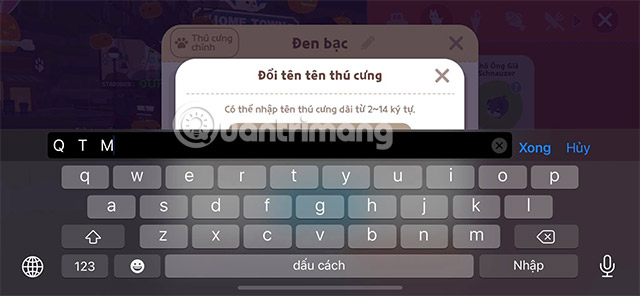
- Open Play Together and go to the profile or character-name editing screen. The exact menu label may differ by app version.
- Copy the prepared name and paste it into the nickname field.
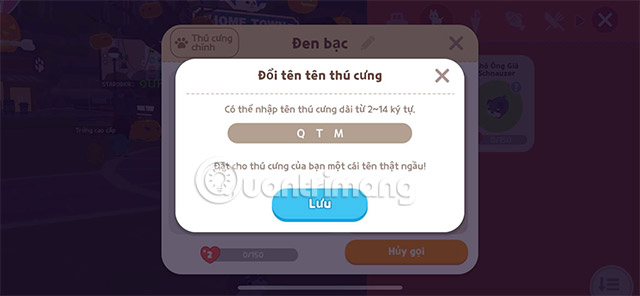
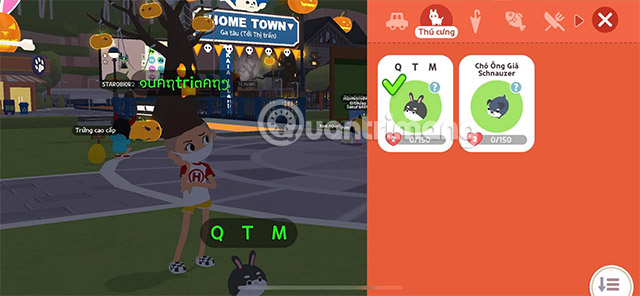
- Check the preview carefully. Make sure the name is not truncated, converted to boxes, or reduced to an apparently blank string.
- Select Save or the equivalent confirmation button only when the result is readable and accepted.
If the space character is rejected
- Try a shorter name; the game may count Unicode characters toward its length limit.
- Remove characters one at a time to identify which symbol is blocked.
- Use an underscore (_) or hyphen (-) instead of trying to bypass a naming filter.
- Update the game and retry only if the name still follows the current rules.
- Do not repeatedly spend a rename item or in-game currency while testing. Prepare and verify the text before confirming.
Why a fully invisible name is a bad idea
An apparently blank nickname can make it difficult for friends to search for, invite, report, or distinguish the account. It can also confuse screen readers and other accessibility tools. Moderation systems may remove invisible formatting characters or treat them as an attempt to evade name rules.
A spaced but readable name is usually the better compromise. Keep at least a few visible letters, avoid impersonating another player, and follow Play Together's current nickname and community rules.
Unicode details that prevent confusion
Not every invisible character is a space. For example, U+200C is a zero-width non-joiner used in text shaping, while U+200E is a left-to-right mark used for bidirectional text. Calling either one “blank space” is technically inaccurate. Games may remove formatting marks for security, search consistency, or moderation.
Font support also varies. A character that appears blank on one phone can display as a box or create different spacing on another device. Ask a friend to view the saved name on a different phone before relying on a decorative Unicode style.
Related Articles
 How to Download and Play Kerbal Space Program PC for Free3 minutes read
 Admire 10 Priceless Photos Taken by Nasa's Spitzer Telescope15 minutes read
 Unique New Rockets Can Enter Space in Just 5 Minutes2 minutes read
 Review Space Haven: Going into a Vast Universe14 minutes read
 5 Ways to Fix 'Insufficient Space Downloading Error' on Android5 minutes read
 Why Is the Strongest Super Typhoon of 2025 Named Ragasa: Explained7 minutes read
Reader Comments 0
Sign in with email or Google to join the discussion.