Table of Contents
This updated guide examines New USB 4 Standard Specifications: 8 Times the Speed of USB 3.0 and organizes the essential facts, background, and practical takeaways in clear American English.
The USB 4 standard has 3 major improvements over USB 3:
Faster speed
Compared with the latest USB 3.2 standard, the USB 4 standard has a data transfer rate of double, 40Gb / s (about 5GB / s). This is 8 times faster than the original USB 3.0 standard.
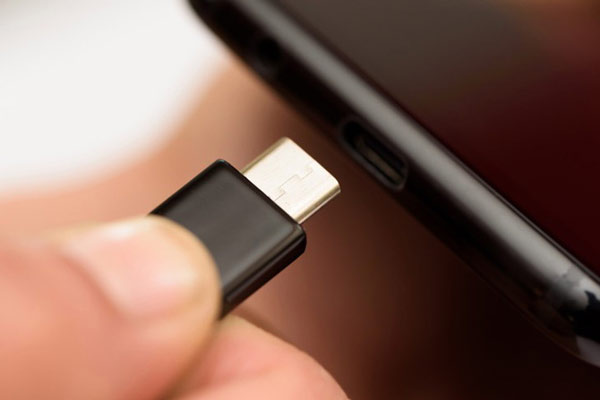
Thunderbolt 3 compatibility
Thunderbolt 3 is Intel's proprietary USB 3 standard, only available on Intel or licensed manufacturers' boards. However, Intel is currently licensing the Thunderbolt 3 specifications for free, so the device or USB 4 connection cable starting to be manufactured can be compatible with Intel's Thunderbolt 3 standard.

Improve the separation of data and video signals
The USB 3 standard allows using a single cable to send data, power and video signals at the same time, but sometimes the speed will be greatly reduced or it may only send one depending on how you set it up.. With the USB 4 standard, this limitation will improve a lot better.
The USB 4 standard still uses the same connector type as USB 3 instead of changing to a new connector.
Specifications for the USB 4 standard are available, but we still don't know when a USB 4 device will appear.
- Black Shark launched the cool design room, capacity 10,000mAh, price only 390 thousand
FAQ
What is New USB 4 Standard Specifications: 8 Times the Speed of USB 3.0 about?
It provides a structured overview of new usb standard, explains the main context, and highlights practical takeaways for readers.
Why does this topic matter?
Understanding the main concepts helps readers evaluate the issue, avoid common mistakes, and make better-informed decisions.
How should readers use this information?
Use the guidance as a practical starting point, confirm details that may have changed, and follow current product, safety, or security recommendations.
Related Articles
 USB 3.0 Has a Lot More to Offer Than 4.8 Gb // S3 minutes read
 Transfer 1 GB of Data in 3 Seconds with USB 3.03 minutes read
 What Is the Maximum Data Transfer Speed That USB-C Can Achieve?7 minutes read
 How to Calculate Data Transfer Speed: Complete Guide7 minutes read
 Transfer Data Between Computers14 minutes read
 Intel Is About to Launch a New Wi-Fi Chip That Makes Web Browsing Speed Unbelievably Fast3 minutes read
Reader Comments 0
Sign in with email or Google to join the discussion.