Table of Contents
Transfer 1 GB of Data in 3 Seconds with USB 3.0 is easier to understand when the core ideas are paired with practical examples. The sections below explain the topic clearly, highlight useful steps, and point out details that can prevent common errors.
Specifications for the new generation connectivity standard, which delivers file transfer speeds up to 10 times faster than USB 2.0, have been completed and manufacturers are starting to experiment to include in new products. Jeff Ravencraft, President of USB Implementers Forum (USB-IF), said that the current speed of the USB standard has been enough to satisfy users, but generation 3.0 will excel on mobile products or to copy multimedia content, large capacity like video.
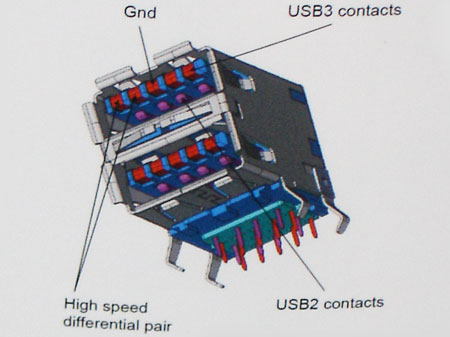
Flash storage with port 3.0 only takes 3.3 seconds to copy 1 gigabyte of data, compared with 33 seconds of standard 2.0. That is, in one minute the device can transmit two full-length movies. The new specification also includes the ability to save battery power: USB 3.0 devices that are plugged into laptops, digital cameras. will automatically switch to inactive mode (sleep mode) if not used. Products equipped with a new USB standard will appear in 2010, first with devices using flash storage technology. Microsoft insists that it will be included in subsequent operating systems, but does not say whether it will support immediately from the Windows 7 version. An average of 2.5 billion devices with USB ports are shipped every year, so USB 3.0 will still be compatible with 2.0 connections.
FAQ
What is Transfer 1 GB of Data in 3 Seconds with USB 3.0?
Specifications for the new generation connectivity standard, which delivers file transfer speeds up to 10 times faster than USB 2.0, have been completed and manufacturers are starting to experiment to include in new products.
Why is Transfer 1 GB of Data in 3 Seconds with USB 3.0 important?
A clear understanding of Transfer 1 GB of Data in 3 Seconds with USB 3.0 helps you make informed decisions, avoid common mistakes, and use the relevant tools or techniques more effectively.
How should beginners approach Transfer 1 GB of Data in 3 Seconds with USB 3.0?
Start with the fundamental concepts, follow the examples step by step, and test each change in a safe environment before applying it to important systems or data.
Related Articles
 7 Ways to Transfer Data Between 2 Computers5 minutes read
 How to Transfer Data from Old iPhone to New iPhone (iPhone X8 minutes read
 How to Calculate Data Transfer Speed: Complete Guide7 minutes read
 How to Transfer Data from Old iPhone to New iPhone with Anytrans8 minutes read
 What Is Data Transfer? How Does Data Transfer Work?8 minutes read
 How to Transfer Data from iPhone to Android?10 minutes read
Reader Comments 0
Sign in with email or Google to join the discussion.