Table of Contents
Anime Chefs codes are redeemed inside the Roblox experience for in-game rewards. The four codes below have appeared in published code lists, but their live status has not been independently tested here. The game's response is the final check for your account.
Reported Anime Chefs codes
| Code | Reported reward | Status |
|---|---|---|
EXECUTIVECHEF | Gems; published amounts differ | Unconfirmed in-game |
BALDURGOAT | 100 Gems reported | Unconfirmed in-game |
SORRYFORDELAY | 100 Gems reported | Unconfirmed in-game |
RELEASE | 100 Gems reported | Unconfirmed in-game |
Do not treat the word “new” in an old list as proof of validity. Codes may expire, be reactivated, or have rewards changed. The available reports do not justify saying that no codes have expired.
How to redeem a code
- Open Anime Chefs by Anime Chefs Studios in Roblox. Confirm the creator so you do not enter a similarly named experience.
- Choose the Codes icon. In the illustrated interface, this takes you to the code NPC.
- Interact with the NPC using the displayed prompt—E on the keyboard in the screenshots, or the appropriate on-screen control.
- Paste one code into the entry box, remove surrounding spaces, and select Claim.
- Read the confirmation and check your Gems or inventory before entering another code.
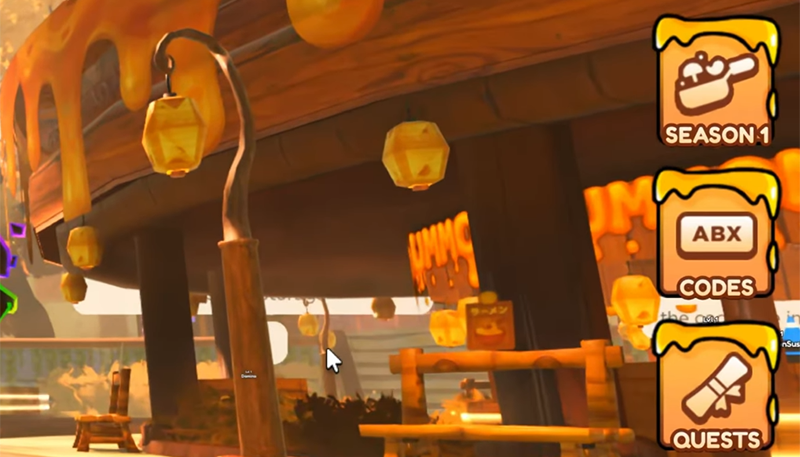
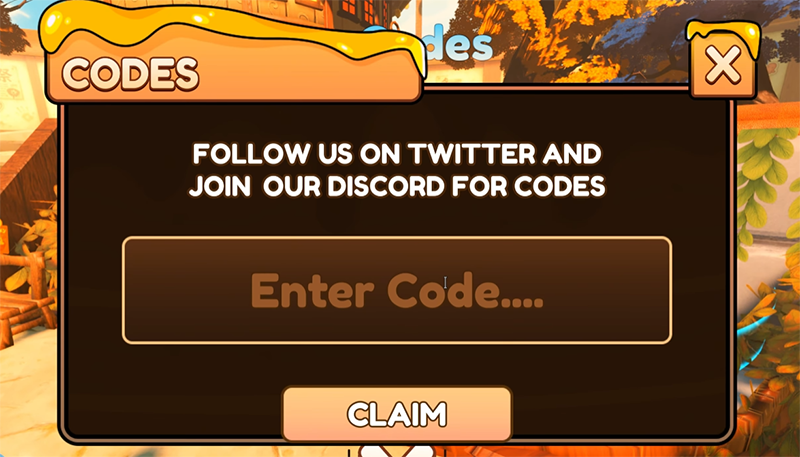
Why a code may fail
- Typing: preserve capitalization and punctuation, and remove extra spaces.
- Already claimed: the account may have used that code previously.
- Expired or invalid: an old code list does not override the game's rejection.
- Old server: if a newly announced code is rejected after an update, try a current server once.
- Wrong experience: Anime Chefs codes do not work in unrelated Roblox games.
Find new announcements safely
Use the developer and community links from the official Roblox experience page. Check announcement dates and whether a code belongs to an event or update. No promise of continuous updates on this article should substitute for the developer's current notice.
These are in-game promotions, not a method of generating Robux. For that separate topic, see legitimate ways to give Robux. Follow Roblox's account-safety advice: never provide a password, session cookie, or verification code to claim a reward, and do not download a “code generator.”
Related Articles
 Anime Crusaders Codes: Working List and Redemption Steps
 List of latest Anime Infinity Roblox giftcodes and how to redeem codes
 Latest Anime Power Roblox Codes and How to Redeem Codes
 How to Redeem SLAP by Current Codes on Roblox
 Roblox Promo Codes for August 2026 and How to Redeem Them
 Latest Roblox Apex Anime Codes
Reader Comments 0
Sign in with email or Google to join the discussion.