Other ways to send Robux to Roblox accounts

Transferring Robux from one account to another isn't difficult. Below is a guide on how to gift Robux to friends or anyone you want.

Roblox is a popular online gaming platform developed by Roblox Corporation. Launched in 2006, Roblox is not just a single game but a vast virtual world where users can participate in millions of different games created by the community itself. Players can explore many genres such as adventure, simulation, role-playing, racing, horror, or city-building.

A unique feature of Roblox is that it allows users to design and develop their own games through the Roblox Studio tool. This provides players not only entertainment but also opportunities to learn programming, graphic design, and develop creative thinking. Roblox supports multiple platforms such as computers, smartphones, tablets, and game consoles, making it easy for users to connect with friends all over the world.

With its user-friendly interface, rich content, and high level of interactivity, Roblox has become one of the most popular online entertainment platforms, especially for children and teenagers.

In Roblox, players can use Robux to purchase exclusive rewards and items on the platform, and you might also want to share or gift them to friends from time to time.

From chilling horror games to more relaxing simulations, Roblox in 2025 is full of great games to enjoy alone or with friends. There are plenty of items to find in the various game experiences, but you'll need the in-game currency Robux to purchase them.

If you're feeling generous and want to share Robux with your friends, this article will summarize all the ways to gift Robux to the people you want.

What is Robux?

Robux is the in-game currency of the online gaming platform ROBLOX . Players can customize their characters or unlock special features using Robux. However, Robux isn't affordable for everyone. If you're a kind friend or loving parent wanting to send Robux to your child's Roblox account, this guide is for you.

Although there isn't a direct way, there are still some workarounds for people to buy and send Robux to someone else on Roblox. In this article, let's explore ways to gift Robux to friends, or transfer it to someone else's Roblox account .

People can create groups in Roblox to send Robux to someone else on Roblox, following these specific steps:

Create a group

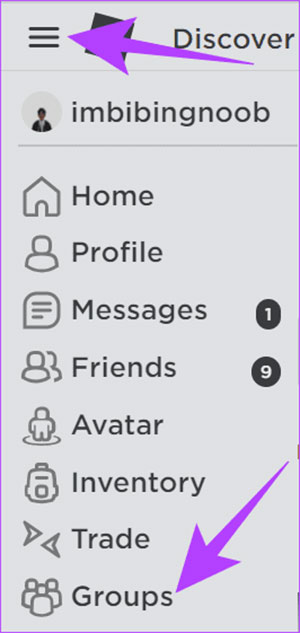
Step 1 : Open Roblox and log in to your account. Click the three horizontal lines icon in the upper right corner and select Groups .

images 1 of Other ways to send Robux to Roblox accounts
Images 1 of Other ways to send Robux to Roblox accounts

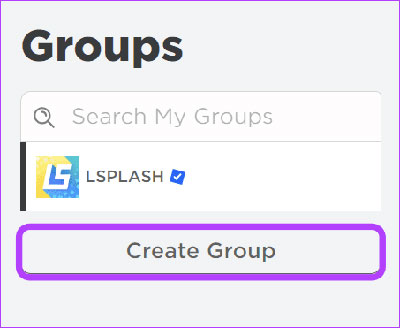
Step 2 : Select Create Group .

images 2 of Other ways to send Robux to Roblox accounts
Images 2 of Other ways to send Robux to Roblox accounts

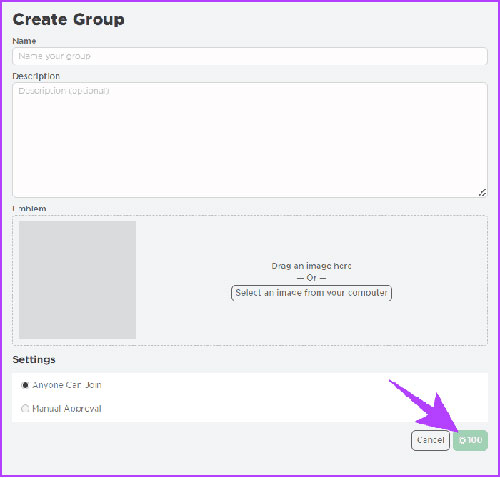
Step 3 : Fill in the information such as title, description, etc., then pay 100 Robux to create the group.

images 3 of Other ways to send Robux to Roblox accounts
Images 3 of Other ways to send Robux to Roblox accounts

You can also add people you want to send Robux to. Then, follow the steps mentioned below.

Add money to the Robux pool

After creating the group, it's time to top up your account. To do that, everyone needs to sell an item.

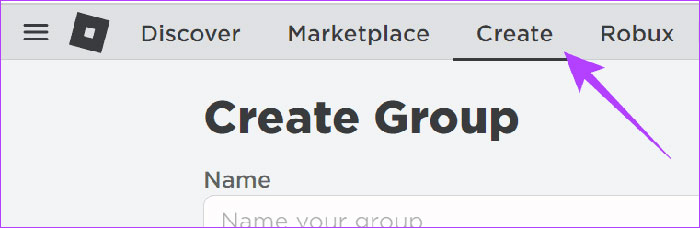
Step 1 : Open Roblox and select Create at the top. On the next page, switch to your team from the dropdown menu.

images 4 of Other ways to send Robux to Roblox accounts
Images 4 of Other ways to send Robux to Roblox accounts

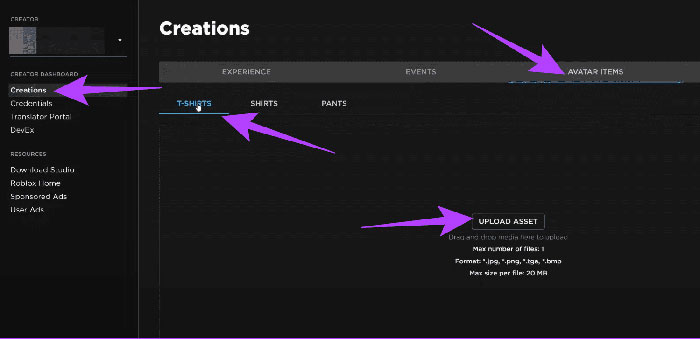
Step 2 : Select Creations from the sidebar. Click on Avatar Items and choose T-shirt , Shirt , or Pants . Then select Upload Asset .

images 5 of Other ways to send Robux to Roblox accounts
Images 5 of Other ways to send Robux to Roblox accounts

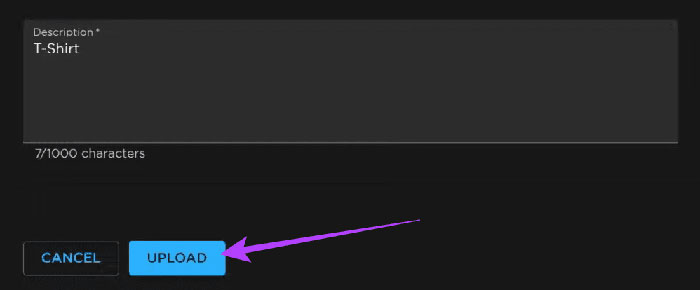
Step 3 : Add images and other information. After adding the necessary information, click Upload .

images 6 of Other ways to send Robux to Roblox accounts
Images 6 of Other ways to send Robux to Roblox accounts

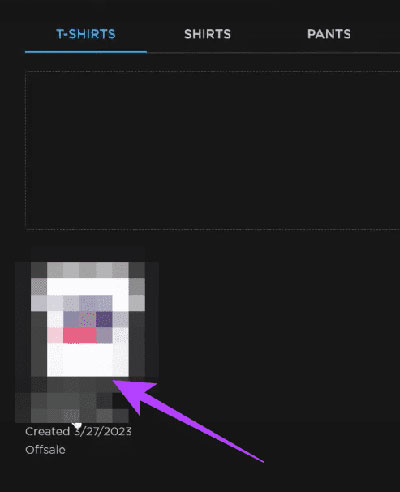
Step 4 : After creating an item, open it. If you can't find it, simply navigate to Create > select your group and click on Creations .

images 7 of Other ways to send Robux to Roblox accounts
Images 7 of Other ways to send Robux to Roblox accounts

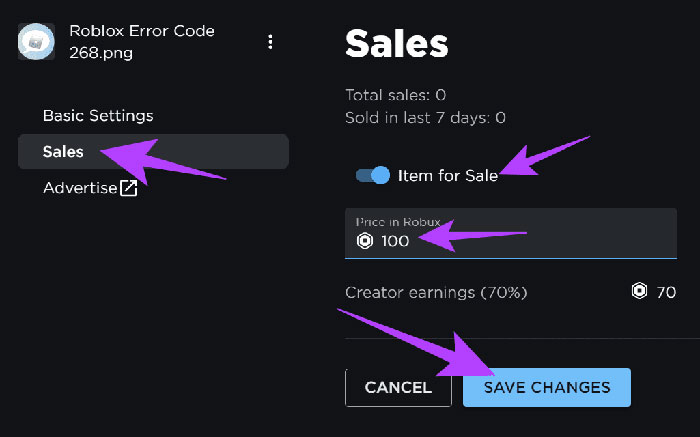
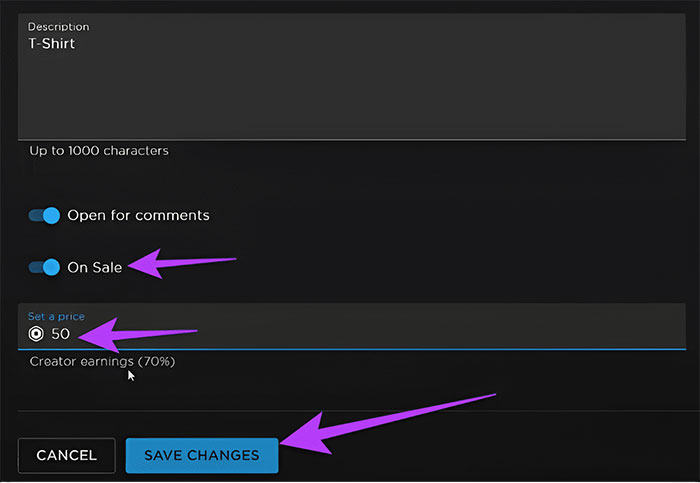
Step 5 : Turn on Sale , set the price, and click Save Changes .

images 8 of Other ways to send Robux to Roblox accounts
Images 8 of Other ways to send Robux to Roblox accounts

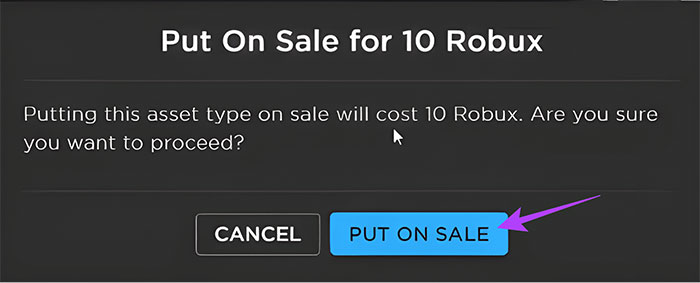
Step 6 : Click on Put on Sale to confirm.

images 9 of Other ways to send Robux to Roblox accounts
Images 9 of Other ways to send Robux to Roblox accounts

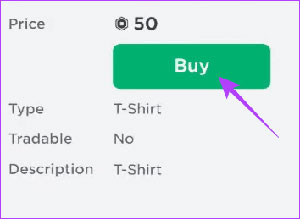
Step 7 : Find the item and click Buy . To quickly access this section, click Open in Marketplace .

images 10 of Other ways to send Robux to Roblox accounts
Images 10 of Other ways to send Robux to Roblox accounts

Distribute Robux to team members.

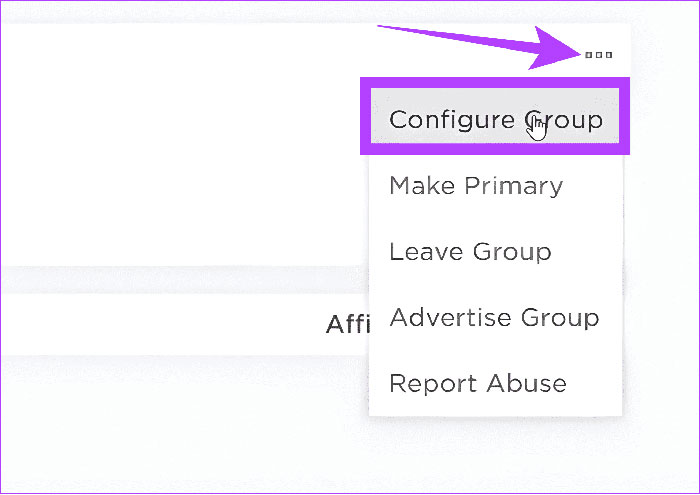
Step 1 : Open your group and click the three dots in the upper right corner.

Step 2 : Select Configure Group .

images 11 of Other ways to send Robux to Roblox accounts
Images 11 of Other ways to send Robux to Roblox accounts

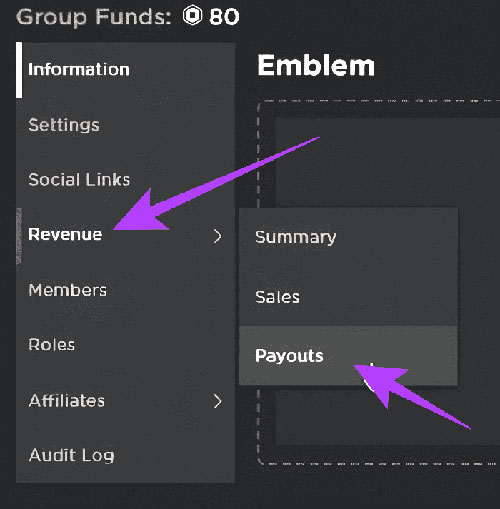
Step 3 : Select Revenue and then select Payouts .

images 12 of Other ways to send Robux to Roblox accounts
Images 12 of Other ways to send Robux to Roblox accounts

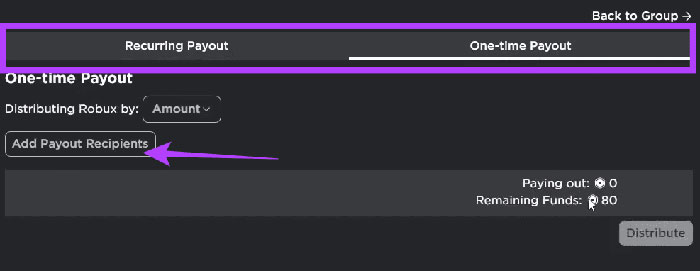
Step 4 : Choose between Recurring Payout or One-time Payout . Then, click Add Payout Recipients .

images 13 of Other ways to send Robux to Roblox accounts
Images 13 of Other ways to send Robux to Roblox accounts

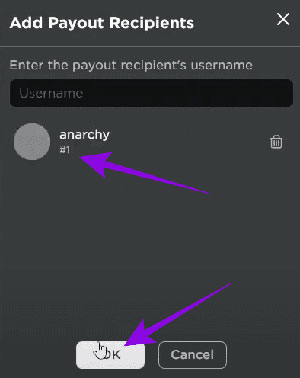
Step 5 : Select the person you want to send Robux to and click OK .

images 14 of Other ways to send Robux to Roblox accounts
Images 14 of Other ways to send Robux to Roblox accounts

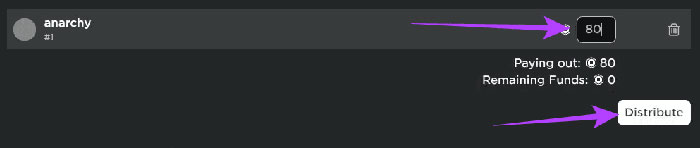
Step 6 : Enter the amount of Robux and click Distribute .

images 15 of Other ways to send Robux to Roblox accounts
Images 15 of Other ways to send Robux to Roblox accounts

Send Robux to friends from Game Pass

Users can also ask friends to create Game Passes that they can purchase and send Robux to them.

Step 1 : Access the Roblox Creators Dashboard .

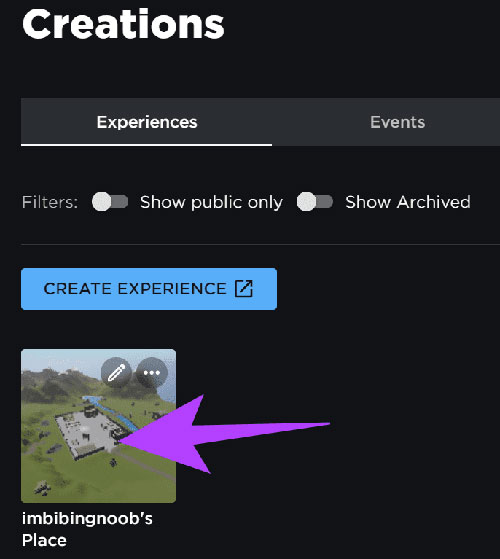
Step 2 : Choose the experience you want to create a Game Pass for.

images 16 of Other ways to send Robux to Roblox accounts
Images 16 of Other ways to send Robux to Roblox accounts

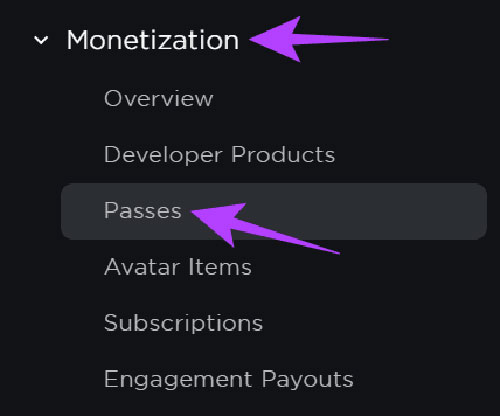
Step 3 : From the sidebar, select Passess under Monetization .

images 17 of Other ways to send Robux to Roblox accounts
Images 17 of Other ways to send Robux to Roblox accounts

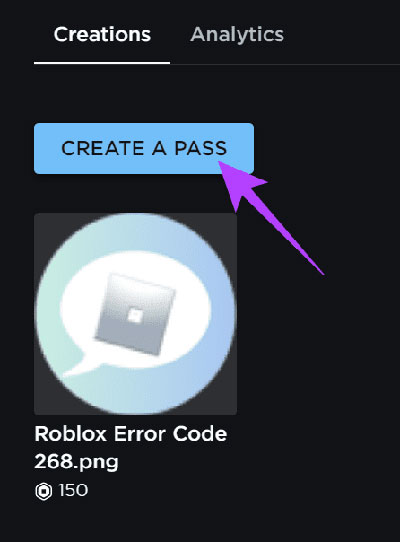
Step 4 : Click on Create a Pass .

images 18 of Other ways to send Robux to Roblox accounts
Images 18 of Other ways to send Robux to Roblox accounts

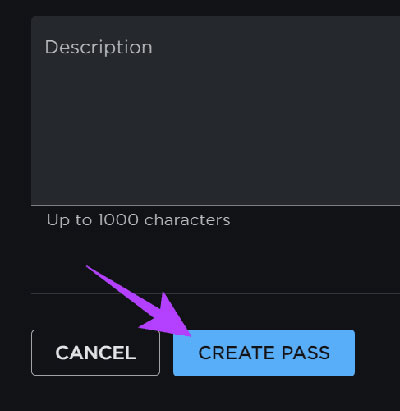
Step 5 : Add images and other necessary information for the Game Pass. Then, click Create Pass .

images 19 of Other ways to send Robux to Roblox accounts
Images 19 of Other ways to send Robux to Roblox accounts

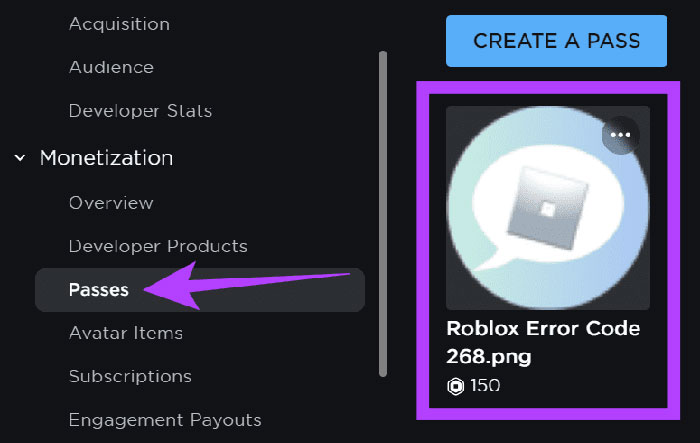
Step 6 : Once the card is ready, navigate to Passes and then open the created Game Pass .

images 20 of Other ways to send Robux to Roblox accounts
Images 20 of Other ways to send Robux to Roblox accounts

Step 7 : Once the pass is created, click on Passes from the sidebar and select the Game Pass you created.

Step 8 : After making the changes, click Save Changes .

images 21 of Other ways to send Robux to Roblox accounts
Images 21 of Other ways to send Robux to Roblox accounts

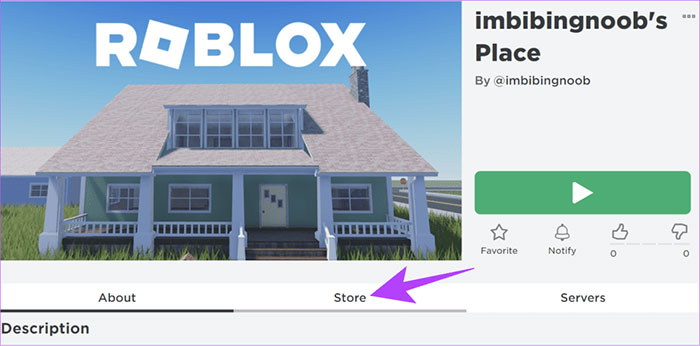
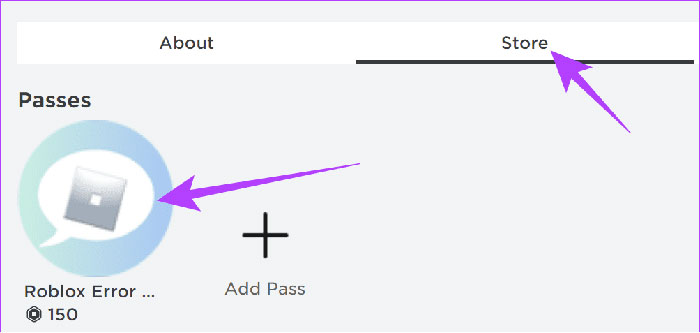
Step 9 : Open Experience and select Store .

images 22 of Other ways to send Robux to Roblox accounts
Images 22 of Other ways to send Robux to Roblox accounts

Step 10 : Purchase a game card from the Experience Store, and Robux will be sent to the person who created the Experience.

images 23 of Other ways to send Robux to Roblox accounts
Images 23 of Other ways to send Robux to Roblox accounts

Buy Roblox gift cards and share them from Amazon.

People can also choose to send Robux via Roblox gift cards from Amazon by following these steps:

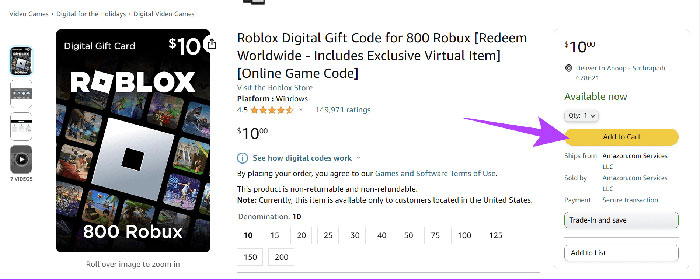
Step 1 : Go to Amazon, search for and select a suitable Robux gift card.

Step 2 : Next, click Add to Cart and complete the gift card purchase.

images 24 of Other ways to send Robux to Roblox accounts
Images 24 of Other ways to send Robux to Roblox accounts

Step 3 : Next, click on Returns & Orders on the homepage.

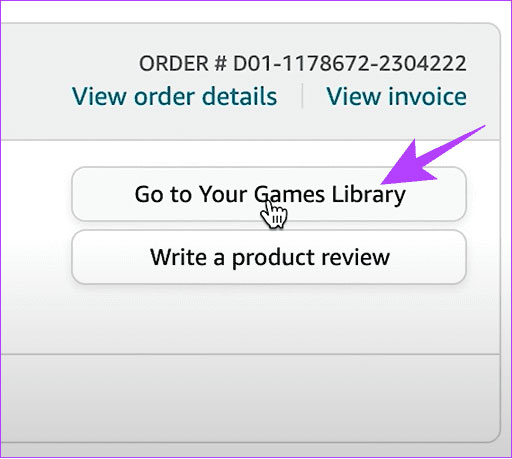
Step 4 : Select "View order details" located next to the purchased Roblox gift card.

Step 5 : Continue by clicking on Go to Your Games Library .

images 25 of Other ways to send Robux to Roblox accounts
Images 25 of Other ways to send Robux to Roblox accounts

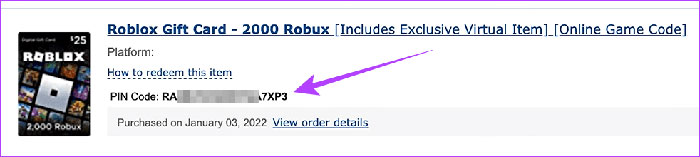
Step 6 : Finally, copy the gift card and then the PIN code.

images 26 of Other ways to send Robux to Roblox accounts
Images 26 of Other ways to send Robux to Roblox accounts

People can paste Robux gift card codes onto their friends' pages, and those friends need to go to the Roblox Redeem page to paste and redeem the code. These are electronic gift cards, so people can buy and share them with anyone.

Sign up for Roblox Premium

Players can also pay for a Roblox Premium subscription to send Robux to another account. With the premium plan, users will receive a monthly Robux allowance and an additional 10% Robux on new purchases.

Frequently Asked Questions about Robux

What is Robux?

  1. Robux is the in-game currency in Roblox, used to purchase outfits, accessories, unlock features, or special experiences in the game.

Can I send Robux directly to my friends on Roblox?

  1. Currently, Roblox does not support sending Robux directly between accounts. However, there are some indirect ways to send it, such as through groups, Game Pass, or gift cards.

How do I send Robux through a Roblox group?

  1. You can create a group, add Robux to the group by selling items, and then distribute Robux to group members via the Payouts section in the group settings.

How do I send Robux using Game Pass?

  1. Friends can create Game Passes within their experience, and you purchase those Game Passes. The Robux earned from the purchase will go to the Game Pass creator.

Can I send Robux via Roblox gift card?

  1. Yes, you can buy Roblox gift cards on Amazon or other platforms and then send the code to your friends so they can enter it into their account and receive Robux.

Does subscribing to Roblox Premium allow me to send Robux?

  1. Roblox Premium allows you to receive Robux monthly and an additional 10% Robux when purchasing items, and also supports sending Robux through methods such as groups or Game Pass.

What is the best way to earn Robux?

The best way to earn Robux depends on how you grind! You can buy it directly, earn it by creating games, selling avatar items, or by owning a Roblox Premium membership. Grind smart, and you'll accumulate Robux quickly.

How do I merge two Roblox accounts?

You can't merge Roblox accounts or transfer items from one account to another, but you can transfer any games or experiences you've created to your new account in Roblox Studio. To do this:

  1. Log in to Roblox Studio with the account that contains the game.
  2. Go to File > Save and save your experience to your computer.
  3. Log out, then log in to Roblox Studio with your new account.
  4. Go to File > Open and select your saved experience to upload.
  5. On the Place tab, go to File > Publish to Roblox, select your experience/game, and follow the on-screen instructions.

What should I do if I transfer Robux to the wrong account?

Please contact Roblox support and tell them what happened. They will help transfer the Robux to the correct account.

Can you resell Robux to Roblox?

If you buy or receive Robux as a gift instead of earning them through gameplay, you cannot resell them to Roblox or exchange them for cash. You can exchange any Robux you have earned for cash, currently at $0.0038 USD per Robux.

4 | 2 Vote
« PREV : All the characters...
How to find all... : NEXT »