Table of Contents
Anime Apex codes can provide in-game resources, but published lists disagree about several older entries. Use the recently reported codes first and treat the game's confirmation as the final status check. None of the entries below has been tested in-game for this article.
Recently reported codes
| Code | Reported reward |
|---|---|
THANKSPLAIN | 50 Gems and 3 Orbs of Potential |
UPDATE6 | 250 Gems and 2 Orbs of Potential |
SPIRIT | 500 Gems and 5 Orbs of Potential |
MORETOKENS | 10 Apex Tokens and 2 Orbs of Potential |
APEXTOKENS | 10 Apex Tokens and 2 Orbs of Potential |
These appear in code-tracker reports available in early November 2026, including UrGameTips' November list. A tracker report is not a guarantee that a code remains active for every account.
Older codes: do not assume “new” means working
| Gift code | Award | Status |
|---|---|---|
GEMSPLEASE |
100 Gems | Disputed or reported expired; check in-game |
ORBSPLEASE |
10 Orbs of Potential | Disputed or reported expired; check in-game |
F2PUPD |
30 Apex Tokens | Disputed or reported expired; check in-game |
MOREORBS |
10 Orbs of Potential | Disputed or reported expired; check in-game |
REACTCODE |
50 Gems | Disputed or reported expired; check in-game |
GIVEORBS |
10 Orbs of Potential | Disputed or reported expired; check in-game |
WELCOME |
50 Gems; 2 Random Potion Box | Reported available; not tested here |
RELEASE |
50 Gems; 2 Random Potion Box | Disputed or reported expired; check in-game |
Some trackers list the older entries as expired while others retain them as active. That conflict is why this table does not label them all working. There is no basis for saying that no Anime Apex codes have expired.
How to redeem Anime Apex codes
- Open the correct Anime Apex experience in Roblox.
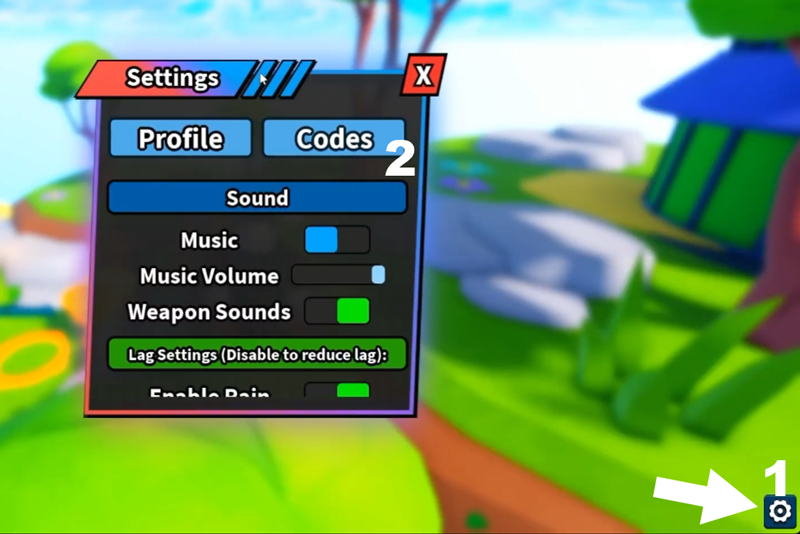
- Select the Settings gear in the lower-right corner of the illustrated interface.
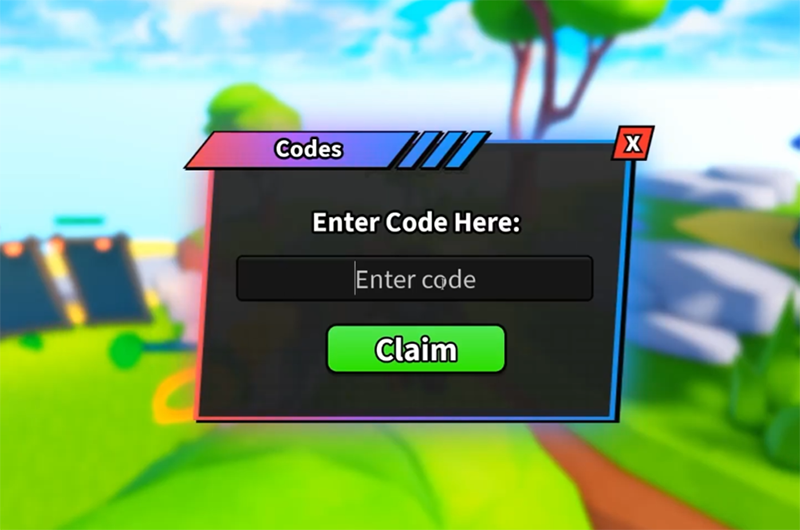
- Open Codes.
- Paste one code into Enter code and remove leading or trailing spaces.
- Select Claim, read the result, and check the relevant resource total.
If a code is rejected
Check spelling, capitalization, punctuation, and whether you already used it on that account. If a newly announced code fails after an update, join a current server and try once more. An expired-code message is not fixed by repeatedly submitting it.
Use the developer and community links on the game's Roblox page to verify new announcements. Avoid unofficial “verification” sites that ask for a password, browser cookie, or security code. In-game rewards are different from Robux; see legitimate Robux options for that separate topic.
If you also play Anime Chefs, its codes use a different redemption system: see the Anime Chefs code guide. Codes from one experience do not transfer to another.
Related Articles
 Anime Crusaders Codes: Working List and Redemption Steps
 Roblox Promo Codes for August 2026 and How to Redeem Them
 List of latest Anime Infinity Roblox giftcodes and how to redeem codes
 Latest Anime Power Roblox Codes and How to Redeem Codes
 Latest Anime Chefs Roblox Codes and How to Redeem Codes
 Instructions for entering the latest Demon Slayer RPG 2 codes and codes
Reader Comments 0
Sign in with email or Google to join the discussion.