Table of Contents
MusicFX DJ is a Google Labs experiment for generating and steering music while it plays. Unlike a conventional DJ app that mixes recorded tracks, it uses Google's Lyria RealTime model to produce a continuous stream from text prompts and musical controls.
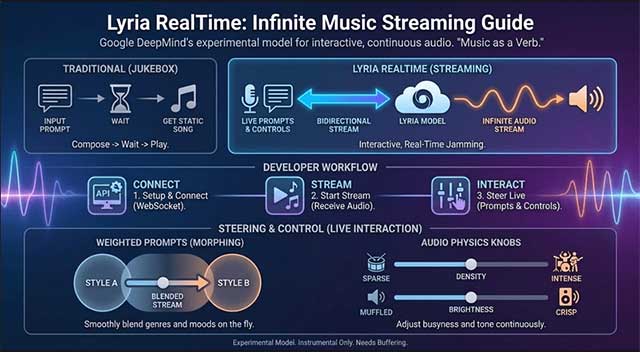
What you can control in MusicFX DJ
You can blend several text ideas—such as an instrument, genre, rhythm, or mood—and adjust how strongly each one influences the output. Current Lyria RealTime controls can also shape attributes including key, tempo, density, and brightness.
- Prompt blend: mixes concepts such as “funk bass,” “ambient pads,” and “breakbeat drums.”
- Key and tempo: help align the generated stream with a musical idea or live performance.
- Density and brightness: change how busy or tonally bright the result feels.
- Instrument controls: can bring elements in or out to create transitions and breakdowns.
Google describes the output as production-quality 48 kHz stereo audio. Availability and export options can vary by experiment, account, and region.
How Lyria RealTime creates a continuous stream
Google explains that the model generates the next segment from previously generated music plus the current prompts and controls. The segments form an evolving stream rather than replaying a fixed loop.
When several prompts are active, MusicFX DJ combines their internal representations and weights them according to the sliders. Raising one prompt's weight steers the music toward that concept without necessarily stopping playback.
The public product information does not fully specify every training-data or model-architecture detail. Claims that MusicFX DJ uses a particular diffusion pipeline or dataset should therefore not be treated as confirmed unless Google publishes that information.
How to experiment with MusicFX DJ
- Open Google's Lyria RealTime page and follow the MusicFX DJ link where the experiment is available.
- Start with two compatible prompts, such as a rhythm and an instrument.
- Begin playback and change one control at a time so you can hear its effect.
- Add contrasting prompts gradually, then rebalance their weights.
- Set key or tempo if you are playing along with another instrument.
- Record or download only through the controls and terms provided by the service.
What MusicFX DJ is useful for
- Sketching a mood, groove, or arrangement before working in a DAW.
- Exploring unexpected combinations of genres and instruments.
- Creating a responsive backing stream for informal practice or experimentation.
- Demonstrating real-time, controllable generative audio.
It is not a full replacement for a digital audio workstation: detailed note editing, multitrack mixing, plug-in processing, and precise arrangement remain better suited to dedicated music software.
Rights, attribution, and responsible use
Check the service's current usage terms before distributing or monetizing generated audio. Avoid prompts designed to imitate a living artist, and do not assume a generated output is free of similarity or rights concerns. Google says music generated by MusicFX DJ is watermarked with SynthID, which is intended to help identify AI-generated audio.
For Google's description of the real-time streaming method and controls, see its MusicFX DJ technical overview.
Related Articles
 Learn About Lyria 3 Pro: Google's Most Advanced AI Music Creation Tool8 minutes read
 Best AI Tools for Creating Impressive Songs8 minutes read
 Guide to Writing Prompts for Creating Professional-quality AI Music6 minutes read
 5 Free AI Music Creation Tools8 minutes read
 How to Create Music Using Google Producer AI5 minutes read
 6 Tips for Writing Prompts for Lyria 3 to Create AI Music in Gemini6 minutes read
Reader Comments 0
Sign in with email or Google to join the discussion.