Table of Contents
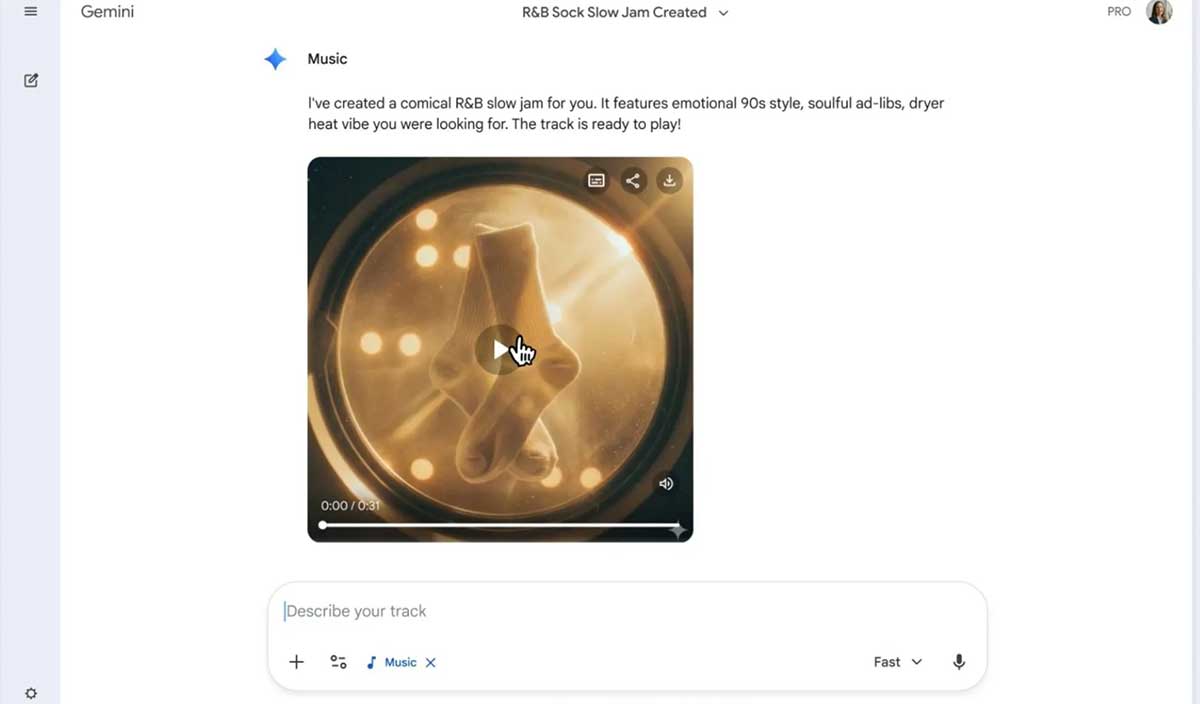
Lyria 3 in the Gemini app can create a short music track from a text prompt, photo, or video. Better results come from describing the musical decisions that matter—mood, genre, instrumentation, vocals, and progression—without packing the prompt with contradictory references.
Open Gemini, choose Create music, and enter a prompt or select a template. Availability and generation limits can depend on age, region, and account plan. In the Gemini experience, Lyria 3 produces a 30-second track with cover art; other Lyria products and model versions may offer different lengths and controls.
1. Start with a clear musical purpose
State what the track is for and the feeling it should create. This gives the model a stronger direction than a genre name alone.
Create a playful 30-second instrumental for a cooking montage. Bright, quick, and lighthearted, with a clean ending for a title card.If you want lyrics, name the topic and point of view. If you want no singing, say instrumental only. One coherent idea usually works better than a long list of unrelated moods.
2. Use an image or video as inspiration—then explain what matters
An uploaded photo or video can provide visual context, but tell Lyria which qualities to translate into music. A sunset might suggest calm warmth to one listener and dramatic change to another.
Use this beach photo as inspiration. Focus on the quiet horizon and slow waves: warm ambient guitar, soft hand percussion, no vocals, gradual fade.Upload only media you are entitled to use, and remove personal information that is irrelevant to the track.
3. Specify genre, era, and mood without naming an artist
A useful style description combines a broad genre with a period, regional influence, or production character:
- late-1990s alternative rock with a raw rehearsal-room sound;
- modern Afrobeats with bright percussion and a relaxed summer mood;
- cinematic chamber music with restrained tension;
- Motown-inspired pop with contemporary electronic drums.
Avoid asking for an exact copy of a living artist's voice or signature sound. Describe observable musical traits instead. This also makes the prompt easier to revise.
4. Control instruments, tempo, and development
Name the lead instrument, supporting texture, approximate tempo, and how the music should change. You do not need formal theory terms, but concrete direction helps.
Upbeat funk-pop at about 110 BPM. Muted rhythm guitar, round electric bass, crisp drums, and short brass accents. Begin sparsely, add the brass halfway through, and finish with a decisive final chord.For vocals, describe range and delivery—such as low baritone, airy soprano, warm ensemble, intimate, energetic, or restrained. Do not combine so many instruments and vocal styles that none has room to register in a short clip.
5. Keep lyrics short and singable
Add your own words after a clear label such as Lyrics:. Short lines, natural stress, and a repeated hook fit a 30-second output better than several verses. Parenthetical text may be interpreted as a backing response, but always preview the result because formatting is not a performance guarantee.
Create an upbeat call-and-response pop track with handclaps.

Lyrics:
Lead: Let's go, the road is open
Group: We go together
Lead: One step, then another
Group: We go together
If Lyria writes the lyrics, provide a subject, tone, perspective, and words to avoid. Review the result for clichés, unwanted implications, and similarity to existing lyrics before sharing it.
6. Iterate one variable at a time
After the first generation, identify the single biggest problem. If the arrangement is too busy, reduce instruments; if the mood is wrong, refine the emotional description; if the hook arrives late, request it at the opening. Changing one or two elements makes it easier to learn which instruction improved the result.
Save the prompt beside each exported version. A simple record of prompt, source image, output date, and intended use is valuable when you later need to reproduce or license a project.
Download and share responsibly
Use the download or share controls shown in Gemini. Google says tracks generated with Lyria 3 in Gemini include a SynthID watermark; see its Lyria 3 announcement. A watermark does not settle questions about commercial rights, platform rules, or ownership of uploaded material, so check the current product terms for your intended use.
For a real-time alternative in Google's ecosystem, see TipsMake's overview of MusicFX DJ. You can also compare another text-to-song workflow in the guide to creating music with Suno AI.
Related Articles
 Try Lyria 3 Now to Create High-quality Music on Gemini: Explained4 minutes read
 Learn About Lyria 3 Pro: Google's Most Advanced AI Music Creation Tool8 minutes read
 Transform Lesson Content into Catchy Songs Using Gemini: Explained4 minutes read
 Guide to Writing Prompts for Creating Professional-quality AI Music6 minutes read
 Tips to Help You Use Gemini Effectively7 minutes read
 How to Create Music Using Google Producer AI5 minutes read
Reader Comments 0
Sign in with email or Google to join the discussion.