Table of Contents
This guide covers msi gx740 for 'pro' people with practical context and easy-to-follow details. Use it to understand the subject and apply the information confidently.
MSI's new laptop has a 17 inch LCD screen with a resolution of 1, 680 1, 050 pixels and hardware configuration including Intel Core i7 processor option, DDR3 4GB RAM memory (can be upgraded), 500GB hard drive at 7, 200 rpm, ATI Radeon HD 5870 graphics card supports DirectX 11 with 1GB of DDR5 VRAM memory.
The GX740 also features high-end entertainment that remembers the standard SRS 7. 1 audio output, a subwoofer and speakers with Cinema Pro technology, HDMI output, 6cell battery, Wi-Fi connectivity, and Bluetooth and runs on Microsoft Windows 7 Home Premium (64 bit) operating system.
It weighs 3. 2 kg, is about 3. 8 cm thick and is sold for about $ 1, 399.
 The top surface of the machine is with a scratched aluminum case.
 Large LCD screen up to 17 inches.
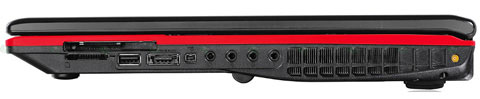 The GX740 supports HDMI and 7. 1 audio output.
FAQ
What should I check before following these steps?
Confirm device and software compatibility, save important data, and make sure you have the required permissions, files, and account access.
Why might the process not work?
Common causes include outdated software, missing permissions, incompatible hardware, an unstable connection, or completing a step in the wrong order.
Can I undo the changes if necessary?
That depends on the tool or setting. Use built-in restore options when available, keep a backup, and record the original configuration first.
Related Articles
 Laptop Playing MSI Core i5 Chip Game3 minutes read
 Why Are Smart People Usually Few5 minutes read
 Map Showing Which Celebrities Were Born in Their Country3 minutes read
 Impressive Numbers When the Earth Shrinks with 100 Inhabitants2 minutes read
 Only Extremely Intelligent People Often Encounter These Problems6 minutes read
 Contacts: How to Use the People App in Windows 814 minutes read
Reader Comments 0
Sign in with email or Google to join the discussion.