Table of Contents
Microsoft’s Outlook Lite support notice states that the Android app retired and stopped providing mailbox functionality starting May 25, 2026. Microsoft recommends moving to Outlook Mobile. The earlier October 2025 installation cutoff should not be mistaken for the final mailbox shutdown date.
See the official Outlook Lite notice for the retirement information.
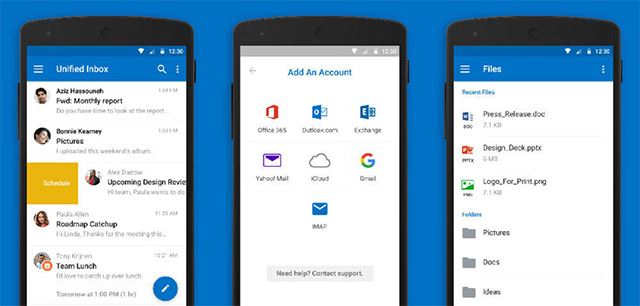
Move to the supported Outlook app
- Open Google Play and search for Microsoft Outlook.
- Check that the publisher is Microsoft, then install the supported app.
- Add the email account you used in Outlook Lite.
- Complete the account’s normal sign-in and multifactor-authentication steps.
- Wait for synchronization, then check recent messages, important folders, sending, and receiving.
For a work or school account, follow your organization’s device and sign-in requirements. An administrator may need to approve or configure mobile access.
Check your data before removing the old app
Mail stored on the account’s server can synchronize when the same account is added, but do not assume that every local preference, draft, attachment download, or notification setting transfers automatically. Verify what matters to you in the new app first.
Keep your account credentials and recovery methods available. Removing an app from a phone is a different action from deleting an email account or deleting mail from the server.
If mail does not appear
Confirm the full account address and check whether the mailbox works through its provider’s normal web interface. If web access works but mobile setup fails, review the error and account type with the provider or your organization’s help desk.
Do not install an old Outlook Lite APK to get around the retirement. A discontinued client is not a reliable way to restore a retired service. Review app permissions when setting up the replacement and use backup basics for any important files that exist only on the phone.
Related Articles
 Free document scanning app Microsoft Lens is about to be 'killed' - what's worth noting?
 Microsoft officially launched Outlook.com Premium
 Windows 10 October 2018 is new, Microsoft is forced to stop updating for some computers
 Summary of useful keyboard shortcuts when using Microsoft Outlook on the web
 Microsoft is about to roll out the new Outlook client to more users, what's remarkable?
 How to download and install PUBG LITE on your computer
Reader Comments 0
Sign in with email or Google to join the discussion.