Table of Contents
Google has just brought its latest video creation model – Veo 3 – to the Google Photos app. The feature, available in the Create tab on the mobile app, allows users in the US to turn still photos into short videos.
In fact, Google Photos already had a 'Photo to video' tool, but with the addition of Veo 3, the video quality is significantly improved. This is also part of Google's strategy to bring advanced AI technology closer to users. As of May 2025, Google Photos has recorded more than 1.5 billion monthly active users.
Veo 3 was first announced at I/O in May and quickly integrated into the Gemini app in July, available to AI Ultra and AI Pro subscribers. Those users can create up to three videos per day, with both visible and hidden watermarks to identify AI-generated content.
With Google Photos, this feature is expected to help users 'breathe life' into memorable photos or even 'revive' old photos. The previous version, based on Veo 2, allowed users to select photos from the library and apply two styles: 'smooth motion' or surprise effects via the 'I'm feeling lucky' button. The result is a 6-second clip that can be easily shared with others.
In the upgrade with Veo 3, the feature is still free but the number of uses is limited. AI Pro and AI Ultra users will be able to create more videos. The videos created are about 4 seconds long and do not support audio.
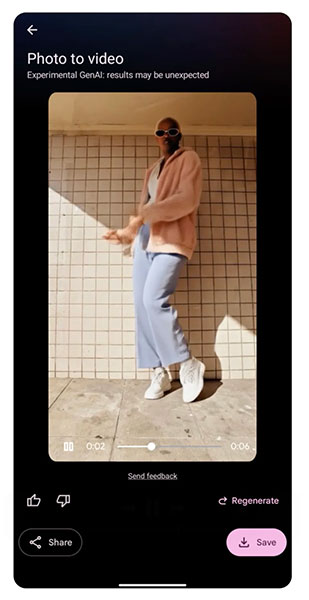
The new feature is located in the Google Photos Create hub – a collection of AI-powered creative tools. In addition to Veo 3, users can also:
- Remix to change photo style
- Create collage
- Montage from photo library
- Making 3D animations (cinematic photos)
- Convert photos to animated GIFs
Final Thoughts
The development covered in this article is worth following, but specifications, dates, and feature details may change until the relevant company or organization publishes an official confirmation.
FAQ
What is the main development covered in this article?
Google has just brought its latest video creation model – Veo 3 – to the Google Photos app. The feature, available in the Create tab on the mobile app, allows users in the US to turn still photos into short videos.
What should you know about the key details?
In fact, Google Photos already had a 'Photo to video' tool, but with the addition of Veo 3, the video quality is significantly improved. This is also part of Google's strategy to bring advanced AI technology closer to users.
Is every reported detail officially confirmed?
Not necessarily. Product leaks, preview builds, research reports, and early announcements can change. Confirm important specifications, dates, and availability through an official source before making a decision.
Related Articles
 Google Search Integrates AI Photo Editing Feature: Useful or Redundant?4 minutes read
 22 Tips to Help You Master Google Photos23 minutes read
 Google Added a New Feature to Google Photos3 minutes read
 Google Photos Introduces a New Messaging Feature That Allows3 minutes read
 10 Google Photos Tips and Tricks You Shouldn't Miss9 minutes read
 Google Photos Is About to Have a Feature to Lock Sensitive3 minutes read
Reader Comments 0
Sign in with email or Google to join the discussion.