Table of Contents
Recently, the Messenger messaging application has added a number of new features to increase users' chatting and connection experience.
Key Takeaways About Messenger
- Recently, the Messenger messaging application has added a number of new features to increase users' chatting and connection experience.
- The most prominent feature is the feature of sending HD photos in chat to ensure the quality of photos when sent on the application.
- Another highlight in Messenger's latest update is support for sending files with a capacity of up to 100MB instead of 25MB as before.
Key Details About Messenger
The most prominent feature is the feature of sending HD photos in chat to ensure the quality of photos when sent on the application.
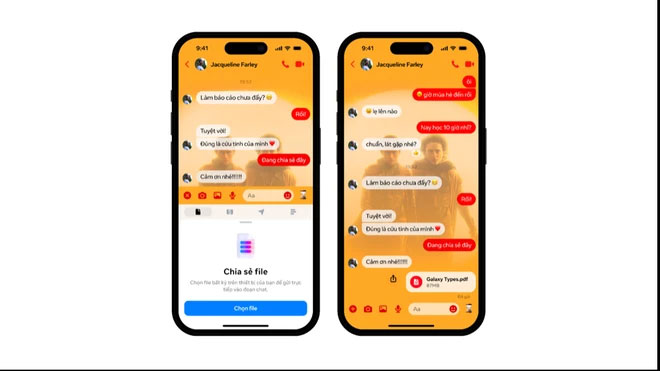
Another highlight in Messenger's latest update is support for sending files with a capacity of up to 100MB instead of 25MB as before. This new feature on Messenger supports all popular file formats, including Word, PDF, Excel and zip.
In addition, Messenger also adds the feature of creating shared albums in group chats, allowing users to share, organize and reminisce about memories associated with those images and videos with relatives and friends.
To create a new album in a chat, users select multiple photos from the compose tool or press and hold a photo in the chat then tap Create album. Click Add to album to add to an existing album.
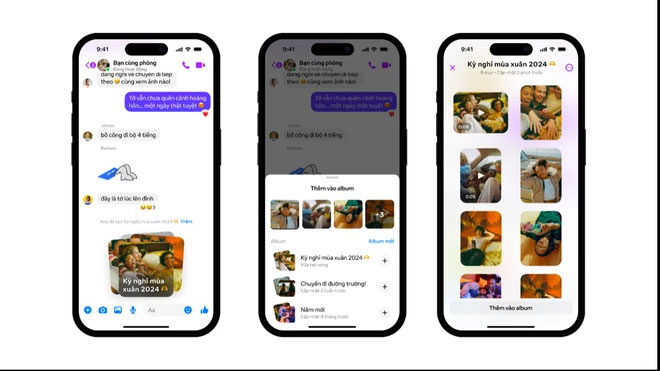
Then, everyone in the chat can view, add, delete, and download images and videos from the album. Meta will roll out this feature to users in the coming weeks.
Messenger users can easily connect with new friends by scanning their Messenger QR code with the camera or sharing their QR code instead of entering a name or phone number. The QR code icon is located in the upper left corner of the screen.

In the future, Messenger will develop new features to enhance users' experience of using the application.
FAQ
What is the main update about Messenger?
Recently, the Messenger messaging application has added a number of new features to increase users' chatting and connection experience.
Why does Messenger matter?
The most prominent feature is the feature of sending HD photos in chat to ensure the quality of photos when sent on the application.
What should readers know about Messenger?
Another highlight in Messenger's latest update is support for sending files with a capacity of up to 100MB instead of 25MB as before.
Related Articles
 Instructions on Sending Files via Messenger on Your Phone and Computer6 minutes read
 Tips for Sending RAR Files via Facebook Messenger on Your3 minutes read
 Share Dropbox Files Via Facebook Messenger4 minutes read
 How to Download Dropbox File Right on Facebook Messenger4 minutes read
 How to Send Videos Via Facebook Messenger: Send Video Messenger5 minutes read
 How to Use Dropbox Transfer to Send Files Online5 minutes read
Reader Comments 0
Sign in with email or Google to join the discussion.