Table of Contents
This guide provides a clear, practical overview of Linux 5.1.3 released, officially supports apple M1 chipset, with useful context, important details, and straightforward takeaways for everyday readers.
In fact, there are many ways for you to use Linux on Mac M1. However, To get the best compatibility state, as well as the most optimal experience, native support is a must. Fortunately, this has officially appeared on the newly released Linux 5.1.3.

Linux on Mac M1 devices with Corellium
Up to now, Apple has equipped the M1 chip on some MacBook, iMac and iPad Pro lines. All give good performance with the absolute power of the new processor, with the core factor lying in good hardware and software (operating system) compatibility. This is understandable because Apple has a great closed ecosystem in hand. Both the software (macOS, iPadOs) as well as the hardware (M1) are researched and developed by the company itself, so compatibility will be very good, resulting in optimal performance.
However, third-party developers do not have such initiative. They will have to wait for the M1 to launch, do a preliminary assessment, then start implementing native compatibility for this new chip on their products. Linux is no exception to that fact.
Not long ago, Corellium caused a stir in the Linux community when it successfully brought Ubuntu - a very popular Linux distribution - to the Mac M1 earlier this year. Apple has no involvement in this project. Even at the time of the M1's launch, Apple's Senior Vice President of Software Engineering, Craig Federighi, once confirmed that it would not be able to natively boot Windows or Linux, nor dual-boot or Boot Camp. Virtualization is the only method that the Cupertino company representative is aiming for.
However, Corellium has proven that Linux is completely usable on Mac M1 devices: 'Boot from Ubuntu desktop USB (rpi). Network works via USB c dongle. The update includes support for USB, 12C, DART'.
The "godfather of Linux" Linus Torvalds has also repeatedly expressed enthusiasm for the plan to bring Linux to the Mac M1. ' I've been waiting for a long time for an ARM laptop that can run Linux. [MacBook] The new Air will be almost perfect, except for the '. Torvalds said so last fall, when the first Mac M1 was announced.
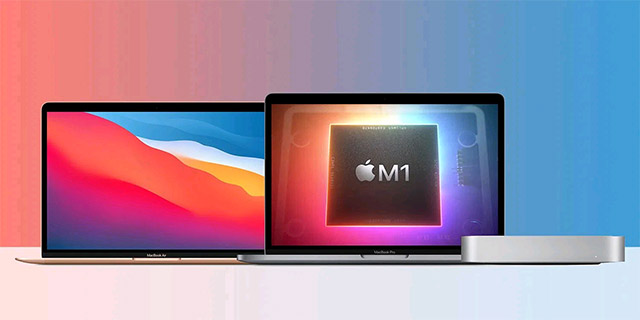
Linux 5.1.3 on Mac M1
With that said, Linux Kernel 5.1.3 has officially got native support with the M1 chipset. As such, the new 24-inch MacBook Air, MacBook Pro, Mac Mini, and iMac can now run Linux natively. The method Corellium takes with Ubuntu isn't actually running Linux on a Mac natively, so it won't be able to take full advantage of the M1's performance.
In addition to native support for M1, Linux Kernel 5.1.3 comes with a host of other notable improvements, including security features and Free Synch HDMI support.
Key Takeaways
Use the information above as a practical reference for Linux 5.1.3 released, officially supports apple M1 chipset. Review each step carefully, confirm any requirements, and choose the option that best fits your situation.
FAQ
What does this guide explain about Linux 5.1.3 Released, Officially Supports Apple M1 Chipset?
It explains the main concepts, practical considerations, and useful steps related to Linux 5.1.3 released, officially supports apple M1 chipset without requiring advanced knowledge.
Who can benefit from learning about Linux 5.1.3 Released, Officially Supports Apple M1 Chipset?
This information is useful for readers who want a clear overview, practical guidance, and reliable steps related to Linux 5.1.3 released, officially supports apple M1 chipset.
What should I check before applying this information?
Review the requirements, confirm that your device, software, or situation matches the instructions, and back up important data before making major changes.
Related Articles
 Linux 6.2 Officially Supports Apple Silicon4 minutes read
 AMD Introduces a New Chipset Driver Update Package for Windows 10 and 115 minutes read
 Apple Is About to Stop Using Intel Chipsets for Computers3 minutes read
 Linux Mint 20.2 'Uma' Released: What's Notable?5 minutes read
 Compare Apple M4 and Snapdragon X Elite: Key Facts11 minutes read
 Linux Kernel 5.16 Officially Released with Great Features for Gamers4 minutes read
Reader Comments 0
Sign in with email or Google to join the discussion.